
TL;DR

Get the latest gadgets delivered free with Prime
- Fast, free delivery on millions of items
- Prime Video, Amazon Music and more included
- Member-only deals all year
The big shift in 2026 is that prebuilt AI workstations often match or beat DIY builds on price, time, and reliability due to component shortages and bulk buying. Your decision hinges more on workflow, support, and future-proofing than just hardware costs.
It used to be simple. Build your own AI workstation — save money, get exactly what you want, learn the ins and outs. But that was then. Today, with shortages, rising component prices, and a booming AI scene, the game has changed.
Now, the choice between building or buying isn’t just about cost. It’s about speed, reliability, support, and how much control you really need. In this article, you’ll see why in 2026, the best decision often isn’t what you expect — and how to pick the right path for your AI projects.
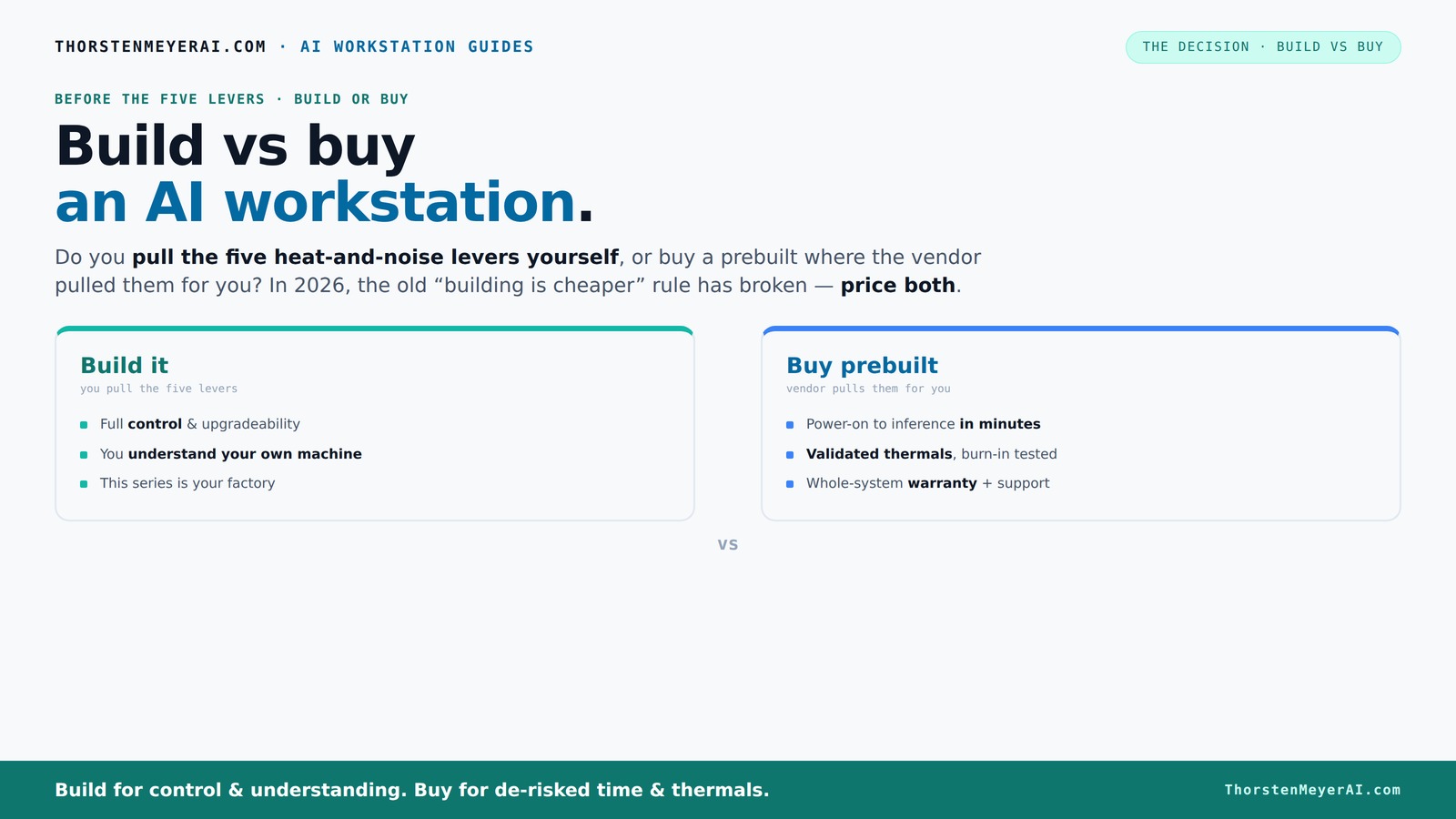
Build vs buy
an AI workstation.
The real question behind this whole series: do you pull the five heat-and-noise levers yourself, or buy a prebuilt where the vendor pulled them for you? And in 2026, the old “building is cheaper” rule has broken. Match your situation in Part 3.
Key Takeaways
- Component shortages in 2026 make prebuilt AI workstations often cheaper and more reliable than DIY builds, especially at high-end specs.
- Buying a prebuilt saves time, reduces troubleshooting, and offers validated thermals backed by warranty — a big plus for operational stability.
- Building your own system is still ideal for hobbyists or those needing a custom setup, but it often costs more in time and hidden operational expenses.
- Hybrid setups, combining prebuilt foundations with targeted upgrades, strike the best balance between control and convenience.
- Support and future-proofing are critical; choose a system that can grow with your AI workload, especially if you plan multi-GPU or expanding RAM.
As an affiliate, we earn on qualifying purchases.
What a Prebuilt AI Workstation Actually Means for You
A prebuilt AI workstation is a machine assembled, tested, and ready to run from a vendor. It’s like buying a car instead of building one in your garage. The vendor handles cooling, thermal validation, and hardware compatibility, so you get a system that’s ready for heavy lifting. Build vs Buy a Prebuilt AI Workstation
For example, a company like Lambda or Puget Systems offers systems with validated thermals and optimized cooling, often with water-cooling options that keep noise low even under massive GPU loads. This means less tinkering for you and more time focusing on your AI work.
As an affiliate, we earn on qualifying purchases.
Why Your Decision Matters More Than Hardware Specs
Choosing between build or buy isn’t just about the number of GPU cores or the amount of RAM. It’s about how quickly you can get your system running, the operational risks you face, and how much ongoing maintenance you’re willing to handle.
In 2026, component shortages mean high-end GPUs and DDR5 RAM can cost 30-50% more than last year. A build that used to cost $1,000 might now push past $1,250, making prebuilt options more financially attractive, especially when they include validation and support.
This shift means that the cost advantage of building your own system is diminishing. You must consider the implications: time wasted troubleshooting, potential delays due to supply issues, and the risk of ending up with incompatible or underperforming components. The complexity of modern hardware, with its rapid evolution and integration challenges, makes a carefully validated prebuilt system a safer, more predictable choice for many.
Furthermore, the tradeoff involves sacrificing some customization flexibility for reliability and speed. For users who need a system now and can’t afford delays or unexpected costs, prebuilt systems reduce uncertainty and ensure operational stability, which is often more valuable than raw specs alone.
As an affiliate, we earn on qualifying purchases.
How a Prebuilt System Saves You Time and Hassle
Setting up a DIY AI workstation can take weeks. You spend time sourcing parts, waiting for deliveries, assembling, BIOS tweaking, driver troubleshooting, and thermal tuning. It’s a complex puzzle.
A prebuilt cuts that down to hours or days. With a system that’s pre-validated and comes with a warranty, you power on, install your AI stack, and start training or inference. It’s the difference between a sprint and a marathon.
This time savings isn’t just about convenience—it directly impacts your productivity. Reduced setup time means you can start experimenting or deploying models faster, gaining a competitive edge or accelerating research timelines. The hassle of troubleshooting hardware conflicts or thermal issues is replaced by reliable performance out of the box, allowing you to focus on your core work rather than hardware problems.
As an affiliate, we earn on qualifying purchases.
The Real Cost: Upfront Price vs Long-Term Expenses
| Build | Buy |
|---|---|
| Lower initial cost (sometimes) | Higher upfront, but often cheaper overall due to bulk discounts |
| Potential hidden costs: troubleshooting, upgrades, downtime | Included support, validated thermals, warranty |
| Longer setup time, higher chance of errors | Fast deployment, lower operational risk |
When Building Yourself Makes Sense (And When It Doesn’t)
If you’re a hobbyist, student, or someone who loves tinkering, building can be rewarding and cheaper. You control every part and learn a lot in the process.
But if your goal is immediate productivity, minimal downtime, and reliable support, a prebuilt is smarter. Especially when supply chain issues drive prices up and validation is a huge plus.
For example, a hobbyist might spend a weekend assembling a rig with a quiet GPU and custom cooling. Meanwhile, a researcher needing to run multi-GPU training for months benefits from a validated, support-backed system from a vendor like Lambda.
Choosing to build or buy hinges on your priorities: if you value learning and customization, building might be worth the effort. But for most users focused on getting results quickly and reliably, prebuilt systems provide a more predictable and less stressful path, allowing you to avoid the pitfalls of hardware incompatibility, delays, and the need for ongoing troubleshooting.
The Hybrid Approach: The Best of Both Worlds
Many users now combine both strategies: buy a solid base system, then upgrade or customize key parts. This approach offers control and speed without the full hassle of a custom build.
For instance, you might buy a prebuilt with a good cooling system, then swap in a quieter GPU or add more RAM as your needs grow. This way, you get reliability and flexibility.
The tradeoff involves balancing immediate deployment with future expandability. This hybrid approach allows you to start with a proven system and adapt it over time, avoiding the pitfalls of over-customization or premature upgrades. It’s especially useful in a market where component availability is unpredictable, and flexibility can help extend the lifespan and performance of your workstation.
Support, Warranty, and Reliability — Why They Matter
Prebuilt systems come with support plans, often lasting several years. If a GPU fails or thermal issues crop up, the vendor handles repairs. You avoid the headache of troubleshooting hardware problems yourself. Learn more about reliable power solutions
In contrast, building your own means you’re the support team. Troubleshooting GPU throttling, cooling, or power delivery becomes your headache.
For example, Lambda offers up to a 5-year warranty, covering parts and labor, which can save you thousands in case of hardware failure during critical AI training runs.
This support and warranty infrastructure isn’t just about fixing hardware; it’s about peace of mind. Knowing that expert help is available reduces operational risks, especially when hardware failures can cause significant delays or data loss. The long-term stability that comes with professional support can be the difference between a smooth project and costly downtime.
Upgrade Paths and Future-Proofing: Can You Keep Up?
Upgrading a prebuilt depends on its design. Some vendors offer easy expansion slots and larger power supplies. Others, especially compact systems, are more restrictive.
If you plan to scale your AI workloads, look for a system with room for more RAM, extra PCIe slots, and a beefy PSU. Building your own can give you maximum flexibility, but you’ll need to plan ahead and choose compatible components.
For example, a DIY builder might select a case with multiple GPU slots and a 1,200W power supply, enabling future expansion without major overhaul. Conversely, some prebuilt systems limit upgrade options, which could hinder your plans down the line. The key is understanding your future needs and choosing a platform that can evolve with your projects, avoiding premature obsolescence or costly upgrades.
Who Should Buy Prebuilt, Who Should Build?
If speed, ease, and support matter most, a prebuilt offers a quick, reliable solution. Small teams or solo creators benefit from the reduced hassle and warranty coverage.
On the other hand, if you crave complete control, enjoy hardware tinkering, or need a highly specialized setup, building remains your best bet.
For example, a data scientist who needs a plug-and-play system for local inference should lean toward a prebuilt. An AI researcher experimenting with custom cooling or unconventional hardware might prefer to build.
Ultimately, the decision depends on your priorities: if you value time-to-deploy, operational stability, and vendor support, prebuilt is the way. If your focus is on customization, learning, and tailored configurations, building might be worth the extra effort.
When a Hybrid Setup Is Your Best Bet
In many cases, buying the base platform and customizing key components makes the most sense. It reduces risk, shortens deployment, and still offers some control.
For instance, you might buy a validated workstation, then swap in a quieter GPU or add extra cooling. This provides a balance of reliability and personalization.
Experts recommend this approach for users who want speed but also want to fine-tune their system for noise, thermal performance, or expandability. It offers a way to adapt to evolving needs without the pitfalls of starting from scratch or over-customizing early on, which can lead to compatibility issues or unnecessary expenses.
Frequently Asked Questions
Should I buy a prebuilt AI workstation or build my own?
If speed, support, and operational reliability matter most, a prebuilt system is usually the better choice. Building your own is great for control and customization but can be more time-consuming and costly, especially with current supply issues.Which option is cheaper over 3 years?
Due to component shortages and bulk buying, prebuilt systems often end up costing less overall because of lower operational costs, reduced troubleshooting, and included warranties. Always compare specific configurations for your workload.How much does customization matter for AI/ML workloads?
Customization is key if you need specialized hardware, unique cooling, or specific component layouts. For most users, however, validated, ready-to-run systems provide ample performance without the hassle.Can I upgrade a prebuilt workstation later?
Yes, but upgradeability varies. Look for systems with accessible PCIe slots, extra RAM slots, and larger power supplies. Some compact prebuilt systems may limit future expansion.When does buying become smarter than building?
When supply chain issues drive up component costs, or when operational stability, warranty support, and quick deployment are priorities, buying a prebuilt often makes more sense than building from scratch.Conclusion
In 2026, your best move is to prioritize your goals: get productive fast, minimize downtime, and reduce hassle. Prebuilt AI workstations now often match or beat DIY on cost and reliability, making them the smart choice for most.
Remember, the right system isn’t just about specs — it’s about how quickly and smoothly you can work. So pick the route that keeps your AI projects moving, and keep your focus on what matters: building amazing models, not fixing hardware.
Halloween Picks
halloween
As an affiliate, we earn on qualifying purchases.