
The best handheld gaming console for most players is the Nintendo Switch 2, thanks to its mix of portable play, TV docking, and access to Nintendo games. For PC libraries and a flexible gaming setup, the Steam Deck OLED is a standout, while the Retroid Pocket 5 suits buyers focused on Android and retro gaming. The biggest tradeoffs are game compatibility, setup effort, screen size, battery demands, and whether a device runs games locally or streams them. Some picks are full gaming PCs, while others are simpler retro players or remote-play companions. Read on for how these 15 handheld gaming consoles compare and which type of player each one suits.

Get the latest gadgets delivered free with Prime
- Fast, free delivery on millions of items
- Prime Video, Amazon Music and more included
- Member-only deals all year
Complete the kit



Key Takeaways
- Nintendo Switch 2 is the strongest all-around fit for players who want one handheld that can also connect to a TV, though its appeal depends on wanting Nintendo’s game library.
- Steam Deck OLED balances a broad PC library with a console-like interface; Windows-based handhelds offer different flexibility but can ask more of buyers during setup and everyday use.
- Retroid Pocket 5 is the clearest specialist pick for Android and retro gaming, rather than a direct substitute for a modern PC or console handheld.
- Retro devices vary widely in how much work they ask of the owner. Built-in game counts alone do not tell buyers about controls, screen quality, legal game access, or ease of setup.
- PlayStation Portal and abxylute One Pro depend on a streaming connection, so they make more sense as companions to a gaming system or cloud service than as standalone consoles.




| handheld gaming console | Display | Connectivity | Storage | Processor |
|---|---|---|---|---|
| Nintendo Switch 2 System | 7.9-inch 1080p touchscreen with HDR | Wi-Fi | 256GB internal; expandable with microSD cards | — |
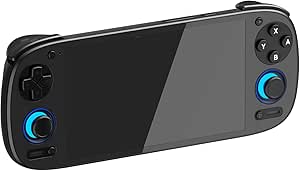
| DREAMHAX X7 Plus Handheld Game | — | — | — | — |
| R36MAX 2 Retro Handheld Game C | 4.5-inch IPS HD, 1024×768 | Wi-Fi | — | RK3326 quad-core Cortex-A35, up to 1.5GHz |
| Retroid Pocket 5 Retro Handhel | 5.5-inch 1080p touchscreen | — | — | Snapdragon 865 |
| UYTGXEN XF40V Retro Handheld G | 4-inch HD IPS | Wi-Fi | 64GB | — |
| Boltz Retro Handheld Game Cons | 3.75-inch IPS HD | — | — | RK3326 quad-core Cortex-A35 |
| Lenovo Legion Go S | 8-inch 120Hz PureSight IPS | HDMI, USB, Bluetooth, Wi-Fi | 512GB | AMD Ryzen Z2 Go |
| ASUS ROG Xbox Ally Gaming Hand | 7-inch 120Hz IPS touchscreen | Wi-Fi 6E, Bluetooth 5.4, USB | 512GB SSD | AMD Ryzen Z2 A |
| Handheld Game for Kids | — | — | 2GB | — |
| Retro Handheld Game Console wi | 3.5-inch IPS | 5G Wi-Fi, Bluetooth, HDMI, USB Type-C | 64GB TF card | Quad-core ARM Cortex-A53 |
| RG56PRO Retro Handheld Game Co | 5.5-inch IPS LCD | Wi-Fi, HDMI, USB Type-C | 128GB | RK3562 quad-core, 2.0GHz |
| Valve Steam Deck OLED 1TB Hand | 7.4-inch HDR OLED, 1280 x 800 | Wi-Fi 6E | 1TB NVMe SSD | — |
| msi Claw A8 PC Gaming Handheld | 8-inch, 1920 x 1200 | Bluetooth, Wi-Fi, Thunderbolt 4 | 1TB NVMe SSD | AMD Ryzen Z2 Extreme |
| abxylute One Pro Handheld Gami | 7-inch touchscreen, native 1080p | Wi-Fi, HDMI, USB | 64GB | MediaTek Genio 510 |
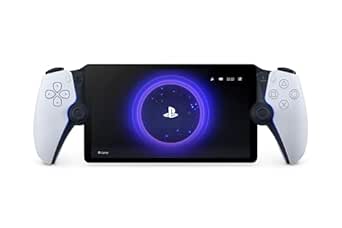
| PlayStation 5 Portal Remote Pl | 8-inch full HD LCD | Wi-Fi | — | — |
More Details on Our Top Picks
Nintendo Switch 2 System
The Nintendo Switch 2 is the most flexible pick here for players who want one handheld that can also take over the living-room TV. Its 7.9-inch 1080p touchscreen gives games more room than the DREAMHAX X7 Plus or the compact UYTGXEN XF40V, while the included dock adds TV play with up to 4K output on compatible sets. Switching among handheld, tabletop, and TV modes makes it a stronger all-purpose choice than the retro-focused R36MAX 2.
That flexibility comes with a narrower focus on Nintendo’s game ecosystem, and compatibility with earlier Switch titles can vary. Some features also depend on extra accessories or subscriptions. I’d choose it for a mix of current Nintendo gaming and shared-screen play, but not for a budget-minded buyer seeking a ready-made library of classic games.
Pros:- Three play modes let the same console work on the go and at home.
- Large 7.9-inch touchscreen supports 1080p, HDR, and up to 120 fps.
- Included dock supports up to 4K output on compatible TVs.
- 256GB internal storage can be expanded with a microSD card.
Cons:- Some features require additional accessories or subscriptions.
- Compatibility with existing Nintendo Switch games may vary.
- Its focus on Nintendo games makes it less suited to buyers seeking broad retro emulation.
Best for: Players who want a current Nintendo system for handheld sessions, tabletop play, and gaming on a compatible TV.
Not ideal for: Retro-only players who want a large preloaded classic library, or buyers who need confirmed compatibility with every existing Switch game.
- Platform:Nintendo Switch 2
- Display:7.9-inch 1080p touchscreen with HDR
- TV output:Up to 4K on compatible TVs
- Frame rate support:Up to 120 fps
- Storage:256GB internal; expandable with microSD cards
- Controllers:Magnetic Joy-Con; can be used as mice
- Connectivity:Wi-Fi
- Play modes:Handheld, tabletop, and TV
Our verdict“Choose the Switch 2 if you want the broadest mix of handheld and TV play in this lineup, rather than a dedicated retro device.”
DREAMHAX X7 Plus Handheld Game Console with 10,000 Preloaded Games, 4.3″ Screen, HDMI Output, Double Player, Retro Arcade
The DREAMHAX X7 Plus is aimed at buyers who want a handheld stocked with classic games from the start, rather than a more powerful device that needs setup. Its stated library spans formats including NES, SNES, GBA, and PS1, and HDMI output gives it a simple route to a larger screen. That makes it a more immediately game-ready retro pick than the Retroid Pocket 5, which has stronger Android hardware but no preloaded games.
The tradeoff is a small 4.3-inch TFT screen and modest storage: 8GB built in, with support for TF cards up to 32GB. Its many extra media functions add flexibility, but the game interface may require folder browsing for some titles. I’d favor it for casual classic play, not for buyers who want a modern touchscreen experience like the Switch 2 or the Retroid.
Pros:- Preloaded collection covers several classic game formats.
- HDMI output supports play on a larger display.
- Includes music, video, camera, and e-book functions.
- Supports two-player gaming.
Cons:- The 4.3-inch TFT display is smaller and less refined than the Switch 2 or Retroid Pocket 5 screens.
- Storage is limited to 8GB built in and TF cards up to 32GB.
- Some games may require navigating folders rather than appearing on the main screen.
Best for: Casual retro players who want a preloaded game collection, basic two-player support, and the option to connect to a TV.
Not ideal for: Players who want a large, high-resolution screen, substantial expandable storage, or a modern app-based gaming platform.
- Screen:4.3-inch TFT LCD
- Preloaded games:10,000
- Built-in storage:8GB
- Expandable storage:TF card up to 32GB
- Supported game formats:PS1, MAME, FBA, NEOGEO, GBA, GBC, GB, NES, SNES, MD
- Players:2
- Connections:HDMI, TF card slot, USB, Micro USB
- Dimensions:7.68 x 2.36 x 1.18 inches
- Weight:8.8 ounces
Our verdict“Pick the X7 Plus for straightforward, preloaded retro variety, but skip it if screen quality and room for a large library matter more.”
R36MAX 2 Retro Handheld Game Console, 4.5-inch IPS HD Display
The R36MAX 2 puts its emphasis on comfortable, self-contained retro sessions. Its 4.5-inch IPS display offers wider viewing angles than the DREAMHAX X7 Plus’s TFT panel, and the listed ergonomic grip and Hall sensor joysticks suit games that benefit from analog control. With Wi-Fi multiplayer and a stated battery life of up to six hours, it is a more focused handheld than the media-player-style X7 Plus.
Compared with the Retroid Pocket 5, though, this is the simpler option: the R36MAX 2 is built around preloaded games and emulators, with no online store access listed, while the Retroid runs Android 13 and has a stronger processor. Storage expansion also requires a TF card. I’d pick the R36MAX 2 for uncomplicated classic gaming, but not for someone seeking modern Android apps or a clearly supported game storefront.
Pros:- 4.5-inch IPS display has wide viewing angles and 1024×768 resolution.
- Hall sensor 3D joysticks provide analog control.
- Ergonomic grip is suited to longer handheld sessions.
- Wi-Fi supports multiplayer functionality.
Cons:- No online store access is listed; play centers on preloaded games and emulators.
- Expanded storage requires a TF card.
- The stated six-hour battery life can vary with game demands.
Best for: Retro-game players who value a comfortable grip, physical joysticks, and a dedicated portable device for emulated classics.
Not ideal for: Buyers seeking Android apps, a listed online game store, or a larger and more versatile screen like the Retroid Pocket 5 offers.
- Display:4.5-inch IPS HD, 1024×768
- Processor:RK3326 quad-core Cortex-A35, up to 1.5GHz
- GPU:Mali-G31MP2
- Battery:4000mAh; up to 6 hours
- Storage expansion:Supports TF cards up to 256GB
- Connectivity:Wi-Fi
- Controls:Hall sensor 3D joysticks
- Additional feature:RGB LED layout
Our verdict“Choose the R36MAX 2 for a straightforward retro handheld with analog controls, not for the broader software options of an Android console.”
Retroid Pocket 5 Retro Handheld Game Console, 8+128GB, 5.5-inch Touchscreen, Android 13, Snapdragon 865, Adreno 650 GPU, WiFi 6, BT5.1
The Retroid Pocket 5 is the lineup’s strongest fit for buyers who want a handheld they can configure around emulation, Android games, and cloud gaming. Its Snapdragon 865 and Adreno 650 GPU give it more processing headroom than the retro-focused R36MAX 2, while the 5.5-inch 1080p touchscreen is larger than the DREAMHAX X7 Plus’s 4.3-inch panel. Wi-Fi 6 and Bluetooth 5.1 also give it a more modern connectivity profile than the simpler retro devices.
That extra flexibility brings setup work: unlike the X7 Plus or UYTGXEN XF40V, it does not come with preloaded games, so buyers need to source and configure their own. Its listed software-update and support details are limited, too. I’d choose it for control over a varied Android-based library, but not for someone who wants to switch on and play a preassembled collection.
Pros:- Snapdragon 865 and Adreno 650 provide more processing capacity than the listed retro-focused handhelds.
- 5.5-inch 1080p touchscreen gives games more room than the X7 Plus display.
- Android 13 supports an adaptable gaming setup.
- 128GB storage and a microSD slot accommodate a growing library.
Cons:- No games are preloaded, so users must provide and set up their own library.
- Software-update and support details are limited.
- Battery protection mode may require an extended first charge.
Best for: Technically comfortable players who want an Android handheld for emulation, Android games, and cloud gaming, with expandable storage.
Not ideal for: Buyers who want preloaded games, minimal setup, or a clearly documented long-term software-update plan.
- Display:5.5-inch 1080p touchscreen
- Operating system:Android 13
- Processor:Snapdragon 865
- GPU:Adreno 650
- Memory and storage:8GB RAM and 128GB storage
- Expandable storage:microSD slot
- Wireless connectivity:Wi-Fi 6 and Bluetooth 5.1
- Battery:5000mAh
Our verdict“Pick the Retroid Pocket 5 if you want a configurable Android gaming handheld and are willing to handle game setup yourself.”
UYTGXEN XF40V Retro Handheld Game Console with Detachable Joysticks, 4-Inch HD IPS Screen, Preloaded Classic Games, Multiple Emulators
The UYTGXEN XF40V makes a clear case for buyers who want a compact retro handheld with games already loaded. Its 4-inch IPS screen, 64GB storage, and stated library of more than 20,000 classics give it a more self-contained setup than the Retroid Pocket 5, which requires users to load their own games. Detachable joysticks add a control option not listed for the DREAMHAX X7 Plus, while the square 720×720 display sets it apart from the R36MAX 2’s wider 4.5-inch screen.
That compact format is a tradeoff: the screen gives less room than the Switch 2 or Retroid Pocket 5, and the product data lists Wi-Fi but no HDMI output. Its Linux platform and multiple emulators suit a retro-first device, not a general-purpose app console. I’d choose it for portable classic gaming, but buyers should also note the stated age guidance and charging-care warning.
Pros:- Stated library of more than 20,000 preloaded classic games.
- 64GB storage is more built-in capacity than the X7 Plus’s 8GB.
- Detachable joysticks provide a different control setup from fixed-button retro handhelds.
- IPS display and tempered glass are suited to portable use.
Cons:- The 4-inch screen is smaller than the R36MAX 2 and Retroid Pocket 5 displays.
- No HDMI output is listed, limiting the documented play options to the handheld screen.
- Charging requires careful handling, and the product is stated as unsuitable for users under 12.
Best for: Retro players who want a compact Linux handheld with preloaded games, detachable joysticks, and 64GB of storage.
Not ideal for: Players who want a large display, TV output, broad modern game support, or a general-purpose Android device.
- Platform:Linux
- Display:4-inch HD IPS
- Resolution:720×720
- Storage:64GB
- Storage type:microSD-compatible
- Connectivity:Wi-Fi
- Controls:Detachable joysticks
- Battery life:Up to 6 hours
Our verdict“Choose the XF40V for a compact, preloaded retro library, but look elsewhere if you want a larger screen or TV connection.”
Boltz Retro Handheld Game Console with 20,503 Built-in Games, 3.75″ IPS Display
The Boltz is the pick for players who want a large preloaded retro collection without depending on downloads or an internet connection. Its 3.75-inch, 720×720 IPS screen is larger and sharper on paper than the kids’ handheld’s 3-inch LCD, while dual joysticks and shoulder triggers provide more control options than a basic button-only device. The RK3326 quad-core processor and Linux system are aimed at retro play, not current PC or console releases, so I would not choose it as an all-purpose gaming handheld. Its advertised library is extensive, but the lack of Wi-Fi means there is no stated online route for adding games. Battery life is listed at up to five hours, shorter than the compact kids’ model’s stated six hours.
Pros:- 20,503 built-in games provide a broad preloaded selection
- 3.75-inch 720×720 IPS display offers more screen area than the 3-inch kids’ handheld
- Dual joysticks, a directional pad, and shoulder triggers accommodate varied control needs
- USB-C charging and a 3,500mAh battery support portable use
Cons:- Limited to retro gaming rather than modern titles
- No Wi-Fi or online connectivity for downloads or online play
- Up to five hours of stated battery life may be restrictive on longer outings
Best for: Retro-game fans who want a ready-to-play collection, physical controls, and no need for online features.
Not ideal for: Players seeking modern releases, online play, or a handheld with a larger screen and longer stated battery life.
- Built-in games:20,503
- Display:3.75-inch IPS HD
- Resolution:720×720
- Processor:RK3326 quad-core Cortex-A35
- Battery:3,500mAh; up to 5 hours
- Charging:USB-C
- Controls:Dual joysticks, directional pad, shoulder triggers, action buttons
- Audio:Built-in speakers and 3.5mm headphone jack
Our verdict“Choose the Boltz for an offline, retro-focused handheld with a large built-in library, not for modern or connected gaming.”
Lenovo Legion Go S – 2025 Mobile Gaming Console with AMD Radeon Graphics and 8″ Display
The Legion Go S makes the most sense for buyers who put screen size and refresh rate ahead of having the lightest handheld. Its 8-inch 1080p IPS display runs at 120Hz, giving games more room to read and motion a smoother presentation than the 7-inch screen on the ASUS ROG Xbox Ally. The Ryzen Z2 Go, Radeon graphics, 16GB of memory, and 512GB of storage put it in a different class from the retro-only Boltz and children’s game player: this is the option here for broader, more demanding portable gaming. The tradeoff is portability; the larger display and body may feel cumbersome during long handheld sessions. The listing also leaves software support duration unknown, so buyers who prioritize clear long-term update details may prefer a product with more defined support information.
Pros:- 8-inch 1080p IPS display provides more viewing area than the ASUS ROG Xbox Ally’s 7-inch screen
- 120Hz refresh rate supports smoother motion in compatible games
- Ryzen Z2 Go processor and Radeon graphics target more demanding gaming than retro-focused models
- 16GB memory and 512GB storage provide capacity for a broader game setup
Cons:- Larger handheld form may be less comfortable to carry or hold for extended sessions
- Software support duration is listed as unknown
- A 55.5Wh battery does not come with a stated playtime in the supplied product data
Best for: PC-handheld buyers who want a roomy 8-inch display for gaming at home or on trips where size is less of a concern.
Not ideal for: Players who want a lighter, compact handheld or need clear information about the duration of software support.
- Display:8-inch 120Hz PureSight IPS
- Resolution:1080p
- Processor:AMD Ryzen Z2 Go
- Graphics:AMD Radeon
- Memory:16GB
- Storage:512GB
- Battery:55.5Wh
- Connectivity:HDMI, USB, Bluetooth, Wi-Fi
Our verdict“Pick the Legion Go S if a large 120Hz screen matters more to you than compact handheld portability.”
ASUS ROG Xbox Ally Gaming Handheld 7″ 120Hz Touchscreen IPS Display with DKZ Hub
The ROG Xbox Ally suits players who want a Windows handheld with access to PC games and an Xbox-oriented experience, rather than a device limited to preloaded retro titles like the Boltz or the 220-game kids’ console. Its 7-inch 1080p touchscreen and 120Hz refresh rate make it more compact than the Legion Go S’s 8-inch panel while keeping a high-refresh display. The stated Ryzen Z2 A processor, 16GB of RAM, and 512GB SSD give it a modern gaming setup, and Wi-Fi 6E and Bluetooth 5.4 support wireless connections. At 2 pounds, though, it is still substantial to hold for a long stretch. The listed 60Wh battery has no specific playtime estimate, and the product data does not specify an expansion option for its storage.
Pros:- Windows platform supports access to PC games and an Xbox-oriented experience
- 7-inch 1080p IPS touchscreen combines touch input with gamepad controls
- 120Hz display offers smoother motion than standard-refresh handheld screens
- Wi-Fi 6E and Bluetooth 5.4 provide modern wireless connectivity
Cons:- Listed weight of 2 pounds may feel heavy during prolonged handheld play
- 512GB storage may constrain a large installed library, with no expansion option specified in the supplied data
- 60Wh battery capacity is provided, but no playtime estimate is listed
Best for: Players who want a portable Windows device for PC gaming and Xbox-related access, plus a touchscreen and wireless connectivity.
Not ideal for: Buyers who prioritize a lightweight handheld, a stated battery runtime, or a confirmed storage expansion path.
- Platform:Windows
- Display:7-inch 120Hz IPS touchscreen
- Resolution:1080p
- Processor:AMD Ryzen Z2 A
- Memory:16GB LPDDR5X
- Storage:512GB SSD
- Battery:60Wh
- Connectivity:Wi-Fi 6E, Bluetooth 5.4, USB
- Weight:2 pounds
Our verdict“Choose the ROG Xbox Ally for Windows and Xbox-related gaming in a smaller high-refresh package than the Legion Go S, if its weight suits you.”
Handheld Game for Kids – Preloaded 220 Retro Video Games, Portable Gaming Player with Rechargeable Battery, 3.0″ LCD Screen, Mini Arcade Electronic Toy for Boys and Girls (Blue)
This handheld is aimed at children who need a simple, self-contained game device, not a system for a growing library of demanding titles. Its 220 preloaded games and straightforward button controls avoid the setup involved with a Windows handheld such as the ASUS ROG Xbox Ally. The compact 5.9-by-2.8-inch body and 6.4-ounce weight also make it easier for small hands to carry than either the Ally or the larger-screen Legion Go S. That simplicity comes with limits: the 3-inch LCD is the smallest display in this group, and the one-player design rules out shared multiplayer sessions. Its stated six-hour battery life exceeds the Boltz’s up-to-five-hour figure, but the 860mAh capacity and actual runtime will depend on use. I’d treat it as a basic child’s game player rather than a family’s main console.
Pros:- 220 preloaded games give children a ready-to-play selection
- At 6.4 ounces, it is lighter than the ASUS ROG Xbox Ally and Lenovo Legion Go S
- Compact dimensions make it easy for children to carry
- Listed battery life of up to six hours is longer than the Boltz’s stated five hours
Cons:- 3-inch LCD is smaller than the displays on the other handhelds in this batch
- Single-player design does not support shared multiplayer sessions
- A basic retro game player cannot substitute for a modern PC or console handheld
Best for: Parents seeking a lightweight, button-controlled handheld with built-in games for a child’s solo play.
Not ideal for: Older players who want a larger, sharper screen, online features, multiplayer, or modern console and PC games.
- Built-in games:220
- Screen:3-inch LCD
- Players:1
- Battery:860mAh rechargeable lithium-ion; stated average life up to 6 hours
- Storage:2GB
- Dimensions:5.9 × 2.8 × 0.7 inches
- Weight:6.4 ounces
- Controls:Button control
Our verdict“This is a sensible first handheld for a child who wants simple solo games and easy portability, but not for multiplayer or modern gaming.”
Retro Handheld Game Console with 3.5″ IPS Screen, 64GB TF Card, 5G WiFi, Bluetooth, HDMI Output
This Linux-based retro handheld stands out for connectivity beyond the device itself: HDMI output lets you connect it to a TV, while Wi-Fi and Bluetooth add wireless options that the offline Boltz lacks. Its 3.5-inch IPS display is a little smaller than the Boltz’s 3.75-inch screen, but the 64GB TF card provides storage for the listed preloaded collection and the 3,200mAh battery is rated for six to seven hours. A quad-core Cortex-A53 processor and 1GB of RAM make this a retro-focused system, not a rival to Windows devices such as the Legion Go S or ROG Xbox Ally. The supplied game counts also conflict between the title and description, so I would not choose it based on a precise library size. HDMI and controller support make it the more flexible pick for couch play.
Pros:- HDMI output supports play on a larger TV screen
- Wi-Fi and Bluetooth add connectivity absent from the Boltz
- 64GB TF card provides storage for the included game collection
- Stated six-to-seven-hour battery life exceeds the Boltz’s up-to-five-hour estimate
Cons:- Conflicting game counts in the supplied title and description make the library size unclear
- 1GB of RAM may limit performance with heavier emulation
- 640×480 resolution and a 3.5-inch screen are modest next to the 1080p displays on the Lenovo and ASUS handhelds
Best for: Retro players who want to connect a handheld to a TV and use wireless or wired controllers for multiplayer.
Not ideal for: Buyers seeking modern PC gaming, high-resolution handheld visuals, or certainty about the exact number of included games.
- Display:3.5-inch IPS
- Resolution:640×480
- Processor:Quad-core ARM Cortex-A53
- Graphics:Quad-core PowerVR SGX544MP
- Memory:1GB LPDDR4
- Storage:64GB TF card
- Battery:3,200mAh; stated 6–7 hours
- Connectivity:5G Wi-Fi, Bluetooth, HDMI, USB Type-C
- Platform:Linux
Our verdict“Choose this retro model if TV output and controller connectivity matter more than modern gaming performance or a precisely stated game count.”
RG56PRO Retro Handheld Game Console with EVA Hard Case (Black, 128GB)
The RG56PRO is the retro-focused pick here: its 128GB storage and advertised library of more than 31,000 games offer a ready-to-browse collection, while the 5.5-inch screen gives older titles more room than the smaller-screen options in this roundup. Compared with the Retroid Pocket 5, it emphasizes preloaded games and simple Linux-based play rather than Android flexibility and a named high-end mobile processor. Its dual joysticks, Wi-Fi, and HDMI support add options for compatible multiplayer or a larger display, but those features depend on suitable devices and setup. The 5,000mAh battery is listed for up to eight hours, though actual play time varies. I’d pick it for portable retro variety, not as a substitute for a modern PC handheld or a guaranteed offline multiplayer system.
Pros:- 128GB storage and an advertised library of more than 31,000 preloaded games
- 5.5-inch IPS display with an anti-glare finish
- Dual 3D joysticks and Hall-effect triggers
- Wi-Fi, HDMI, and USB Type-C connectivity
Cons:- Multiplayer features depend on compatible Wi-Fi and HDMI devices
- The Linux platform and listed specs do not establish compatibility with modern PC games
- The up-to-eight-hour battery estimate varies with usage and settings
Best for: Retro-game fans who want a large preloaded library, a mid-size screen, and basic TV or Wi-Fi play options.
Not ideal for: Players seeking a clearly specified modern PC-game library, or anyone who needs multiplayer to work without compatible Wi-Fi or HDMI equipment.
- Storage:128GB
- Display:5.5-inch IPS LCD
- Processor:RK3562 quad-core, 2.0GHz
- Battery:5,000mAh; up to 8 hours
- Controls:Hall-effect triggers and dual 3D joysticks
- Connectivity:Wi-Fi, HDMI, USB Type-C
- Platform:Linux
- Weight:7.2 ounces
Our verdict“Choose the RG56PRO for a large preloaded retro library and a more spacious screen than compact retro handhelds, but skip it for modern PC gaming.”
Valve Steam Deck OLED 1TB Handheld Gaming Console
The Steam Deck OLED makes the strongest case for buyers who want a handheld built around a broad PC game library. Its 7.4-inch HDR OLED screen, anti-glare etched glass, and refresh rate up to 90Hz give games a more vivid, fluid presentation than the RG56PRO’s retro-oriented 5.5-inch display. The 1TB NVMe SSD also provides substantial built-in space, so a microSD card is an option rather than an immediate requirement. Battery life is listed at three to 12 hours, a wide range that reflects how much game demands matter; demanding titles can shorten untethered sessions. Compared with the Windows-based MSI Claw A8, this pick is the clearer fit for a Steam-centered library, while the Claw offers Windows 11 and a larger 120Hz display. I’d favor the Deck for screen quality and storage, not for the longest sessions in every game.
Pros:- 7.4-inch HDR OLED display with anti-glare etched glass
- 1TB NVMe SSD provides substantial built-in storage
- Refresh rate up to 90Hz
- Wi-Fi 6E and included carrying case with removable liner
Cons:- Listed battery range spans three to 12 hours, with demanding games reducing unplugged play time
- The 1280 x 800 resolution is lower than the MSI Claw A8’s listed 1920 x 1200
- A microSD card is needed for storage beyond the built-in 1TB
Best for: Steam users who want a premium handheld with a large OLED display and ample built-in game storage.
Not ideal for: Buyers who need predictable long battery sessions with demanding games, or who want the larger 120Hz display listed on the MSI Claw A8.
- Storage:1TB NVMe SSD
- Display:7.4-inch HDR OLED, 1280 x 800
- Refresh rate:Up to 90Hz
- Battery:50Wh; listed gameplay range of 3–12 hours
- Connectivity:Wi-Fi 6E
- Touchscreen polling rate:180Hz
- Weight:30g lighter than the LCD model
- Included accessory:Carrying case with removable liner
Our verdict“Pick the Steam Deck OLED for a Steam-focused handheld with a standout OLED display and generous internal storage, while accepting game-dependent battery life.”
msi Claw A8 PC Gaming Handheld: AMD Ryzen Z2 Extreme, 8″ FHD+ 120Hz Display, 24GB LPDDR5x, 1TB NVMe SSD, SD Card Reader, Thunderbolt 4, Win 11 Home: White BZ2EM-070US
The MSI Claw A8 stands out for its 8-inch, 1920 x 1200 display with a 120Hz refresh rate, giving handheld PC games more screen space and smoother motion than the Steam Deck OLED’s 7.4-inch, up-to-90Hz panel. Its Ryzen Z2 Extreme, 24GB of LPDDR5x memory, and 1TB NVMe SSD position it for demanding Windows gaming, while Windows 11 Home also brings familiar PC software access. That versatility comes with a tradeoff: the product data gives no specific battery capacity or runtime, so its endurance is harder to compare with the Steam Deck’s stated three-to-12-hour range. The 8-inch format also puts screen size ahead of compactness. I’d shortlist this Claw for buyers who value resolution, refresh rate, and Windows flexibility over a well-defined battery expectation.
Pros:- 8-inch 1920 x 1200 display with a 120Hz refresh rate
- AMD Ryzen Z2 Extreme processor and 24GB LPDDR5x memory
- 1TB NVMe SSD with an SD card reader
- Windows 11 Home and Thunderbolt 4 connectivity
Cons:- No specific battery capacity or gameplay runtime is provided in the product details
- The 8-inch screen makes this a larger-format choice than the 7.4-inch Steam Deck OLED
- The supplied information does not establish performance or battery results across specific games
Best for: Handheld PC players who want a large high-resolution, high-refresh-rate screen, Windows 11, and substantial memory and SSD storage.
Not ideal for: Travelers who prioritize a compact device or need a clearly stated battery runtime before choosing.
- Processor:AMD Ryzen Z2 Extreme
- Display:8-inch, 1920 x 1200
- Refresh rate:120Hz
- Memory:24GB LPDDR5x
- Storage:1TB NVMe SSD
- Operating system:Windows 11 Home
- Connectivity:Bluetooth, Wi-Fi, Thunderbolt 4
- Expansion:SD card reader
Our verdict“Choose the Claw A8 if a large 120Hz Windows handheld screen matters more than compact size or a clearly stated battery runtime.”
abxylute One Pro Handheld Gaming Console – 64GB, 7″ 1080P Touchscreen, Cloud & Retro Gaming
The abxylute One Pro is aimed at players who already have games elsewhere: it combines cloud gaming, remote play, Android games, and retro emulation in a 430g handheld. Its 7-inch 1080p touchscreen is sharper on paper than the RG56PRO’s 5.5-inch HD screen, and its listed battery life of more than eight hours suits longer streaming sessions. The key difference from the PlayStation Portal is broader platform support: the abxylute lists Xbox Cloud Gaming, GeForce NOW, and PlayStation services, while Portal is designed around streaming compatible PS5 and PS4 games from a PS5. That flexibility depends on a stable internet connection and, for subscription services, separate memberships. With 64GB of storage, it also has less local space than the RG56PRO’s 128GB. I’d choose it for streaming variety, not for offline-first play.
Pros:- Supports cloud gaming, remote play, Android gaming, and retro emulation
- 7-inch native 1080p touchscreen
- 430g weight and listed battery life of more than eight hours
- Capacitive digital joysticks with switchable precision modes
Cons:- Cloud and remote play depend on a stable broadband connection
- Some services require separate subscriptions
- 64GB storage is half the RG56PRO’s listed 128GB capacity
Best for: Players with reliable broadband who want one handheld for cloud services, remote play, Android games, and retro emulation.
Not ideal for: Offline-first gamers, or buyers who want to stream PlayStation games without depending on compatible services, subscriptions, and a stable connection.
- Storage:64GB
- Display:7-inch touchscreen, native 1080p
- Processor:MediaTek Genio 510
- Weight:430g
- Battery life:More than 8 hours
- Connectivity:Wi-Fi, HDMI, USB
- Platform support:Android, PC, Xbox, PlayStation, and cloud services
- Video output:Up to 4K
Our verdict“Choose the abxylute One Pro if you want a lightweight streaming-focused device with several platform options and dependable internet access.”
PlayStation 5 Portal Remote Player
The PlayStation Portal has a narrower purpose than the abxylute One Pro: it is designed to stream compatible PS5 and PS4 games from a PS5 console over Wi-Fi, rather than serve as a general-purpose handheld. That focused setup makes the Portal the more direct choice for a PS5 owner who wants a large screen and familiar PlayStation controls away from the TV. Its 8-inch 1080p display supports gameplay up to 60fps, and the controller includes haptic feedback and adaptive triggers. The compromise is dependence: a PS5, broadband connection, and compatible games are required, and it does not replace a standalone console for local play. Compared with the abxylute’s listed cloud and platform range, Portal is much more PlayStation-specific. I’d buy it only when that PS5 link is the point.
Pros:- Streams compatible PS5 and PS4 games remotely
- 8-inch full HD display with gameplay up to 60fps
- PlayStation controller features include haptic feedback and adaptive triggers
- Tempest 3D AudioTech support
Cons:- Requires a PS5 console and a broadband Wi-Fi connection
- Limited to compatible games streamed from the console rather than standalone local play
- Listed weight of 2.6 pounds may be a drawback for extended handheld sessions
Best for: PS5 owners who want to play compatible PS5 and PS4 games around the home or elsewhere with a suitable Wi-Fi connection.
Not ideal for: People without a PS5, players who want local standalone games, or households where reliable Wi-Fi is unavailable.
- Display:8-inch full HD LCD
- Gameplay:Up to 1080p at 60fps
- Connectivity:Wi-Fi
- Compatible devices:PlayStation 5
- Game compatibility:Compatible PS5 and PS4 games streamed from a PS5
- Audio:Tempest 3D AudioTech
- Weight:2.6 pounds
- Controls:15 buttons; wireless controller with haptic feedback and adaptive triggers
Our verdict“Choose the Portal if you already own a PS5 and want its compatible games on a dedicated remote-play screen; skip it if you need a standalone handheld.”

How We Picked
I compared these handhelds by the job each is designed to do: run current games locally, play Nintendo titles, handle retro libraries, stream games, or offer a simple first device. The ranking favors a strong combination of game access, controls, display usability, setup demands, and flexibility for portable play. A device with a large screen or powerful components does not automatically rank higher if its software demands more effort or its use case is narrow.
Ranking reflects category fit, not raw specifications alone. That puts the Switch 2 and Steam Deck OLED ahead as broadly useful systems, while specialist retro, kids’, and streaming models rank lower for general-purpose use but may be better matches for particular buyers. I also weighed practical tradeoffs such as game compatibility, storage, connectivity, and whether play depends on another device or a reliable network. Product names and listed features provide the basis for comparison; details that can vary by configuration or region should be checked before purchase.
Factors to Consider When Choosing Handheld Gaming Consoles
Before choosing, decide what you want to play and how much setup you are willing to take on. Handheld gaming consoles span dedicated systems, small retro players, Windows PCs, and streaming screens; similar shapes can hide very different requirements.
Start With the Games You Want to Play
Make a short list of specific games or libraries before comparing screens and processors. Nintendo games point toward a Switch, while a PC library may favor a Steam Deck or Windows handheld, with compatibility varying by title and launcher. Retro-focused devices suit older games but may require configuration and legally sourced game files. A common mistake is buying based on a large advertised game count without checking what is included, how the controls map, or whether the games you care about run well. If your favorite game is tied to a particular platform, that compatibility should outweigh a small hardware advantage.
Choose Local Play, Streaming, or Both
Local-play consoles run games on the device, so they can work away from home without a strong internet connection, subject to game and account requirements. Remote-play and cloud devices send video over a network and return your controls to another system or service. That can keep a handheld lighter and simpler, but latency, Wi-Fi quality, and access to the host console or subscription shape the experience. Do not assume a streaming handheld is a standalone console just because it has a screen and controls. Buyers who travel often should give offline play more weight than a streaming-focused feature set.
Match Performance to Your Library, Not Just the Spec Sheet
Power matters most when you plan to play demanding modern games at higher resolutions or frame rates. For older games, lighter indies, and streamed play, a more modest device may be easier to carry and operate without giving up much that you will notice. Larger displays and faster refresh rates can improve clarity and motion, but they may also increase battery demands and device size. Check that the operating system supports your storefronts and preferred controls, not just that the listed chip sounds capable. Paying for headroom makes sense when it serves games you intend to play, not as a general guarantee of a better handheld experience.
Think Through Comfort, Size, and Battery Habits
A handheld that stays at home because it is too large or tiring to hold is a poor travel choice, even if its display is impressive. Screen size, weight distribution, grip shape, button placement, and the position of sticks and triggers all affect long sessions. Smaller retro players are easier to pack but can make modern games and text feel cramped. Battery life changes with game demands, brightness, refresh rate, and wireless use, so advertised capacity alone cannot predict time between charges. If possible, compare the device dimensions and control layout with how you plan to play—on a commute, on a sofa, or docked near a TV.
Budget for Storage, Accessories, and Setup
Think beyond the console itself: a microSD card, carrying case, charger, or controller may be useful, depending on the model and your routine. Large modern games can fill internal storage quickly, while retro libraries may need less space but can involve file management. Windows and Android handhelds can offer broad software choices, yet storefront logins, updates, settings, and controller mapping may take more time than a dedicated console interface. Simpler devices reduce that setup burden but can provide fewer options for expanding or customizing use. Check what is included in the box and what your preferred games require before deciding which device gives you the best fit.
Check Ownership and Compatibility Details
Handhelds can rely on different accounts, launchers, subscriptions, and network services, and those requirements affect long-term convenience. Before buying, verify whether the games you own can be installed, whether they need an internet check, and whether multiplayer or cloud features require a membership. Retro systems need particular care: preloaded-game claims do not clarify licensing, availability, or how easily the library can be managed. Also check the return policy and support information for lesser-known brands, since instructions and software updates may differ from major console ecosystems. A clear ownership path can matter more than a feature you may use only occasionally.
Frequently Asked Questions
Should I choose a Nintendo Switch 2 or a Steam Deck OLED?
Choose the Switch 2 if Nintendo games and the option to move between handheld and TV play are your priorities. The Steam Deck OLED makes more sense if your games are on PC storefronts and you want access to a broad PC library in a portable format. The Deck can involve more compatibility checks and settings, while the Switch offers a more dedicated console experience. Neither choice automatically covers the other platform’s games, so check your existing library and must-play titles first. Your preferred game ecosystem is the clearest tie-breaker.
Can I use the PlayStation Portal or abxylute One Pro without a console or internet connection?
These devices are designed around streaming rather than running a full local game library, so they are not direct replacements for a standalone console. The PlayStation Portal is intended for remote play from a compatible PlayStation setup, while the abxylute One Pro is aimed at cloud and retro gaming. Their usefulness away from home depends on the service, host device, account access, and network conditions involved. A weak or inconsistent connection can introduce lag or interruptions. If you need reliable offline play, choose a handheld that runs your games locally.
Are retro handhelds with thousands of included games a good choice for a first console?
They can be an accessible way to explore older games, but a high game count does not tell you whether the selection is organized, the controls are comfortable, or the titles are ones you want to play. Check the screen, button layout, storage format, and how easy it is to save and resume games. Also look into what is included and how the games are licensed; the product description alone may not answer those questions. A dedicated kids’ handheld can be simpler but may offer a much narrower experience than a full console. For a first device, favor clear setup instructions and games suited to the intended player over a headline library count.
Is a Windows gaming handheld a better buy than the Steam Deck?
A Windows handheld may suit you if you value Windows software access, specific launchers, or a configuration with hardware features that match your needs. The Steam Deck is often a more straightforward starting point for buyers who want a handheld-focused interface and are comfortable using its supported PC game library. Windows can bring added flexibility, but it may also mean more configuration and interface work on a small screen. Game compatibility, controls, and launcher behavior differ by title, so compare the games you actually play rather than assuming one operating system covers everything. Choose the platform whose everyday setup feels manageable to you.
How much storage should I look for in a handheld gaming console?
Storage needs depend on the size of your games and whether the device supports expansion. Modern PC and console games can take substantial space, so a small internal drive may require frequent uninstalling or a compatible memory card. Retro games usually take less room, but large collections, save files, and media can still add up. Confirm the exact model’s included storage and supported expansion method before you buy; cards and drives are not interchangeable across every handheld. If you keep only a few large games installed at once, you may need less capacity than someone carrying a broad library.
Conclusion
For most buyers, I recommend the Nintendo Switch 2 as the best overall choice for portable and TV play within Nintendo’s ecosystem. The best value depends on your library: the R36MAX or another simple retro handheld can suit buyers seeking older games, while the Steam Deck OLED offers a stronger fit for players building around PC games. For a premium PC handheld, compare the Steam Deck OLED, Lenovo Legion Go S, ASUS ROG Xbox Ally, and MSI Claw A8 by software comfort, display preference, and the games you plan to run. Beginners may find a dedicated Nintendo system or a straightforward kids’ handheld easier to start with than a Windows device. Choose the Retroid Pocket 5 for Android and retro play, or the Portal and abxylute One Pro if streaming is your specific need; choose a locally powered console instead if offline play matters most.
Halloween Picks

Star Wars Yoda and R2-D2 Inflatable Halloween Decor, 6 ft with LEDs, Indoor/Outdoor

Kalolary 12ft Halloween Witch Haunted House Inflatable Archway

DomKom 6 ft Halloween Inflatable Ghosts Roasting Marshmallows
As an affiliate, we earn on qualifying purchases.