Finding the best smart home hub means balancing compatibility, ease of use, and future-proof features. The Amazon Echo Show 8 stands out as the best overall for its balanced combination of smart display, sound quality, and Alexa integration. For those seeking a more customizable option, the Home Assistant Green offers advanced automation capabilities. Meanwhile, the Aqara Smart Home Hub M3 excels in supporting Zigbee, Thread, and Apple HomeKit for a versatile smart setup. The main challenge lies in choosing between a simple control panel, a versatile automation hub, or a dedicated device for specific functions. Continue reading for a detailed breakdown of each option and what makes them suitable for different needs.
Key Takeaways
- Compatibility with multiple ecosystems like Alexa, Google, and Apple varies significantly between hubs.
- Built-in displays add convenience but often increase the price and complexity of setup.
- Hubs supporting Zigbee and Thread tend to offer better device integration and future-proofing.
- Dedicated automation hubs like Home Assistant Green provide more customization but require technical knowledge.
- Most affordable options work well for basic control, but advanced automation and integration often come at a premium.






More Details on Our Top Picks
Amazon Echo Show 8, With Spatial Audio, Smart Home Hub, ideal for open living spaces, Designed for Alexa+, Charcoal
This Echo Show 8 stands out for combining a vibrant 8″ HD touchscreen with high-quality spatial audio, making it a strong choice for those who want a central control point with entertainment. Compared with the Echo Hub, it offers a larger display and richer media experience, but its bulk makes it less suitable for compact spaces. The built-in Zigbee, Matter, and Thread support simplifies device pairing without extra hubs, and the high-quality camera and privacy features add to its appeal. However, the device’s size and higher price could be drawbacks for users seeking a minimal setup or tighter budgets. This option is perfect for open living areas where both control and entertainment are priorities.
Pros:- Immersive spatial audio and vibrant HD touchscreen enhance media experience
- Built-in Zigbee, Matter, and Thread support for seamless device integration
- High-quality 13 MP camera with privacy shutter and noise reduction
Cons:- Relatively large and may dominate smaller spaces
- Higher cost compared to simpler smart displays
Best for: Homeowners who want a combined smart display, media hub, and smart home controller in a stylish package.
Not ideal for: Small apartments or bedrooms where space is limited and a more discreet device is preferred.
- Display:8-inch HD touchscreen
- Camera:13 MP with shutter
- Audio:Spatial audio with full-range drivers
- Connectivity:WiFi, Bluetooth, Zigbee, Matter, Thread
- Size:7.9” x 5.5” x 4.2”
- Weight:36.6 oz
Bottom line: Best suited for those seeking an all-in-one media and smart home hub with a sizable, feature-rich display.
Amazon Echo Hub, 8” smart home control panel, Designed for Alexa+, Compatible with thousands of devices
The Echo Hub offers a straightforward 8″ touch screen designed specifically for controlling a wide array of smart devices, making it ideal for users who want a dedicated, wall-mounted control panel. Unlike the Echo Show 8, it lacks a built-in speaker for media playback but excels in device management and security features. Its compatibility with Zigbee, Thread, and Matter, combined with a robust privacy design, makes it a reliable choice for those who prefer local control and customization. Setup is simple, and the ability to mount it on a wall keeps surfaces uncluttered. However, its lack of media streaming features limits its use as an entertainment device. This pick makes sense for anyone wanting a centralized, customizable smart home dashboard.
Pros:- Customizable dashboard for quick device access
- Supports Zigbee, Thread, and Matter for broad device compatibility
- Easy wall-mount installation with included hardware
Cons:- Limited media playback capabilities
- Smaller speaker quality—no built-in media streaming
Best for: Homeowners seeking a dedicated, wall-mounted control panel for managing smart devices and security systems.
Not ideal for: Users looking for a combined media and control device or those wanting built-in entertainment features.
- Display:8-inch touch screen
- Connectivity:WiFi, Bluetooth, Zigbee, Thread, Matter
- Size:7.9″ W x 5.4″ H x 0.6″ D
- Weight:12.9 oz
- Mounting:Wall mount included
- Supported Protocols:WPA3, 2.4/5 GHz WiFi
Bottom line: Ideal for those who want a sleek, dedicated control surface for their smart home systems without media distractions.
Amazon Echo Show 15 (newest model), Full HD 15.6″ kitchen hub for home organization, with built-in Fire TV, Designed for Alexa+
The Echo Show 15 excels as a central family hub, with a 15.6″ Full HD display that supports customizable widgets for calendars, to-do lists, and smart home controls. It combines entertainment with home management, thanks to the built-in Fire TV for streaming and a powerful sound system. Compared to smaller devices like the Echo Show 8, it offers a more immersive experience for cooking, family scheduling, and media. The camera’s auto-framing and noise reduction improve video calls, while privacy controls like a physical shutter ensure user confidence. The size and cost may be overkill for individuals without a dedicated space like a kitchen wall. This product is perfect for busy households needing a multi-purpose display that keeps everyone connected and organized.
Pros:- Large 15.6” Full HD display with customizable widgets
- Built-in Fire TV for streaming entertainment
- Advanced video calling with auto-framing and noise reduction
Cons:- Size and weight limit placement options
- Higher price point may not suit budget-conscious buyers
Best for: Families and homeowners who want a large, multi-functional display in communal spaces like kitchens or living rooms.
Not ideal for: Small apartments or bedrooms where space is limited and a compact device is more practical.
- Display:15.6-inch Full HD
- Connectivity:Wi-Fi 6E, Bluetooth, Zigbee, Matter, Thread
- Camera:13 MP with auto-framing
- Audio:Dual 2” woofers and tweeters
- Size:16.1″ W x 10.1″ H
- Weight:4.96 lbs
Bottom line: Best for larger households needing a versatile, sizable control and entertainment hub in communal areas.
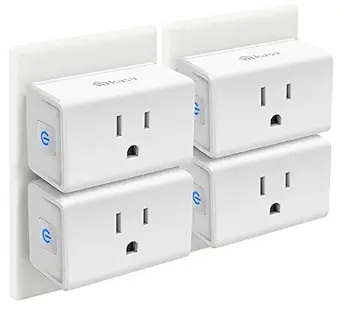
Kasa Smart Plug Mini 15A, Smart Home Wi-Fi Outlet Works with Alexa, Google Home & IFTTT, No Hub Required, UL Certified, 2.4G WiFi Only, 4-Pack(EP10P4)
The Kasa Smart Plug Mini offers an affordable, compact solution for expanding smart control to multiple outlets without blocking adjacent sockets. It works seamlessly with Alexa, Google, and IFTTT, making it accessible for most smart home ecosystems. Its simple setup via the Kasa app and reliable 2.4 GHz WiFi connection make it a favorite for users who want effortless automation—whether controlling lamps, fans, or holiday lights. The 4-pack provides excellent value, and the UL certification adds peace of mind regarding safety. However, being limited to 2.4 GHz WiFi and lacking Zigbee or Thread support may restrict future expansion or performance in congested networks. This pick is ideal for budget-minded users seeking dependable, space-saving outlets.
Pros:- Compact design fits in tight outlets without blocking second socket
- Works with Alexa, Google Assistant, IFTTT for versatile control
- Affordable 4-pack offers great value
Cons:- Limited to 2.4 GHz WiFi; no Zigbee or Thread support
- No built-in energy monitoring or advanced scheduling features
Best for: Homeowners or renters looking for a cost-effective, easy-to-use set of smart plugs for basic automation.
Not ideal for: Power users needing Zigbee or Thread support for more advanced or extensive smart ecosystems.
- Current Rating:15A
- Connectivity:WiFi 2.4 GHz
- Materials:Polycarbonate
- Size:1.5″ x 5.6″ x 0.7″
- Included:4 plugs
- Control:Voice and app
Bottom line: Best for budget-conscious users who want reliable, simple remote control over multiple outlets.
Aqara Smart Home Hub M3 for Advanced Automation, Matter Controller, Thread Border Router, Features Zigbee, Bluetooth, Wi-Fi, PoE, IR, Supports Apple HomeKit, Alexa, SmartThings, Home Assistant, IFTTT
The Aqara M3 offers a comprehensive solution with support for Zigbee, Thread, Bluetooth, Wi-Fi, and IR, making it a standout for advanced users who want robust local automation. Its Matter bridge capability allows integration with ecosystems like Home Assistant and Apple HomeKit, surpassing the more basic hubs like the Amazon Echo Hub in versatility. The inclusion of PoE and USB-C for power adds flexibility, while its emphasis on privacy and encrypted local storage appeals to security-minded homeowners. Unlike simpler hubs, the M3’s extensive protocol support and local control make it ideal for complex smart setups, but its advanced features and higher price may be overkill for casual users. This hub is best suited for tech-savvy homeowners who want seamless, power-user-level automation.
Pros:- Supports Zigbee, Thread, Bluetooth, Wi-Fi, and IR for broad device compatibility
- Matter bridge enables seamless ecosystem integration
- PoE and USB-C support for flexible power options
- Enhanced privacy with encrypted local storage
Cons:- Higher complexity and cost compared to simpler hubs
- Requires technical knowledge for setup and configuration
Best for: Smart home enthusiasts and power users demanding extensive protocol support and local control.
Not ideal for: Casual users or those with basic smart homes who do not need advanced automation features.
- Protocols:Zigbee, Thread, Bluetooth, Wi-Fi, IR
- Support:Apple HomeKit, Alexa, SmartThings, Home Assistant
- Connectivity:WPA3 Wi-Fi, PoE, USB-C
- Device Capacity:127 Zigbee, 127 Thread
- Size:Approx 8 x 8 x 1 inches
- Weight:Varies
Bottom line: Best suited for advanced users seeking a highly versatile, privacy-focused hub with power-user features.
Aeotec Smart Home Hub2 – V4, Works as a SmartThings Hub, Zigbee, Matter Gateway, Compatible with Alexa, Google Assistant, WiFi (No Z-Wave)
This option stands out for its seamless integration within Samsung’s proven ecosystem, making it an excellent choice for those already invested in SmartThings or seeking a system aligned with the latest Matter standard. Compared with the Amazon Echo Hub, it offers broader protocol support—specifically Zigbee and Matter—while excluding Z-Wave, which might be a drawback for users with existing Z-Wave devices. Its straightforward setup over Wi-Fi or Ethernet ensures quick installation, and local automations continue functioning offline, enhancing reliability. The cost is higher, but the broad compatibility and future-proof features justify the investment for dedicated smart home enthusiasts.
Pros:- Supports Zigbee and Matter, ensuring compatibility with the latest devices
- Reliable local automations that work offline
- Easy setup via Wi-Fi or Ethernet
Cons:- Does not support Z-Wave, limiting compatibility with some existing devices
- Higher price point compared to simpler hubs
Best for: Homeowners looking for a versatile, future-ready hub that supports Zigbee and Matter devices, especially those already using Samsung or SmartThings products.
Not ideal for: Users with a large Z-Wave device collection or those on a tight budget, since Z-Wave support is missing and the price is higher than basic hubs.
- Smart Home Compatibility:Zigbee, Matter, Wi-Fi
- Supported Platforms:Alexa, Google Assistant
- Connection Type:Wi-Fi, Ethernet
- Supported Protocols:Zigbee, Matter
- No Z-Wave Support:Yes
- Setup Options:Wi-Fi or Ethernet
Bottom line: Ideal for tech-savvy users wanting a compatible, future-proof smart home hub with broad protocol support.
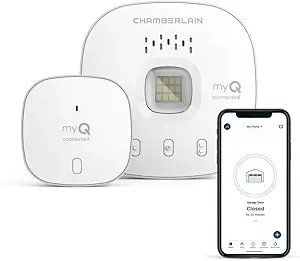
CHAMBERLAIN Smart Garage Control – Wireless Garage Hub and Sensor with Wifi & Bluetooth – Smartphone Controlled, myQ-G0401-ES, White
This pick makes the most sense for homeowners who want to convert their existing garage opener into a smart device with remote control and scheduling. Compared with dedicated hubs like the Amazon Echo Hub, it offers straightforward control over garage doors and integration with Amazon Key In-Garage Delivery, adding convenience and security. While setup is simple via Bluetooth and Wi-Fi, it only works with garage openers manufactured after 1993 with standard sensors—limiting compatibility with older models. The app’s user experience is solid, but it’s focused solely on garage control, meaning it isn’t a comprehensive smart home hub. Its affordability and specific functionality make it a great upgrade for garage-centric households.
Pros:- Easy to install with Bluetooth setup
- Control and schedule garage doors remotely
- Integrates with Amazon Key for in-garage delivery
Cons:- Limited to garage doors with compatible openers
- Not a full smart home hub, only garage control
Best for: Homeowners seeking a reliable, easy-to-install garage automation solution that integrates with their existing garage door opener.
Not ideal for: Users looking for a multi-protocol smart home hub or those with older garage openers not compatible with myQ.
- Connection Type:Wi-Fi, Bluetooth
- Supported Devices:Garage openers after 1993 with standard sensors
- App Compatibility:iPhone and Android
- Control Range:Up to 50 feet
- Additional Features:Amazon Key In-Garage Delivery
- Power Supply:Included
Bottom line: Perfect for those who want a simple, effective way to manage their garage remotely without needing a full smart home hub.
eufy Security eufy Smart Display E10, Smart Home Hub, 8″ Control Panel, Compatible Devices, Four Views on One Screen, Instant Door Alerts, Daily Event Reports, One Tap Control
This pick is ideal for users who want a dedicated visual control panel with instant alerts and multi-view capabilities, surpassing simpler hubs like the Amazon Echo Show 8 in display features. It excels in providing four simultaneous live feeds, making it great for monitoring multiple cameras at once, and its local storage ensures fast playback without buffering. Compared to the Amazon Echo Hub, it offers a more intuitive touchscreen experience and rich security features, though it is limited to Eufy devices and doesn’t support broader protocols like Zigbee or Z-Wave. Its portability and user-friendly interface make it perfect for family homes or those prioritizing visual security.
Pros:- Supports four live video feeds simultaneously
- Instant alerts and local storage for fast playback
- Easy-to-use touchscreen interface
Cons:- Limited device compatibility—only works with Eufy devices
- No support for protocols like Z-Wave or Zigbee
- Battery life limited to about 7 days
Best for: Families wanting a dedicated, easy-to-use visual control panel for security cameras and smart devices in the home.
Not ideal for: Power users looking for a truly integrated, multi-protocol hub supporting Zigbee, Z-Wave, and Matter devices.
- Display Size:8 inches
- Video Resolution:1080p
- Supported Devices:Eufy cameras, locks
- Power:Rechargeable battery
- Connectivity:Wi-Fi
- Features:Four views, instant alerts
Bottom line: Great for households focused on visual security and family control, but not for broad protocol integration.
Like-New Amazon Echo Hub, 8” smart home control panel, Designed for Alexa+, Compatible with thousands of devices
This pick makes sense for users deeply integrated into the Alexa ecosystem who want a large, dedicated control panel. Compared with the Eufy Smart Display, it offers broader device compatibility via Alexa and supports a wide range of protocols—Zigbee, Zwave, Matter, Sidewalk—making it a versatile control point. The device is easy to install with options for wall mounting or tabletop use, and it emphasizes privacy with multiple controls. The main tradeoff involves its reliance on Alexa, which may not appeal to those seeking a platform-agnostic hub or local automation support. Its expansive device support and integration make it a strong choice for Alexa-centric households.
Pros:- Supports thousands of Alexa-compatible devices
- Protocols supported include Zigbee, Z-Wave, Matter
- Easy to install with mounting options
Cons:- Requires Alexa ecosystem, limiting alternatives
- Relies on cloud services for many functions
Best for: Homeowners invested in Alexa-compatible devices seeking a large, centralized control panel for their smart home.
Not ideal for: Users preferring platform-neutral hubs or those not using Alexa as their primary voice assistant.
- Display Size:8 inches
- Supported Protocols:Zigbee, Z-Wave, Matter
- Voice Assistant:Alexa
- Connectivity:Wi-Fi, Bluetooth
- Mounting Options:Wall or tabletop
- Privacy Features:Mic off button
Bottom line: Excellent for Alexa users wanting a large, all-in-one control panel with broad device support.
Home Assistant Green | Smart Home hub with Advanced Automation | Official Home Assistant Hardware
This choice stands out for users who prefer a DIY approach with local control and privacy, integrating seamlessly with Home Assistant’s ecosystem. Compared with the Amazon Echo Hub, it offers a more customizable automation experience and supports Z-Wave, Zigbee, and Thread via USB expandability. Its small, fanless design ensures quiet operation, and it’s ideal for tech-savvy users who want full data ownership. The setup is straightforward for those familiar with Home Assistant, but it may be daunting for beginners and lacks out-of-the-box integrations for protocols like Zigbee or Z-Wave without USB adapters. Its focus on privacy and flexibility appeals to advanced users wanting complete control.
Pros:- Supports Z-Wave, Zigbee, Thread via USB
- Local control and data privacy
- Compact, fanless design
Cons:- Requires familiarity with Home Assistant setup
- No native protocol support—needs USB expansion
- Lacks integrated app or cloud services
Best for: Home automation enthusiasts who want local control, full customization, and data privacy, plus flexibility to expand protocols via USB.
Not ideal for: Beginners or casual users seeking simple, plug-and-play smart hubs without DIY setup.
- Processor:Quad-core ARM
- RAM:4GB
- Storage:32GB
- Connectivity:Ethernet, USB
- Supported Protocols:Z-Wave, Zigbee, Thread (via USB)
- Size:Small, fanless
Bottom line: Perfect for DIYers who prioritize privacy, customization, and protocol flexibility over simplicity.
How We Picked
The products in this roundup were evaluated based on a combination of compatibility, ease of setup, build quality, automation capabilities, and value. I prioritized hubs that support popular ecosystems like Alexa, Google Assistant, and Apple HomeKit to ensure broad device compatibility. Performance in terms of responsiveness and stability was also key, alongside user interface design and future expandability. Devices that blend affordability with advanced features earned higher rankings, while those with limited ecosystem support or higher complexity were rated lower. The ranking reflects a balance between affordability, versatility, and user experience, ensuring options for different types of smart home enthusiasts.Factors to Consider When Choosing Best Smart Home Hubs
Choosing the best smart home hub involves considering several factors beyond just features. Your decision should align with your existing devices, technical skill level, and how much automation you want. A good hub should be reliable, easy to set up, and capable of expanding as your smart home grows. Keep in mind that some hubs excel in automation but lack displays, while others prioritize user interface. Understanding these tradeoffs will help you select a hub that not only meets your current needs but also adapts to future smart home developments.Compatibility and Ecosystem Support
One of the most important factors is ensuring your chosen hub supports your existing smart devices and preferred voice assistants. Some hubs work seamlessly with Alexa, Google Assistant, and Apple HomeKit, while others have limited ecosystem support. If you already own devices tied to a specific platform, choosing a hub that integrates smoothly will save you setup headaches and improve reliability. Be cautious of hubs that claim broad support but lack real-world compatibility, especially with newer or less common devices.
Ease of Use and Setup
While many hubs advertise simple setup, the actual experience can vary. Devices with clear, user-friendly apps and guided onboarding tend to minimize frustration. If you’re a beginner, look for hubs with built-in displays or comprehensive mobile apps that walk you through configuration. Advanced users might prioritize hubs that support custom automations or scripting, but these often require more technical skill. Balancing ease of use with advanced capabilities is key to avoiding future headaches or underutilized features.
Automation Capabilities and Flexibility
The ability to create complex automations distinguishes a good hub from an average one. Consider whether the hub supports popular automation standards like Zigbee, Z-Wave, or Thread, which enable integration with a wider range of devices. Hubs like Home Assistant Green excel here, offering extensive customization options. However, more automation options often mean a steeper learning curve. Think about your comfort level with technology and whether you want a plug-and-play experience or a highly configurable system.
Build Quality and Expandability
A durable, well-designed hub minimizes installation issues and ensures longevity. Some hubs are all-in-one devices with screens and speakers, while others are more modular, like the Aqara M3 or Home Assistant Green. Consider future growth—if you plan to expand your smart home, choose a hub that supports a broad array of devices and protocols. Compatibility with future standards and integrations can save money and effort down the line, especially if you want a smart home that evolves over time.
Price and Value
Pricing varies widely, from budget-friendly plugs to premium control panels. Remember that a higher price often correlates with better compatibility, more features, or a more robust build. However, not every user needs a high-end hub; budget options can work well for basic control. Determine how much automation and future-proofing matter to you, then weigh those features against your budget. Sometimes, investing a bit more yields a more reliable, versatile system that lasts longer and integrates seamlessly.
Frequently Asked Questions
Can I use multiple smart home hubs together?
Yes, combining multiple hubs can expand your smart home’s capabilities, especially if different hubs support different ecosystems or protocols. For example, a Zigbee hub like Aqara paired with an Alexa-enabled device can offer greater flexibility. However, managing multiple hubs can increase complexity and require more coordination. Ensure they can communicate or integrate smoothly, often via a common platform or automation system, to avoid creating isolated device islands or conflicts.
Is a display on a smart home hub necessary?
A display provides visual feedback, quick access to controls, and can serve as a central home dashboard. If you prefer a visual interface or have a household with many smart devices, a hub with a screen—like the Echo Show 8 or 15—can be very convenient. However, displays often come at a higher cost and may be redundant if you’re comfortable using voice commands or mobile apps. Consider your household’s tech habits and whether a display adds meaningful value for your setup.
Do I need a dedicated hub if I already have smart devices?
Many smart devices are now Wi-Fi based and do not require a dedicated hub, making setup simpler and more affordable. However, hubs can improve reliability, reduce network congestion, and enable advanced automation. If your devices use protocols like Zigbee or Z-Wave, a dedicated hub becomes essential for integration. Evaluate your device ecosystem—if most are Wi-Fi and your automation needs are simple, a hub might not be necessary, but for larger, protocol-diverse setups, a dedicated hub offers significant benefits.
How future-proof are these hubs for new smart home standards?
Future-proofing largely depends on whether the hub supports emerging protocols like Thread or upcoming standards like Matter. Devices supporting Zigbee or Z-Wave are generally well-established, but hubs with Thread support or Matter compatibility are better positioned to adapt to new device standards. Consider hubs that are actively updated by manufacturers and support multiple protocols, as these are more likely to remain compatible with future devices and ecosystems, protecting your investment over time.
Should I pay extra for a hub with a voice assistant built-in?
Integrating a voice assistant directly into your hub can streamline voice control and reduce the need for additional devices. If voice control is a priority, a hub like the Echo Show 8 or 15 offers both display and sound, making it a versatile control point. However, built-in voice assistants often come with higher costs and may have limitations compared to dedicated smart speakers. Evaluate whether you prefer a combined device or if separate voice assistants and hubs better suit your automation and audio needs.
Conclusion
The best overall smart home hub for most users is the Amazon Echo Show 8 because of its balanced mix of display, sound, and Alexa integration. Those seeking a highly customizable and automation-rich experience should consider the Home Assistant Green. If compatibility with multiple ecosystems and advanced protocols matters most, the Aqara M3 is a strong choice. Beginners or households that want a simple, reliable control panel might prefer the eufy Smart Display E10. For users prioritizing device compatibility and ease of setup, the Amazon Echo Hub or Like-New Amazon Echo Hub are excellent options. Ultimately, your choice depends on your existing devices, automation needs, and whether you prefer simplicity or advanced control features.