
🔍 Read the full analysis: 8 High Refresh Gaming Monitors For Fast-Paced Games In 2027 on ThorstenMeyerAI.com

Get the latest gadgets delivered free with Prime
- Fast, free delivery on millions of items
- Prime Video, Amazon Music and more included
- Member-only deals all year
TL;DR
ThorstenMeyerAI.com compares eight gaming monitors across 4K, QHD and 1080p resolutions, including IPS, QD-OLED, curved and ultrawide options. The guide is a buyer’s comparison, not news of newly launched products; prices, availability and whether these models remain current in 2027 are not established in the source.
As detailed in ThorstenMeyerAI.com’s original comparison, eight high-refresh gaming monitors are compared for fast-paced games, ranging from a 4K, 320Hz MSI to 1080p esports displays and a QD-OLED Samsung. The guide describes their intended tradeoffs, but it does not establish that the products are new, available, or priced for 2027.
The comparison names the MSI MAG 272URDFA E16 as its overall pick, citing its unusual combination of 4K resolution and 320Hz refresh; for other options, see more high-refresh gaming monitors. The source says that pairing offers a broad performance brief, while warning that running games at 4K and very high frame rates requires a capable graphics card. It identifies the AOC Q27G41ZE as a more conventional 27-inch QHD option, with 240Hz native refresh and a 260Hz overclocked mode.
For buyers prioritizing panel technology, the guide points to the Samsung Odyssey OLED G6 and its QD-OLED design, alongside other OLED gaming monitor options. It also lists four 1080p-oriented alternatives: the ASUS VG259QM5A, Dell SE2426HG, AOC C27G4ZH and a 32-inch SANSUI model. The source describes the ASUS and Dell as 24-inch-class, 240Hz choices, and the AOC as a curved 27-inch 1080p screen. Specific refresh-rate or panel details for every listed model are not supplied in the material.
The remaining pick is a 34-inch Sceptre ultrawide. The guide frames it as an immersion and workspace option, rather than a straightforward competitive-speed choice. Across the list, it says the ranking weighs resolution, refresh, panel, adaptive-sync support where specified, connectivity and adjustment details; it also says unspecified features are not assumed to be present.
The 8 picks
- 1
 Samsung 27" Odyssey OLED G6 (G61SH) QD-OLED Gaming MonitorView on Amazon →
- 2
 msi MAG 272URDFA E16 27-inch 3840 x 2160 (UHD) Gaming Office Monitor, 320Hz,…View on Amazon →
- 3
 Sceptre C345B-QU240T 34-inch Curved Ultrawide Gaming MonitorView on Amazon →
- 4
 SANSUI 32 Inch Curved 240Hz Gaming Monitor High Refresh Rate, FHD 1080PView on Amazon →
- 5
 AOC 27" Gaming Monitor QHD 240Hz Overclocked IPS NVIDIA G‑Sync Q27G41ZEView on Amazon →
- 6
 AOC C27G4ZH 27-Inch Curved FHD Gaming MonitorView on Amazon →
- 7
 ASUS TUF Gaming VG259QM5A 24.5-Inch 1080p 240Hz Gaming MonitorView on Amazon →
- 8
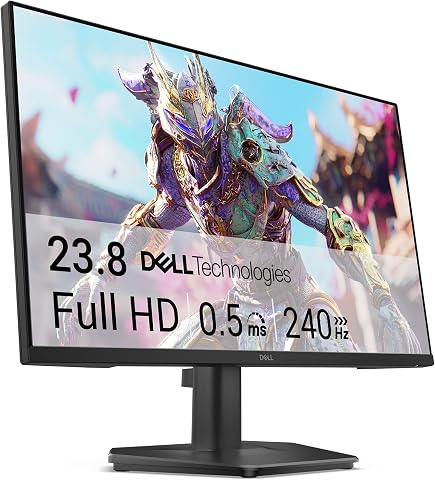 Dell 24 240Hz Gaming Monitor – SE2426HG – 23.8-inch FHD (1920×1080) 240Hz Dis…View on Amazon →
Match Screen Speed to Your PC
The list is useful because a monitor’s advertised refresh rate is only one part of the experience. A display can refresh rapidly, but the player’s graphics card and game settings determine the frame rate available to use that capability. The source cautions that 4K places a heavier rendering load on a PC than 1080p, while QHD sits between the two in detail and GPU demand.
That distinction can affect both performance and spending. Competitive players may prefer a smaller 1080p screen if it helps their system sustain high frame rates; players seeking sharper detail may favor QHD or 4K and accept lower frame rates in demanding games. Screen size and viewing distance also matter: a large 1080p panel can look less crisp at a close desk distance than a smaller display at the same resolution.
The guide’s distinctions are recommendations, not measured guarantees of gaming performance. It provides no standardized response-time tests, independent benchmark results, pricing comparison or hands-on testing details in the supplied material. Buyers should treat the picks as a starting point and confirm specifications and performance for their own setup.
Popular right now

Bose QuietComfort Headphones (2nd Gen), Wireless Noise-Cancelling Over-Ear Headphones, Black

TCL 55-Inch R7D Series QLED 4K UHD HDR Roku Smart TV (55R7D, 2026)

Sony WH-1000XM4C Wireless Noise-Cancelling Headphones, Black
As an affiliate, we earn on qualifying purchases.
Eight Formats, Different Tradeoffs
The source’s central comparison is between resolution, refresh rate and screen format. Its MSI pick combines the highest resolution mentioned with a very high refresh figure, whereas the AOC QHD model is presented as a more attainable balance. The 1080p options emphasize easier frame-rate targets, while OLED and ultrawide designs appeal to different image and immersion priorities.
Refresh rate measures how often a display can update; it does not mean a PC will deliver an equal number of frames. The guide says the gap between 240Hz and higher figures such as 260Hz or 320Hz is more specialized and depends on a system producing very high, stable frame rates. It also recommends checking whether the games a buyer plays support ultrawide resolutions, since some titles may not use the format properly.
The material provides a shortlist and selection rationale, but not a publication date, retailer links, prices, warranty details or a full specification sheet for all eight models. It therefore supports a comparison of stated use cases, not a claim that these are the best or most available monitors in 2027.
“The MSI combines 4K resolution and 320Hz refresh.”
— ThorstenMeyerAI.com
What the Guide Does Not Verify
The supplied source does not give a publication date or confirm that the list reflects 2027 availability or pricing. It also does not provide full specifications for each monitor, independent test results, measured response times, brightness figures or side-by-side image assessments. Some details, including refresh rates and features for several models, remain unspecified in the material.
The source recommends checking adaptive-sync support and game compatibility, but it does not state that every listed monitor has a particular sync feature. Nor does it establish how each screen performs in specific games or with particular graphics cards. Readers should verify current manufacturer specifications, regional availability and the exact mode requirements before buying.
Verify Models Before Buying
The next practical step for readers is to compare current manufacturer product pages and retailer listings for the exact model numbers, including price, availability and supported refresh modes. Buyers should also check whether a high refresh or overclocked mode requires a particular connection, setting or configuration; those requirements are not fully detailed in the source.
For a system-specific choice, compare the frame rates the PC can sustain in the games played most often, then weigh that against resolution, viewing distance and desk space. Until updated listings or testing are supplied, the guide should be read as a set of use-case recommendations rather than a verified 2027 buying ranking.
Key Questions
Which monitor does the guide rank first?
ThorstenMeyerAI.com names the MSI MAG 272URDFA E16 as its overall pick, highlighting its stated 4K resolution and 320Hz refresh. The source says a capable graphics card is needed to make demanding use of that combination.
Is the AOC Q27G41ZE a 260Hz monitor?
The source lists 240Hz as its native refresh rate and describes 260Hz as an overclocked mode. It does not provide further details about the requirements for enabling that mode.
Which picks use OLED technology?
The guide identifies the Samsung Odyssey OLED G6 as a QD-OLED model. The supplied material does not give a complete panel-technology specification for every other monitor in the list.
Are these confirmed as the best monitors available in 2027?
No. The source provides a comparison, but its publication date and 2027 availability, prices and market coverage are not confirmed. Treat the picks as a shortlist and check current specifications and listings before purchasing.
Source: ThorstenMeyerAI.com