This checklist is for people setting up or refreshing a home workspace for remote work. It covers six kinds of gear: a docking station, speakerphone, webcam, keyboard, laptop stand, and portable monitor. The picks are identified by their supplied product names, so check the maker’s current product details before relying on any specific feature or connection.

Get the latest gadgets delivered free with Prime
- Fast, free delivery on millions of items
- Prime Video, Amazon Music and more included
- Member-only deals all year
The sections are organized by workspace need, from connecting devices to improving how you participate in calls and arrange your screen. Each one explains what to consider, offers a short checklist, and names a best-fit use case along with a limitation to keep in mind. The names and descriptions are the starting point; compatibility and fit depend on your own equipment and preferences.
Use this as a buying checklist, not a requirement to get everything at once. Start with the task that currently causes the most friction, compare the listed considerations with your laptop and work habits, and confirm compatibility with the manufacturer before ordering. Then work through the remaining sections as your setup needs change.
USB-C docking station
Anker Prime DL7400 14-in-1 DisplayLink Docking Station

This docking station connects up to three 4K displays and offers USB-C, USB-A, HDMI, DisplayPort, Ethernet, audio, and SD/TF card ports. It supports laptop charging up to 140W, with a built-in display and fan for monitoring and cooling.
Pros:
- Supports up to three 4K external displays
- Provides up to 140W laptop charging
- Broad selection of ports, including 2.5Gbps Ethernet
- Built-in smart display and fan cooling
Cons:
- Requires a DisplayLink driver for triple-display use
- DRM-protected streaming may show a black screen
- Front USB-C ports do not support video output
Best for: most shoppers filling this slot
Not ideal for: highly specialized needs
Bottom line: A dependable pick for this checklist slot.
Wireless conference speakerphone
Jabra Speak2 75 Wireless Bluetooth Speakerphone

The Jabra Speak2 75 is a portable, wireless Bluetooth speakerphone designed for professional online meetings and calls. It features noise-cancelling microphones, high-quality sound, easy setup, and up to 32 hours of battery life, making it ideal for on-the-go use.
Pros:
- Excellent noise cancellation for clear audio
- Long battery life supports extended use
- Compact and portable with protective pouch
- Compatible with major online meeting platforms
Cons:
- May be expensive for casual users
- Limited to professional and conference use
- Requires USB-C or Bluetooth for connection
Best for: most shoppers filling this slot
Not ideal for: highly specialized needs
Bottom line: A dependable pick for this checklist slot.
Webcam privacy shutter
NexiGo N680E Pro 4K Webcam with Ring Light, Autofocus, 1080p 60FPS, Dual Mics, P
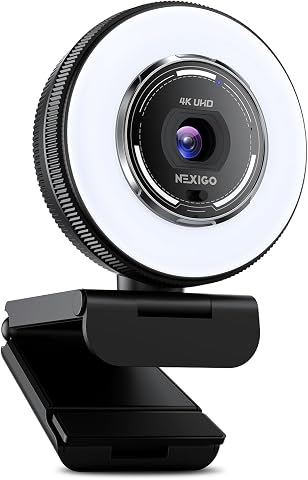
The NexiGo N680E Pro is a high-quality 4K webcam featuring a Sony sensor for sharp video, PDAF autofocus, and a built-in adjustable ring light. It includes dual noise-canceling microphones, a privacy shutter, and broad compatibility with popular conferencing platforms, making it ideal for streaming, gaming, and online meetings.
Pros:
- Ultra-sharp 4K video quality with smooth 1080p 60FPS streaming
- Built-in adjustable ring light for optimal lighting
- Advanced PDAF autofocus for clear focus during movement
- Dual noise-canceling microphones for clear audio
Cons:
- Output resolution depends on camera software settings
- Requires USB-A port; may need adapters for some devices
- Limited details on tripod compatibility
Best for: most shoppers filling this slot
Not ideal for: highly specialized needs
Bottom line: A dependable pick for this checklist slot.
Ergonomic wireless keyboard
Logitech Ergo K860 Wireless Ergonomic Split Keyboard with Wrist Rest

The Logitech Ergo K860 is an ergonomic wireless keyboard designed to promote natural typing posture and reduce muscle strain. It features a split keyframe, cushioned wrist rest, adjustable tilt legs, and quiet, full-size keys for comfortable and precise typing.
Pros:
- Ergonomically designed to reduce wrist and muscle strain
- Comfortable cushioned wrist rest with memory foam
- Adjustable tilt for personalized typing posture
- Wireless connectivity via Bluetooth or USB receiver
Cons:
- May be more expensive than standard keyboards
- Requires batteries or power source for wireless operation
Best for: most shoppers filling this slot
Not ideal for: highly specialized needs
Bottom line: A dependable pick for this checklist slot.
Adjustable laptop stand
STXND Model-X 2.0 Adjustable 360° Rotating Laptop Stand

This foldable aluminum laptop stand adjusts from 1.8 to 10.4 inches and rotates 360° to support ergonomic positioning and screen sharing. It weighs about 1.6 pounds, folds compactly for travel, and includes a velvet pouch and pressure adjuster.
Pros:
- Adjustable height supports ergonomic screen positioning
- 360-degree swivel enables screen sharing
- Foldable and portable with an included travel pouch
- Silicone padding helps prevent scratches
Cons:
- Compatibility is specified for devices from 13 to 17 inches
- Tension may need retuning over time
Best for: most shoppers filling this slot
Not ideal for: highly specialized needs
Bottom line: A dependable pick for this checklist slot.
Portable monitor
VisionOwl Portable Dual 15.6-Inch 1080P FHD Monitor with Foldable Design and VES

The VisionOwl dual-screen monitor features two 15.6-inch IPS displays with 1080p resolution and 107% sRGB color gamut, offering an expansive workspace ideal for multitasking and creative work. It supports quick setup with multiple connectivity options, a durable full-metal build, and flexible viewing modes, making it perfect for mobile professionals.
Pros:
- High-quality 1080p IPS displays with vibrant color reproduction
- Flexible foldable design with adjustable viewing angles
- Multiple connectivity options included for versatile setup
- Durable full-metal construction for professional appearance
Cons:
- Not a continuous waterfall display, limited to extended or mirror modes
- Relatively heavy for portable use at 3.5 pounds
- Requires driver installation for full functionality
Best for: most shoppers filling this slot
Not ideal for: highly specialized needs
Bottom line: A dependable pick for this checklist slot.
For a budget-first buying order, start by identifying the biggest daily obstacle and address that item first: connections, call audio, camera privacy, typing setup, laptop position, or screen space. Before adding another device, check whether your existing computer and accessories already meet the need. For each candidate, verify compatibility and fit using the manufacturer’s current information.
You do not need to assemble a complete setup in one go. Make one considered choice, see how it works with your routine, and update the checklist as your needs become clearer. With a little attention to compatibility and comfort, you can build a remote-work setup that suits the way you actually work.
Fall Picks
fall essentials
As an affiliate, we earn on qualifying purchases.