

Portable external hard drives remain the easiest way to back up a laptop, expand a console, or carry a media library in your pocket — but the category splits sharply between high-capacity workhorses and budget-friendly slim models. The WD 6TB My Passport stands out as my best overall pick for combining the largest capacity in this lineup with password encryption and hardware ransomware protection. The Toshiba Canvio Basics 1TB takes the value crown for plug-and-play simplicity at a low cost, while the Seagate Portable 4TB balances price and storage for console gamers. The main tradeoff you’ll face is capacity versus portability: bigger drives mean more bulk, while ultra-slim options like the UnionSine models sacrifice storage space. Read on for the full breakdown of all 15 drives.

Get the latest gadgets delivered free with Prime
- Fast, free delivery on millions of items
- Prime Video, Amazon Music and more included
- Member-only deals all year
Complete the kit



Key Takeaways
- WD’s My Passport line dominated the top tier because it bundles security features (password encryption, ransomware protection) that the Elements and Seagate drives leave out entirely.
- Capacity per dollar scales steeply in this lineup: the 5TB and 6TB drives cost only modestly more than their 2TB siblings, making the large-capacity picks the smarter long-term buys.
- The budget 500GB drives (UnionSine slim and the generic 500GB console model) only make sense for light backup duty — they fill up fast if you store games, video, or photos.
- Every drive here uses USB 3.0/3.2 Gen 1, so real-world differences come down to bundled software, warranty length, and build quality rather than raw speed.
- Console owners should prioritize the Seagate Portable drives and WD Elements over My Passport, since the extra security software adds friction on PS4 and Xbox setups.
| Toshiba Canvio Basics 1TB Portable External Hard Drive USB 3.0, Black |  | Best for First-Time Buyers | Capacity: 1 TB | Interface: USB 3.0 (backward compatible with USB 2.0) | Form Factor: 2.5 inches | VIEW LATEST PRICE | See Our Full Breakdown |
| WD 4TB Elements Portable External Hard Drive for Windows, USB 3.2 Gen 1/USB 3.0 |  | Best Value for Capacity | Capacity: 4 TB | Interface: USB 3.2 Gen 1 / USB 3.0 | Design: Portable, lightweight 2.5-inch | VIEW LATEST PRICE | See Our Full Breakdown |
| Seagate 2TB Portable Hard Drive USB 3.0 |  | Best Balanced All-Rounder | Capacity: 2 TB | Interface: USB 3.0 | Rotational Speed: 7200 rpm | VIEW LATEST PRICE | See Our Full Breakdown |
| UnionSine 500GB Ultra Slim Portable External Hard Drive HDD-USB 3.0 | 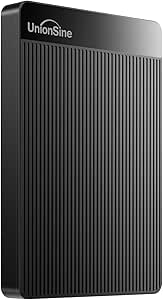 | Best Ultra-Compact Pick | Capacity: 500 GB | Interface: USB 3.0 | Form Factor: 2.5 inches, ultra slim | VIEW LATEST PRICE | See Our Full Breakdown |
| WD 6TB My Passport Portable External Hard Drive |  | Best Premium Security Pick | Capacity: 6 TB | Interface: USB 3.1 / USB 3.0 | Design: Slim, durable portable enclosure | VIEW LATEST PRICE | See Our Full Breakdown |
| WD 4TB My Passport Portable External Hard Drive |  | Best Security Features | Capacity: 4TB | Connectivity: USB 3.1 / USB 3.0 | Color: Black | VIEW LATEST PRICE | See Our Full Breakdown |
| Western Digital 5TB Elements Portable External Hard Drive |  | Best High-Capacity Value | Capacity: 5TB | Interface: USB 3.2 Gen 1 / USB 2.0 | Form Factor: 2.5 inches | VIEW LATEST PRICE | See Our Full Breakdown |
| WD 2TB Elements Portable External Hard Drive |  | Best Lightweight Everyday Drive | Capacity: 2TB | Interface: USB 3.2 Gen 1 / USB 3.0 | Compatibility: Windows, Mac | VIEW LATEST PRICE | See Our Full Breakdown |
| 500 GB External Hard Drive, Portable USB 3.0 Slim HDD |  | Best for Console Gamers and Casual Use | Capacity: 500GB | Interface: USB 3.0 | Form Factor: 2.5 inches, slim | VIEW LATEST PRICE | See Our Full Breakdown |
| WD 5TB My Passport Portable External Hard Drive |  | Best Overall for Secure High Capacity | Capacity: 5TB | Connectivity: USB 3.1 / USB 3.0 | Color: Black | VIEW LATEST PRICE | See Our Full Breakdown |
| WD 6TB Elements Portable External Hard Drive | | Best High-Capacity Budget Pick | Capacity: 6 TB | Interface: USB 3.2 Gen 1 / USB 3.0 | Form Factor: 2.5 inches | VIEW LATEST PRICE | See Our Full Breakdown |
| Seagate Portable 1TB External Hard Drive HDD |  | Best for Gamers and Console Storage | Capacity: 1 TB | Interface: USB 3.0 (backward compatible with USB 2.0) | Rotational Speed: 7200 RPM | VIEW LATEST PRICE | See Our Full Breakdown |
| UnionSine 1TB Ultra Slim Portable External Hard Drive HDD |  | Best Slim Design for Everyday Carry | Capacity: 1 TB | Interface: USB 3.0 | Form Factor: 2.5 inches, ultra slim | VIEW LATEST PRICE | See Our Full Breakdown |
| Seagate Portable 4TB External Hard Drive HDD | | Best Value Sweet Spot | Capacity: 4 TB | Interface: USB 3.0 | Compatibility: Windows and Mac (reformat for Mac) | VIEW LATEST PRICE | See Our Full Breakdown |
| WD 2TB My Passport Portable External Hard Drive |  | Best Security and Backup Features | Capacity: 2 TB | Interface: USB 3.1 / USB 3.0 | Form Factor: 2.5 inches | VIEW LATEST PRICE | See Our Full Breakdown |
| portable external hard drife | Capacity | Interface | Compatibility |
|---|---|---|---|
| Toshiba Canvio Basics 1TB Port | 1 TB | USB 3.0 (backward compatible with USB 2.0) | PC (pre-formatted), Mac (reformat required) |
| WD 4TB Elements Portable Exter | 4 TB | USB 3.2 Gen 1 / USB 3.0 | Windows (pre-formatted), Mac (reformat required) |
| Seagate 2TB Portable Hard Driv | 2 TB | USB 3.0 | Windows, Mac, laptop, PC |
| UnionSine 500GB Ultra Slim Por | 500 GB | USB 3.0 | Desktop, laptop, gaming console, television |
| WD 6TB My Passport Portable Ex | 6 TB | USB 3.1 / USB 3.0 | Windows, Mac |
| WD 4TB My Passport Portable Ex | 4TB | — | — |
| Western Digital 5TB Elements P | 5TB | USB 3.2 Gen 1 / USB 2.0 | — |
| WD 2TB Elements Portable Exter | 2TB | USB 3.2 Gen 1 / USB 3.0 | Windows, Mac |
| 500 GB External Hard Drive | 500GB | USB 3.0 | — |
| WD 5TB My Passport Portable Ex | 5TB | — | — |
| WD 6TB Elements Portable Exter | 6 TB | USB 3.2 Gen 1 / USB 3.0 | Windows, Mac (reformat required for Mac) |
| Seagate Portable 1TB External | 1 TB | USB 3.0 (backward compatible with USB 2.0) | PC, Mac, PlayStation, Xbox |
| UnionSine 1TB Ultra Slim Porta | 1 TB | USB 3.0 | PC, Mac, gaming consoles, TVs |
| Seagate Portable 4TB External | 4 TB | USB 3.0 | Windows and Mac (reformat for Mac) |
| WD 2TB My Passport Portable Ex | 2 TB | USB 3.1 / USB 3.0 | Desktop, laptop, tablet |
More Details on Our Top Picks
Toshiba Canvio Basics 1TB Portable External Hard Drive USB 3.0, Black
For anyone buying their first external drive, the Toshiba Canvio Basics strips away everything that complicates the category. There’s no bundled software, no licensing hurdles — just true plug-and-play storage that works the moment it’s connected. Compared with the Seagate Portable 2TB, the Toshiba gives up half the capacity but wins on simplicity for Windows users, since the Seagate route involves more manual setup if you want automated backups.
The tradeoff is that this is a bare-bones spinner: a 5400 rpm disk means slower sustained transfers than the Seagate’s 7200 rpm, and Mac owners will need to reformat before it’s usable. Still, for a laptop owner who just wants a drag-and-drop overflow drive, this pick makes the most sense for keeping things uncomplicated.
Pros:- Genuine plug-and-play with no software to install or license
- Matte polycarbonate shell resists fingerprints and scratches
- Works on both USB 3.0 and older USB 2.0 ports
- Lightweight 2.5-inch design slips into any bag
Cons:- Ships Windows-formatted, so Mac owners must reformat first
- 5400 rpm rotational speed is slower than 7200 rpm rivals like the Seagate Portable
Best for: Windows laptop owners who want their first external drive with zero setup friction
Not ideal for: Mac users who don’t want to reformat, or anyone moving large video files regularly — the 5400 rpm speed becomes a bottleneck
- Capacity:1 TB
- Interface:USB 3.0 (backward compatible with USB 2.0)
- Form Factor:2.5 inches
- Rotational Speed:5400 rpm
- Data Transfer Rate:Up to 5 Gbps
- Enclosure Material:Polycarbonate
- Compatibility:PC (pre-formatted), Mac (reformat required)
Our verdict“A no-fuss starter drive for Windows users who value simplicity over capacity or speed.”
WD 4TB Elements Portable External Hard Drive for Windows, USB 3.2 Gen 1/USB 3.0
When the math is cost per terabyte, the WD Elements 4TB is the standout in this lineup. Four terabytes in the same physical footprint as the 1TB Toshiba Canvio Basics means you’re quadrupling storage without carrying anything larger — a rare trade that actually favors the buyer.
Compared with the WD My Passport 6TB, the Elements skips the hardware encryption and ransomware protection, which is precisely why it costs less per terabyte. That’s a reasonable sacrifice for media archives and console storage where security features sit unused. The USB 3.2 Gen 1 interface keeps large file moves brisk, though you’ll want a modern port to get full speed. This option stands out for people who need space, not software — anyone wanting automatic encrypted backups should step up to the My Passport instead.
Pros:- 4TB of storage in a compact, lightweight body
- Fast USB 3.2 Gen 1 transfers for large media libraries
- Plug-and-play on Windows with no software overhead
- Better capacity-to-size ratio than smaller rivals
Cons:- No encryption, password protection, or backup software
- Older USB 2.0 ports will throttle transfer speeds dramatically
Best for: Media hoarders and console gamers who want maximum terabytes per dollar without extra software
Not ideal for: Professionals carrying sensitive client data — there’s no encryption or password protection here
- Capacity:4 TB
- Interface:USB 3.2 Gen 1 / USB 3.0
- Design:Portable, lightweight 2.5-inch
- Setup:Plug-and-play
- Compatibility:Windows (pre-formatted), Mac (reformat required)
Our verdict“The smart capacity play for buyers who need lots of space and don’t care about security extras.”
Seagate 2TB Portable Hard Drive USB 3.0
The Seagate Portable 2TB hits the sweet spot most buyers actually live in: enough space for a photo library and a game or two, without paying for terabytes that go unused. Unlike the Toshiba Canvio Basics, it ships ready for both Windows and Mac, which removes the reformatting hassle entirely.
Its 7200 rpm spindle gives it a real edge in sustained transfer speed over the 5400 rpm Toshiba and the UnionSine 500GB, both of which lag noticeably when copying large batches of video. The compromise is the middle-child problem: at 2TB it’s half the capacity of the WD Elements 4TB for similar money-per-useful-space, and there’s no bundled backup software, so you’re managing copies manually. For students and hybrid Windows/Mac households, though, this model is better suited to everyday flexibility than anything else in this batch.
Pros:- Works out of the box with both Windows and Mac
- 7200 rpm speed outpaces 5400 rpm competitors
- Compact, pocketable design for on-the-go use
- Simple plug-and-play USB 3.0 connection
Cons:- 2TB ceiling may not satisfy large media libraries
- No bundled backup software means manual file management
- Plain enclosure offers little drop or impact protection
Best for: Students and mixed Windows/Mac households needing moderate capacity with cross-platform ease
Not ideal for: Archivists with multi-terabyte media collections — 2TB fills up fast, and manual backups get tedious
- Capacity:2 TB
- Interface:USB 3.0
- Rotational Speed:7200 rpm
- Read Speed:Up to 120 MB/s
- Data Transfer Rate:Up to 1 Gbps
- Compatibility:Windows, Mac, laptop, PC
- Setup:Plug-and-play, plug-in installation
Our verdict“The easiest recommendation for buyers who want fair capacity, decent speed, and zero platform friction.”
UnionSine 500GB Ultra Slim Portable External Hard Drive HDD-USB 3.0
If portability is the whole point, the UnionSine 500GB makes a convincing case as the thinnest, lightest option here. Its heat dissipation stripes aren’t just cosmetic — they help the drive sustain its rated 125 MB/s reads during long transfers, where the similarly slim Toshiba Canvio Basics can throttle under sustained load.
The obvious catch is capacity: 500GB is half the Seagate Portable 2TB and an eighth of the WD Elements 4TB, so this is not an archive drive. Where it shines is device versatility — plug-and-play support across PCs, Macs, consoles, and even televisions makes it a handy shuttle drive for moving content between machines. A three-year warranty is longer coverage than most rivals offer at this size. Buyers needing file security should look elsewhere, since there’s no encryption of any kind.
Pros:- Ultra-slim, lightweight body ideal for pockets and travel bags
- 125 MB/s read speeds hold up during sustained transfers
- Heat dissipation stripes support long-term durability
- Works with PCs, Macs, consoles, and TVs without software
Cons:- 500GB capacity is the smallest in this lineup
- 5400 rpm mechanical speed lags far behind any SSD
- No encryption or security features of any kind
Best for: Travelers and console owners who want a featherweight shuttle drive to move files between devices
Not ideal for: Anyone with a growing media library — 500GB fills up quickly, and there’s no encryption for sensitive files
- Capacity:500 GB
- Interface:USB 3.0
- Form Factor:2.5 inches, ultra slim
- Rotational Speed:5400 rpm
- Read Speed:Up to 125 MB/s
- Write Speed:Up to 103 MB/s
- Compatibility:Desktop, laptop, gaming console, television
- Warranty:Three-year manufacturer’s warranty
Our verdict“A pocket-sized transfer tool for device-hopping users, not a primary storage solution.”
WD 6TB My Passport Portable External Hard Drive
The WD My Passport 6TB is where this roundup’s capabilities peak. It’s the only drive in this batch pairing hardware encryption with ransomware protection, which matters if the drive leaves your desk carrying work files or irreplaceable family archives. The WD Elements 4TB offers more terabytes per dollar, but none of the protection — a meaningful difference once a drive starts traveling.
Compared with the Seagate Portable 2TB, the My Passport triples capacity while adding password protection the Seagate simply lacks. The tradeoffs are real, though: the security software requires setup and occasional management, the price per terabyte runs higher than the Elements line, and squeezing 6TB into a portable shell means this is the heaviest-feeling drive of the group. This pick makes the most sense for buyers who treat their external drive as an insurance policy, not just extra space.
Pros:- 6TB is the largest capacity in this lineup
- Hardware encryption and password protection built in
- Ransomware protection guards backed-up files from attack
- Still slim and travel-friendly despite the capacity
Cons:- Higher price per terabyte than the WD Elements line
- Security and backup software adds setup complexity
- Full performance depends on a modern USB 3.1/3.0 port
Best for: Professionals and families who want maximum protected capacity for sensitive or irreplaceable files
Not ideal for: Budget-focused buyers using the drive purely for game storage or media dumps — the security features add cost they won’t use
- Capacity:6 TB
- Interface:USB 3.1 / USB 3.0
- Design:Slim, durable portable enclosure
- Security:Hardware encryption, password protection
- Backup Features:Included backup software with ransomware protection
- Compatibility:Windows, Mac
Our verdict“The choice for buyers who want big capacity wrapped in genuine security rather than raw value.”
WD 4TB My Passport Portable External Hard Drive
Among spinning-drive options in this roundup, the WD 4TB My Passport stands out for its built-in security stack: password protection, hardware encryption, and backup software with ransomware protection. Compared with the WD Elements drives, which ship as bare-bones storage, the My Passport line is the stronger choice for anyone carrying sensitive work files or personal documents between locations. The tradeoff is that you pay a bit of a premium for those features relative to the raw-per-gigabyte value of the Elements lineup, and 4TB sits in the middle of the capacity range — the 5TB My Passport gives you more headroom for a modest bump in size. Formatting out of the box favors Windows, so Mac users will need to reformat before first use.
Pros:- Hardware encryption and password protection secure your data on the road
- Included backup software adds ransomware protection
- Slim, pocketable design despite 4TB of space
- 3-year warranty exceeds the 1-year coverage common in this category
Cons:- Costs more per terabyte than comparable WD Elements models
- Ships formatted for Windows, so Mac users must reformat first
Best for: Professionals and students who travel with sensitive files and want encryption and ransomware protection built in
Not ideal for: Buyers chasing maximum capacity per dollar — the Elements drives deliver more storage for less without the software bundle
- Capacity:4TB
- Connectivity:USB 3.1 / USB 3.0
- Color:Black
- Security:Password protection with hardware encryption
- Software:WD backup software with ransomware protection
- Warranty:3 years
Our verdict“This is the pick for people whose portable drive will hold files they can’t afford to have exposed, not just media archives.”
Western Digital 5TB Elements Portable External Hard Drive
If raw storage per dollar drives your decision, the WD 5TB Elements is hard to beat in this lineup. It matches the capacity of the WD 5TB My Passport while stripping away the encryption and backup software, which keeps costs down — a fair trade if you’re archiving media rather than protecting confidential files. Transfer performance over USB 3.2 Gen 1 is adequate for large photo and video libraries, though it’s noticeably slower than smaller-capacity options like the Seagate Portable 4TB when copying many small files. At 5TB, this is a drive you’ll think of as a portable archive first: fine for carrying between desk setups, less ideal if you want something that disappears into a jacket pocket.
Pros:- 5TB of capacity handles years of photos, video projects, and system backups
- Plug-and-play with both Windows and Mac
- USB 3.2 Gen 1 connectivity for reasonable large-file transfer times
- Lower cost per terabyte than feature-loaded rivals
Cons:- No bundled backup software or security features
- Physically larger and heavier than 1–2TB portable drives
Best for: Photographers and video creators who need to carry or back up multi-terabyte media libraries on a budget
Not ideal for: Anyone transporting sensitive data — there’s no encryption or password protection here, unlike the My Passport line
- Capacity:5TB
- Interface:USB 3.2 Gen 1 / USB 2.0
- Form Factor:2.5 inches
- Compatible Devices:Desktop, laptop, tablet (Windows and Mac)
- Color:Black
- Warranty:30-day return guarantee
Our verdict“The smart choice when your priority is fitting the most storage into a portable drive without paying for software you won’t use.”
WD 2TB Elements Portable External Hard Drive
The WD 2TB Elements hits a sweet spot that the bigger drives in this roundup miss: enough space for real work, small enough to genuinely forget you’re carrying it. Compared with the Seagate 2TB Portable, it matches capacity with the same plug-and-play simplicity over USB 3.2 Gen 1, and WD’s Elements line has a long track record of reliability in budget storage. What you give up versus the WD 2TB My Passport is the security layer — no password protection or backup utilities — so this model makes the most sense for general-purpose storage like media libraries, class notes, or a secondary backup, rather than encrypted vaults. Two terabytes also fills up fast if you shoot video, so heavy media creators should size up.
Pros:- Genuinely compact and lightweight for true pocket portability
- Plug-and-play setup with no software installation required
- USB 3.2 Gen 1 speeds handle everyday file transfers comfortably
- Works with both Windows and Mac after standard formatting
Cons:- No password protection or backup software included
- Capacity ceiling of 2TB limits long-term media storage
Best for: Students and everyday users who want a dependable, no-frills drive for documents, photos, and a laptop backup
Not ideal for: Video editors or anyone working with 4K footage — 2TB fills quickly and there’s no included backup software
- Capacity:2TB
- Interface:USB 3.2 Gen 1 / USB 3.0
- Compatibility:Windows, Mac
- Design:Portable, lightweight 2.5-inch form factor
- Setup:Plug-and-play, no external power required
Our verdict“A dependable, featherweight workhorse for people who want storage that just works and travels unnoticed.”
500 GB External Hard Drive, Portable USB 3.0 Slim HDD
Half a terabyte feels modest next to the multi-terabyte WD drives here, but this 500GB slim HDD carves out a clear niche: console storage expansion and casual portable backup. Unlike the UnionSine 500GB, which targets the same budget tier, this model advertises solid real-world transfer speeds (around 133 MB/s read), which matters when moving game installs and large video files. It works with PS4 and Xbox as an archive drive for older titles, though current-generation games run poorly from any 5400rpm spinning disk — serious gamers should treat this as overflow storage, not a game library. Compared with the Seagate Portable 1TB, you’re getting less space but a smaller, lighter footprint for basic on-the-go needs.
Pros:- USB 3.0 transfer speeds that keep pace with larger mainstream drives
- Works across PC, Mac, PS4, and Xbox for flexible use
- Extremely slim and light for effortless portability
- Simple plug-and-play setup with no drivers needed
Cons:- 500GB fills quickly by modern standards
- Not suitable for running current-generation games directly
- Requires reformatting for Mac use
Best for: Console gamers needing archive space for older titles and casual users wanting an inexpensive, pocket-sized backup drive
Not ideal for: Anyone storing a modern game library or large media collection — 500GB disappears fast, and current-gen games won’t run well from it
- Capacity:500GB
- Interface:USB 3.0
- Form Factor:2.5 inches, slim
- Rotational Speed:5400 rpm
- Read Speed:133 MB/s
- Write Speed:103 MB/s
- Compatible Devices:Windows PC, Mac, PS4, Xbox
- Warranty:1 year
Our verdict“A sensible budget pick for light storage duties and console overflow, as long as you accept the tight capacity.”
WD 5TB My Passport Portable External Hard Drive
This is the drive I’d point most storage-hungry buyers toward, because it combines the two things the rest of the lineup makes you choose between: serious capacity and serious security. The WD 5TB My Passport matches the 5TB Elements model on storage while adding hardware encryption, password protection, and ransomware-aware backup software — the same feature set that makes the smaller 4TB My Passport appealing, but with an extra terabyte of headroom for growing photo and video libraries. The tradeoffs are real: it’s one of the heftier pocket drives here, only supports USB 3.1/3.0 rather than newer standards, and sits at the premium end of the spinning-drive price band. If your data is replaceable media, the Elements 5TB saves money; if it isn’t, this is the safer bet.
Pros:- 5TB capacity plus hardware encryption in one portable package
- Backup software with ransomware protection included
- Password security guards the drive if it’s lost or stolen
- 3-year warranty provides long-term peace of mind
Cons:- Premium pricing over equal-capacity Elements drives
- USB 3.1/3.0 only — no support for newer interface standards
- Bulkier than 1–2TB portable drives
Best for: Content creators and professionals who need 5TB of genuinely portable storage with encryption protecting it
Not ideal for: Buyers who only need simple media overflow storage — the WD 5TB Elements delivers the same capacity more cheaply
- Capacity:5TB
- Connectivity:USB 3.1 / USB 3.0
- Color:Black
- Security:Password protection with hardware encryption
- Software:WD backup software with ransomware protection
- Warranty:3 years
Our verdict“The best blend of capacity, security, and portability in this batch — worth it if the files you carry matter more than the price difference.”
WD 6TB Elements Portable External Hard Drive
Capacity is the whole story here, and the WD 6TB Elements delivers more storage per dollar than anything else in this lineup. Compared with the Seagate Portable 4TB, it adds two extra terabytes in essentially the same 2.5-inch chassis, which matters if your photo and video library keeps outgrowing smaller drives. The USB 3.2 Gen 1 interface keeps transfers moving at typical spinning-drive speeds, and plug-and-play setup works across Windows and Mac after a simple reformat. The tradeoffs are real, though: the plastic enclosure feels less rugged than premium alternatives, and there’s no bundled backup software or security of any kind — unlike the WD My Passport, which includes encryption and ransomware protection. This model is a raw capacity play, pure and simple.
Pros:- Massive 6TB capacity in a 2.5-inch portable form factor
- Fast USB 3.2 Gen 1 transfers for a spinning drive
- Plug-and-play with both Windows and Mac
- Higher capacity than similarly sized drives in this roundup
Cons:- Plastic enclosure feels less durable than ruggedized competitors
- No included backup software
- No encryption or password protection features
Best for: Media hoarders and photographers who need maximum storage for backups and don’t care about security extras
Not ideal for: Anyone carrying sensitive client or business files, since there’s no encryption or password protection
- Capacity:6 TB
- Interface:USB 3.2 Gen 1 / USB 3.0
- Form Factor:2.5 inches
- Compatibility:Windows, Mac (reformat required for Mac)
- Enclosure:Plastic
- Color:Black
Our verdict“If raw storage space is the priority and security features are not, this is the most capacity you can carry in a pocket-sized drive.”
Seagate Portable 1TB External Hard Drive HDD
What separates the Seagate Portable 1TB from the crowd is console compatibility — it works out of the box with PlayStation and Xbox alongside PCs and Macs, which most drives in this roundup only claim indirectly. It’s a straightforward plug-and-play experience with no software to install, and Seagate bundles a 1-year rescue service for data recovery, a safety net the UnionSine 1TB and Toshiba Canvio Basics don’t match. The 1TB capacity fills up fast if you install modern games, which can exceed 100GB each, so serious game libraries will want the Seagate Portable 4TB instead. Mac users should also expect a reformat before first use, and there’s no encryption or backup software included. For expanding a console or adding quick laptop storage, it nails the basics without fuss.
Pros:- Works with PlayStation and Xbox as well as PC and Mac
- Plug-and-play with no software installation
- Includes 1-year rescue data recovery service
- Light 190g build that travels easily
Cons:- 1TB capacity is small by current standards
- Requires reformatting for Mac use
- No backup software or encryption included
Best for: Console gamers and casual users who want quick, no-frills extra storage without installing software
Not ideal for: Gamers with large libraries or video creators, since 1TB fills up quickly with modern titles
- Capacity:1 TB
- Interface:USB 3.0 (backward compatible with USB 2.0)
- Rotational Speed:7200 RPM
- Read Speed:Up to 120 MB/s
- Compatibility:PC, Mac, PlayStation, Xbox
- Weight:190 g
- Dimensions:4.61 x 3.15 x 0.58 inches
Our verdict“The easiest plug-and-play storage upgrade for console gamers, provided 1TB covers your game count.”
UnionSine 1TB Ultra Slim Portable External Hard Drive HDD
Among the 1TB options here, the UnionSine Ultra Slim is the one designed for pockets rather than desks. Its thin profile and heat dissipation strips help it run cooler and quieter during long transfers — a genuine comfort advantage over the thicker Seagate Portable 1TB when the drive sits on a laptop’s palm rest. The JMicron 578 controller delivers transfer speeds up to 125MB/s, marginally quicker in practice than most budget rivals, and it plugs into consoles, TVs, and computers without any software. The compromises are typical of value brands: a 5400 RPM drive means slower random access than the Seagate’s faster spindle, and there’s no encryption, backup suite, or rescue service if something goes wrong. The three-year warranty partially offsets the brand-risk question.
Pros:- Ultra-slim chassis that fits in a shirt pocket
- Heat dissipation strips keep it cool during extended use
- Up to 125MB/s transfer speeds over USB 3.0
- Three-year warranty, longer than the Seagate Portable’s coverage
Cons:- 5400 RPM spindle is slower for random access than 7200 RPM rivals
- No encryption or backup software
- Less established brand with no data recovery service
Best for: Students and commuters who want the thinnest possible drive for carrying files between devices daily
Not ideal for: Buyers who prioritize brand pedigree and bundled support, since UnionSine lacks the recovery services of WD or Seagate
- Capacity:1 TB
- Interface:USB 3.0
- Form Factor:2.5 inches, ultra slim
- Rotational Speed:5400 RPM
- Transfer Speed:Up to 125 MB/s
- Compatibility:PC, Mac, gaming consoles, TVs
- Warranty:3 years
Our verdict“The pick for anyone who values a genuinely slim drive for daily carry and is comfortable skipping bundled software and support.”
Seagate Portable 4TB External Hard Drive HDD
If the 6TB WD Elements is the capacity king, the Seagate Portable 4TB is the smarter middle ground for most buyers. It doubles the storage of the 1TB Seagate for a modest step up, holds roughly 40 modern games or years of photo archives, and keeps the same plug-and-play USB 3.0 simplicity with the included 18-inch cable — a small detail that cheaper drives often skip. Compared with the WD 4TB Elements, it offers comparable capacity and speed, but the included rescue service tips the balance for anyone worried about drive failure. The weaknesses mirror its siblings: no backup software, no security features, and Mac users must reformat before use. It’s the drive I’d point most people toward when they simply need dependable space without paying for extras they won’t use.
Pros:- 4TB capacity suits game libraries and large media archives
- Includes an 18-inch USB 3.0 cable
- Plug-and-play for Windows with Mac reformat support
- 1-year rescue data recovery service included
Cons:- No bundled backup software
- USB 3.0 only, no newer interface
- Formatting required before Mac use
Best for: General users who want a dependable balance of capacity, portability, and price without extra software clutter
Not ideal for: Security-conscious professionals, since it offers no encryption or password protection
- Capacity:4 TB
- Interface:USB 3.0
- Compatibility:Windows and Mac (reformat for Mac)
- Included Cable:18-inch USB 3.0
- Setup:Plug-and-play
- Rescue Service:1 year included
Our verdict“The balanced pick for most buyers — enough space for real libraries, dependable hardware, and no fluff.”
WD 2TB My Passport Portable External Hard Drive
The WD My Passport 2TB is the only drive in this batch that treats your data as something worth protecting. Its 256-bit hardware encryption and password protection mean a lost drive doesn’t become a data breach, and bundled backup software with ransomware protection adds a layer none of the Elements, Seagate Portable, or UnionSine options provide. Compared with the WD 2TB Elements, you trade a bare-bones drive for a full security suite at similar capacity. The three-year warranty also outlasts Seagate’s one-year coverage. Tradeoffs exist: 2TB sits in an awkward middle for heavy media users, the backup software must be downloaded and installed rather than living on the drive, and spinning-drive speeds mean large backups take patience. For professionals carrying work files, though, those features justify the pick outright.
Pros:- Hardware encryption and password protection built in
- Includes backup software with ransomware protection
- Three-year warranty outlasts Seagate’s coverage
- Compact 2.5-inch design travels easily
Cons:- 2TB capacity is modest for large media libraries
- Backup software requires download and installation
- Spinning-drive speeds make large backups slow
Best for: Professionals and students carrying sensitive documents who need encryption and automatic backups on the go
Not ideal for: Media creators needing 4TB or more, who should step up to the Seagate 4TB or WD 6TB Elements instead
- Capacity:2 TB
- Interface:USB 3.1 / USB 3.0
- Form Factor:2.5 inches
- Hardware Encryption:Yes, with password protection
- Included Software:WD backup software with ransomware protection
- Compatibility:Desktop, laptop, tablet
- Warranty:3 years
Our verdict“The clear choice when data protection matters more than maximum capacity, thanks to encryption and ransomware defenses the rest of this lineup lacks.”

How We Picked
I evaluated each drive against four buyer-facing criteria: capacity flexibility, ease of use across platforms, build and reliability reputation, and software and security value. Because all 15 drives share the same USB 3.0-class interface, the ranking was driven less by speed claims and more by what you get alongside the storage — bundled backup utilities, encryption, rescue services, and how gracefully each drive works between Windows, Mac, and consoles without reformatting headaches.
The ordering also reflects who each drive serves best rather than a single scoreboard. WD’s My Passport models earned the highest placements for combining large capacities with security features, Elements models ranked as strong mid-tier values for people who don’t need encryption, and the budget slim drives filled the entry-level niche where low cost and pocketability matter more than storage headroom.
| portable external hard drife | Interface |
|---|---|
| Toshiba Canvio Basics 1TB Port | USB 3.0 (backward compatible with USB 2.0) |
| WD 4TB Elements Portable Exter | USB 3.2 Gen 1 / USB 3.0 |
| Seagate 2TB Portable Hard Driv | USB 3.0 |
| UnionSine 500GB Ultra Slim Por | USB 3.0 |
| WD 6TB My Passport Portable Ex | USB 3.1 / USB 3.0 |
| WD 4TB My Passport Portable Ex | — |
| Western Digital 5TB Elements P | USB 3.2 Gen 1 / USB 2.0 |
| WD 2TB Elements Portable Exter | USB 3.2 Gen 1 / USB 3.0 |
| 500 GB External Hard Drive | USB 3.0 |
| WD 5TB My Passport Portable Ex | — |
| WD 6TB Elements Portable Exter | USB 3.2 Gen 1 / USB 3.0 |
| Seagate Portable 1TB External | USB 3.0 (backward compatible with USB 2.0) |
| UnionSine 1TB Ultra Slim Porta | USB 3.0 |
| Seagate Portable 4TB External | USB 3.0 |
| WD 2TB My Passport Portable Ex | USB 3.1 / USB 3.0 |
Factors to Consider When Choosing Portable External Hard Drives
Before settling on a specific model, it helps to understand the broader patterns in this category — where the real costs hide, which specs are marketing noise, and how your intended use should shape the decision.Capacity: Buy More Than You Think You Need
The most common mistake buyers make is purchasing exactly the capacity they need today. A photo library, game install, or video project grows faster than most people expect, and upgrading later means buying a second drive instead of growing into one. In this lineup, the jump from 2TB to 5TB or 6TB typically costs far less than double, which makes the larger drives the better long-term value. If you’re backing up a whole computer, treat 4TB as the practical floor. Reserve 500GB and 1TB drives for single-purpose roles like offloading documents or expanding a console that already has internal storage.
Software and Security: The Hidden Differentiator
Nearly all portable drives at this price point use similar spinning-disk internals, so the bundled software is often what actually separates them. WD’s My Passport line ships with password encryption and ransomware protection — features that matter if the drive leaves your desk regularly and could be lost in transit. Elements and Seagate Portable drives skip these extras, which keeps them simpler but leaves your files readable by anyone who picks up the drive. Ask yourself honestly whether you’d use encryption if it were offered; if the answer is no, don’t pay a premium for it. If the drive will carry tax documents, client work, or personal photos, hardware encryption is worth prioritizing over raw capacity.
Platform Compatibility: Reformatting Is the Real Cost
Most of these drives arrive formatted for Windows, which means Mac users face an immediate reformat — and sometimes reduced flexibility if the drive needs to move between systems later. Console owners have a separate wrinkle: PS4 and Xbox both accept these drives, but the console will typically insist on dedicating the drive to its own format, wiping anything already stored. Buyers who plan to share a drive between a PC and a console should buy separate drives rather than one shared unit. If cross-platform flexibility is the goal, a drive that works cleanly on both Windows and Mac out of the box, like the 5TB Elements, saves real setup friction.
Physical Size and Durability
Spinning-disk portables all follow similar rules: they’re pocketable but not rugged. The ultra-slim models like the UnionSine drives trade away capacity for a thinner profile that disappears into a laptop bag, but none of these drives are built for drops the way SSDs are. If your drive will live a bumpy life — commuting daily, riding in a camera bag — a padded case matters more than brand choice. Also note that higher-capacity drives in the same family are often slightly heavier and thicker; the 6TB models won’t feel like the 1TB ones. For stationary desk backup with occasional moves, this factor barely matters, and you should prioritize capacity instead.
Speed Expectations: Don’t Overpay for USB Marketing
Every drive in this roundup uses USB 3.0 or USB 3.2 Gen 1 — which are electrically identical — and all are bottlenecked by their spinning platters long before the interface becomes the limit. Real-world transfers land in the same ballpark regardless of brand, so don’t let USB version numbers sway your decision between models here. What does affect perceived speed is drive capacity class: larger drives often pack higher-density platters that sustain transfer rates better when half full. If you regularly move huge video files and speed genuinely matters, the honest answer is that a portable SSD is the right category — these HDDs are built for affordable capacity, not velocity.
Frequently Asked Questions
Is a 5TB or 6TB portable drive overkill for everyday backups?
For most people, no — capacity headroom is the cheapest insurance in storage. A full system backup of a typical laptop, plus a photo and video library, can easily consume 2TB within a couple of years, and drives perform best when they aren’t filled to the brim. The 5TB and 6TB options in this lineup, like the WD My Passport and Elements models, typically cost only a modest amount more than their 2TB siblings, so the price-per-terabyte math strongly favors going bigger. The only buyers who should skip them are those with a clearly defined small workload, such as storing only documents or a single console’s save data. If you’re unsure, err toward the larger capacity — regret almost never goes the other direction.
Do these hard drives work with PS4, PS5, and Xbox consoles?
Yes, all of the drives here connect via standard USB and are recognized by current and last-generation consoles, but with a catch worth knowing. When a console formats the drive for game storage, it typically claims the entire drive for itself, erasing anything already on it. That means you can’t use one drive as both your PC backup and your game expansion — plan on dedicating it. The Seagate Portable models and WD Elements are particularly popular console choices because they skip unnecessary bundled software that adds setup friction. Also remember that PS5 games must run from internal or NVMe storage; external spinning drives store PS5 titles but play PS4 games directly.
What’s the actual difference between WD Elements and WD My Passport?
The hardware platform is similar — the real gap is software and security. My Passport drives ship with WD’s backup utility plus password encryption and ransomware protection, which protects your files if the drive is lost or stolen. Elements drives are the no-frills versions: same reliable spinning storage, formatted for Windows, without the security layer or backup software. That makes Elements the sensible choice when the drive stays at home or stores non-sensitive media, while My Passport earns its premium for travelers and anyone carrying personal or professional data. Both lines are available in overlapping capacities, so the decision genuinely comes down to whether you’ll use the security features rather than performance.
Are the cheap 500GB and 1TB slim drives worth buying?
They’re worth it only when the job is small and well defined. A 500GB drive like the UnionSine slim or the generic console model handles document backups, a music library, or a modest photo archive without trouble, and their thin profiles genuinely suit travel. The problem is that modern game installs alone can exceed 100GB each, and phone video chews through storage quickly — these drives fill up fast, and a full drive you have to manage defeats the convenience that drew you to it. My guidance: buy the small slim drives only as second, task-specific drives. If this will be your primary or only backup, step up to at least 2TB so you’re not shopping again in a year.
How long do portable hard drives last, and how should I use one safely?
A well-treated portable hard drive commonly lasts three to five years of regular use, though failure is always a possibility with any spinning-disk storage. Because these drives contain mechanical parts, they’re vulnerable to drops and vibration while running — so set the drive on a stable surface during transfers and carry it in a padded pocket or case. The single most important habit is understanding that an external drive is a backup, not an archive: keep at least two copies of anything irreplaceable, ideally one off-site or in cloud storage. Also avoid the trap of deleting files from your computer after moving them to the drive, which converts your backup into your only copy. Treated this way, even the budget models in this lineup serve reliably for years.
Conclusion
After comparing all 15 drives, the right choice depends less on brand loyalty and more on how you plan to use the storage. For best overall, the WD 6TB My Passport pairs the lineup’s largest capacity with password encryption and ransomware protection, making it the most complete package for serious backups. The WD 6TB Elements earns best value for delivering nearly the same capacity without paying for software you may not use. For beginners and light users, the Toshiba Canvio Basics 1TB and Seagate Portable 1TB offer true plug-and-play simplicity with nothing to configure or learn.
For specific needs: console gamers get the most from the Seagate Portable 4TB with its rescue service and console-friendly setup; travelers and minimalists will appreciate the UnionSine ultra-slim drives, accepting the capacity tradeoff in exchange for a pocket-thin profile; and buyers who want a middle path between capacity and cost should look at the WD 5TB Elements, which handles Windows and Mac interchangeably. Whatever you pick, buy more capacity than you currently need — in this category, storage regret only ever runs in one direction.
Halloween Picks
halloween
As an affiliate, we earn on qualifying purchases.