
TL;DR
Smart home device gifts let recipients automate, monitor, or control parts of their home, from lighting to heating and security. Choose a device that solves a specific everyday problem, works with the recipient’s platform and home, and has manageable setup, privacy, and ongoing costs. A compatible smart plug or bulb is often an easier first gift than a camera, lock, or thermostat.
A smart plug that turns on a reading lamp at sunset can feel like a small bit of magic. A smart camera that needs a subscription, a new account, and an afternoon of troubleshooting can feel like homework wrapped in gift paper. The difference is rarely the number of features; it’s whether the device fits the person’s home and solves something they actually do every day.

Get the latest gadgets delivered free with Prime
- Fast, free delivery on millions of items
- Prime Video, Amazon Music and more included
- Member-only deals all year
Smart home device gifts let recipients automate, monitor, or control parts of their home, including lights, heating, entertainment, and security. This guide will help you match a gift to a real need, check platform and network compatibility, and spot the costs and privacy tradeoffs that can hide behind a glossy product page.
You’ll also find practical ways to make a gift easier to set up and use. Think of it like buying shoes: the clever design matters less if the fit is wrong.
Choose a device to solve one recurring task, such as scheduling a lamp or making a hallway easier to light.
Check compatibility for the exact model, including the recipient’s platform, Wi-Fi requirements, and any hub or Thread border router.
Compare the purchase price with subscriptions, setup demands, maintenance, and replacement parts.
For cameras, speakers, and locks, check privacy controls and make account security part of the setup.
Keep physical or app controls available, and consider the needs of renters and everyone sharing the home.
Pick a Gift That Fixes One Everyday Annoyance
Smart home device gifts work best when they solve a specific recurring problem, such as reaching a lamp switch from bed or remembering to turn off a hallway light. A smart device can automate, monitor, or control a home feature, but it only earns its place if the recipient wants that help. Start with a habit you’ve seen, not a feature list.
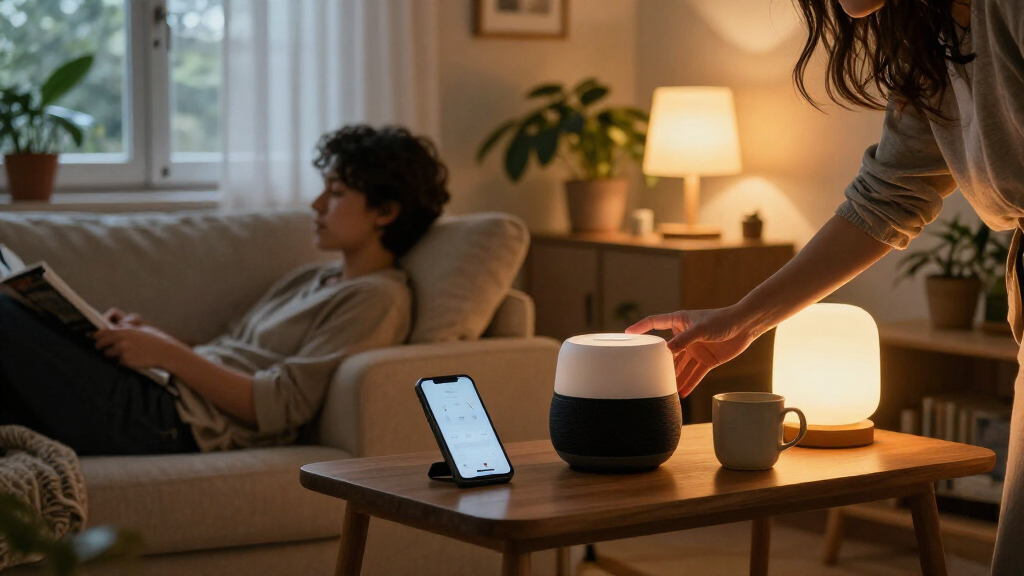
Imagine your brother always leaves the porch light on through the bright morning. A smart bulb or compatible lighting control could schedule it to switch off at sunrise, giving him a simple fix he can see right away. For a friend who likes to read on the sofa, a smart plug could turn a compatible lamp on with a schedule or app tap. In both cases, the gift follows an existing routine instead of asking them to invent a new one.
That distinction matters because a device adds steps as well as options. Many products need a phone app, account, Wi-Fi connection, and sometimes a hub or bridge. If your recipient dislikes tinkering, the simplest useful device may be a better gift than a feature-packed gadget that needs careful setup.
Use this quick check before you buy:
- Name the task: What repeated chore, inconvenience, or access need would the device address?
- Match the control: Would the recipient rather use a button, an app, a voice command, or an automatic schedule?
- Check the home: Consider renting, shared spaces, pets, and whether installing or replacing hardware is practical.
- Count the ongoing costs: Include subscriptions, replacement parts, and any required hub in the real price.
A gift should make the familiar feel easier. If you can’t name a clear job for the device, you may be buying a gadget in search of a problem.
Popular right now

Vitamix 5200 Blender with 64 oz Container, Black

Roborock Q7 M5+ Robot Vacuum and Mop with Self-Emptying Dock

Dyson Airwrap Co-anda2x Multi-Styler and Dryer (2026 Model)
As an affiliate, we earn on qualifying purchases.
Match the Device to the Recipient’s Existing Setup
Before choosing a smart home device gift, check the recipient’s existing platform, Wi-Fi, and hardware. Alexa, Apple Home, Google Home, and other systems do not offer identical support for every product or feature. A product listing may say “works with” a platform while still reserving certain settings for its own app.
For instance, your cousin might already use Apple Home to control lights from an iPhone. A bulb that supports the platform they use can fit into their existing routines; a different bulb that needs an unfamiliar app and a separate account may feel like another chore. Check the exact model rather than relying on a brand name, since compatibility can vary by model, feature, region, and software version.
Matter is a shared standard intended to improve compatibility among supported smart home products and platforms. It helps, but it does not promise that every feature will work everywhere. Some brand-specific functions may still need the manufacturer’s app, and a device using Thread may require a Thread border router to connect to the home network. Requirements vary by product and platform.
Network details can trip up a gift that looks simple. Some products connect directly to Wi-Fi, while others need a hub or bridge; some devices require a 2.4 GHz network or particular router settings. A camera placed at the back door may also need a reliable signal there, not just beside the router in the living room. Review the setup requirements before you wrap the box.
Check the exact model’s compatibility and setup requirements. Shared standards can help devices work together, but they don’t erase every difference between platforms.
This small check can save the recipient from opening a box only to find that their home needs another piece of equipment.
Compare Easy Starters With Higher-Commitment Gifts
The easiest smart home device gifts usually control something the recipient already owns, while cameras, locks, and thermostats ask more of the home. That tradeoff affects setup effort, privacy, and cost. A smart plug might take minutes to add for a compatible lamp; a thermostat or lock can involve wiring, door measurements, permission, and careful installation.
Say your friend has just moved into a rental apartment. A smart bulb may be a manageable way to schedule warm evening light, provided it matches the fitting and their preferred controls. A new thermostat could be a much riskier surprise: their HVAC system may not support it, and their lease may limit changes. A retrofit smart lock may preserve existing exterior hardware, but door fit and building rules still matter.
| Gift type | Good fit | Check before buying |
|---|---|---|
| Smart plug | Scheduling a compatible lamp or small appliance | Wi-Fi, app requirements, and appliance suitability |
| Smart bulb or lighting control | Dimming or setting light schedules | Bulb fitting, dimmer compatibility, and preferred wall controls |
| Speaker or display | Music, timers, calls, or voice control | Microphone preferences and platform compatibility |
| Camera or video doorbell | Remote viewing and alerts | Recording options, placement, subscriptions, and privacy preferences |
| Lock or thermostat | Access routines or heating automation | Door or HVAC compatibility, installation, permission, and backup access |
Even a smart plug has limits: it does not make every appliance suitable for remote switching. Follow the device’s and appliance’s instructions, especially when an appliance heats, moves, or needs someone present. For a recipient who enjoys a physical switch, choose a setup that keeps one available. The best fit is the device they’ll be comfortable using after the novelty wears off.
Check Privacy and Subscription Costs Before You Gift
For smart home device gifts with cameras, microphones, locks, or sensors, check what data the device collects and which features cost extra. A low sticker price can hide a monthly plan for cloud video storage or extended recording history. Read the current product and plan details before buying, because features and prices can change.
Consider a video doorbell for a neighbor who gets frequent deliveries. They may appreciate an alert when a parcel arrives, but they may not want recordings stored in the cloud or a recurring bill to keep old clips. Some features may work without a subscription, while others—such as longer video history or advanced alerts—may be paid. Make sure the gift makes sense with the features available at the price you’re willing to cover.
Privacy preferences differ from household to household. A smart speaker can make timers and music effortless, yet its microphone may bother someone who prefers a physical control. A camera pointed at a shared entrance can affect housemates and visitors, not just the person who owns the device. Look for clear privacy controls, information about storage, and options such as local recording where available.
Good account habits help, too. Encourage the recipient to use a strong, unique password, turn on multifactor authentication when available, review app permissions, and install firmware updates. Security depends on the product and its configuration, so a gift should include enough information for the recipient to make their own choices.
One thoughtful option is to include a card listing any known subscription requirement and the device’s key privacy settings. That makes the ongoing commitment clear before the first alert appears on their phone.
Make Setup Feel Like Part of the Gift
A smart home device gift feels easier when you prepare for setup and support as carefully as you choose the product. Some gifts need an app, account, compatible phone, network access, or hub before they work. If you know the recipient’s platform, you can check those needs ahead of time and avoid a box that leaves them hunting for passwords on a busy evening.
For example, a parent might love a smart bulb that turns on a soft amber hallway light at bedtime, but dislike pairing devices and configuring schedules. You could give the bulb with a note offering to help them set it up, while letting them create their own account and choose the permissions. That’s more respectful and useful than preconfiguring a connected device under your own account.
Keep the first routine simple. A single lamp that turns on at a set time is easy to understand; a chain of sensors, voice commands, and exceptions can be confusing before the recipient knows what each part does. Many newer products support routines based on schedules, sensors, presence, or other device states. Claims about AI-powered features vary, so focus on what the device actually does and whether that behavior helps your recipient.
Longevity matters after installation. Check for clear support policies, replacement parts where relevant, and a track record of app and firmware updates. A robot vacuum that needs a new brush or filter should have parts the recipient can find; a device that loses app support may become a useless plastic puck. A smart gift should earn its shelf space over time.
Offer help as an invitation, not an obligation. The best setup leaves the recipient with a control they understand, a routine they can change, and a way to use the device if the internet or voice assistant is unavailable.
Choose a Gift That Fits the Whole Household
A smart home gift is a better fit when it works for everyone who shares the space, including renters, housemates, children, and pets. An app or voice command can make a task easier, but it should not remove the controls people already rely on. Think about who will install it, who can access it, and what happens when the network drops.
For a relative with limited mobility, a voice-controlled light or remote switch may reduce the need to cross a dark room. But voice control should not be the only option: a wall switch, app, or physical button gives them another way to act. For a household with a curious cat, a robot vacuum could save time, though mapping features and maintenance deserve a look. Hair wrapped around a roller is a much less charming surprise than a clean floor.
Energy products also call for realistic expectations. A smart thermostat, plug, or energy monitor can help someone manage schedules or see usage, but any bill savings depend on the home, usage, utility rates, and configuration. A household that already keeps the heat low may see little change, while someone who often forgets to adjust a schedule might find automation useful. Avoid treating a potential saving as a guaranteed return.
Internet outages reveal another household-fit question: what still works locally? Some functions may continue on the home network, while remote access, cloud features, or voice assistants may stop. The answer varies by product. If the gift controls something important, such as entry or heating, check how the household can use it when a service is unavailable.
A small conversation can prevent a mismatch. Ask whether the recipient wants app control, voice control, or a physical button—and whether they’re comfortable adding a connected device to shared space. That one answer can narrow the choices quickly.
Frequently Asked Questions
Will a smart home device work with Alexa, Apple Home, or Google Home?
Check the exact model’s compatibility list for the platform the recipient uses. Support can vary by feature, region, and software version, so a brand name alone may not tell you whether the gift will fit.
What is Matter, and does it make every device work together?
Matter is a shared smart home standard intended to improve interoperability among supported devices and platforms. Both the device and controller need compatible support, and some brand-specific features may still require the maker’s app.
Do smart home devices need a hub?
Some devices connect directly to Wi-Fi; others need a hub, bridge, or Thread border router. Check the setup requirements for the exact model before gifting it, and check network requirements such as 2.4 GHz Wi-Fi when listed.
What is a good smart home gift for someone who is not very technical?
A compatible smart plug, bulb, or simple sensor can be a low-complexity place to start, as long as it serves a clear need. Check whether it requires an app, a new account, or help connecting to the home network, and offer setup support if welcome.
Do smart cameras and doorbells need a subscription?
Some features may work without a paid plan, while cloud recording, longer video history, or advanced alerts may require one. Check the current plan details for the exact model and account for that cost when choosing the gift.
Are smart home devices private and secure?
Privacy and security depend on the product and how it is configured. Review data storage and privacy controls, use a strong unique password and multifactor authentication where available, check permissions, and install updates.
Conclusion
Choose the device that makes one familiar task easier in the recipient’s actual home. Check the exact model’s compatibility, setup, privacy, and ongoing costs before you buy, then offer help if pairing or routines might be a hurdle.
A good smart home gift doesn’t demand attention. It quietly turns on the lamp, answers the doorbell, or makes a daily routine feel lighter—then lets the person get on with their evening.