
🔍 Read the full analysis: 10 Best 3D Printers For Multicolor Printing, From Models To Household Projects In 2027 on ThorstenMeyerAI.com

Get the latest gadgets delivered free with Prime
- Fast, free delivery on millions of items
- Prime Video, Amazon Music and more included
- Member-only deals all year
TL;DR
This buyer’s guide compares 10 printers for multicolor printing and household projects, with the Bambu Lab P2S Combo ranked as its broadest all-around package. The recommendations are based on design and stated features, not independent testing results; buyers should weigh enclosure, material handling, setup, and potential filament waste against their needs.
ThorstenMeyerAI.com has published a comparison of 10 3D printers aimed at multicolor printing, models, and household projects, ranking the Bambu Lab P2S Combo as its top all-around pick. The guide contrasts bundled filament-handling systems with other approaches, including the Snapmaker U1’s four-toolhead design, and advises buyers to match features to their materials, workspace, and project habits.
The guide recommends the P2S Combo for buyers seeking an enclosed printer bundled with a multicolor material system. It places the Bambu Lab A1 Combo among more approachable options for hobbyists, while distinguishing the standalone P1S from the P1S Combo: the former offers an enclosed printer without bundled multicolor hardware, and the latter adds an AMS package. Buyers comparing machines for a home workshop can also consult this home workshop 3D printer guide.
Its 10-model lineup also includes the Snapmaker U1, Adventurer 5M, Kobra X, AD5X, and K2 Combo. The source characterizes the Adventurer 5M as speed-focused and the U1 as a four-toolhead alternative to systems that switch between filaments. It does not provide a complete specification table, test results, prices, or model-by-model performance measurements in the supplied material.
The ranking says it considers print-system design, material handling, enclosure, setup, maintenance, and versatility, with added attention to whether multicolor hardware comes in the package. The source says the P2S Combo ranks first for general-purpose usefulness, but also cautions that a lower-ranked machine may suit a particular buyer better.
The 10 picks
- 1
 Snapmaker U1 3D Printer with 4-Toolhead and 5-Second Tool ChangerView on Amazon →
- 2
 Bambu Lab P2S Combo – P2S 3D Printer with AMS 2 Pro (Multi‑Color)View on Amazon →
- 3
 Bambu Lab P1S Combo 3D Printer with AMS – Multi‑Color PrintingView on Amazon →
- 4
 Creality K2 Combo 3D Printer, Multicolor Printing, Max 600mm/s Speed, Auto Le…View on Amazon →
- 5
 Bambu Lab A1 Combo + LED Lamp Kit (with AMS Lite)View on Amazon →
- 6
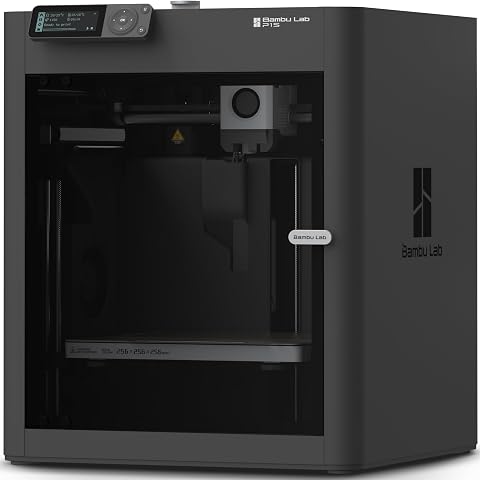 Bambu Lab P1S 3D PrinterView on Amazon →
- 7
 Anycubic Kobra X Multicolor 3D PrinterView on Amazon →
- 8
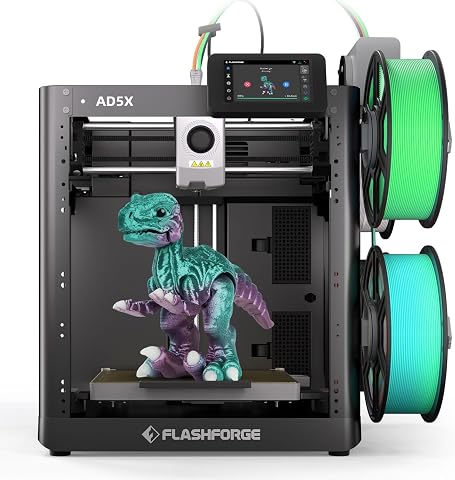 Flashforge AD5X Multi-Material 3D PrinterView on Amazon →
- 9
 Bambu Lab A1 FDM 3D PrinterView on Amazon →
- 10
 FLASHFORGE Adventurer 5M 3D Printer, All-Metal CoreXY, 600mm/s Max TravelView on Amazon →
Choosing a Multicolor Workflow
The comparison addresses a practical purchase decision: multicolor printing adds capability, but also workflow tradeoffs. Filament-switching systems and multiple toolheads handle color changes differently. The guide says frequent changes can increase print time and create purge waste, so the number of colors supported alone does not tell buyers how convenient or economical a setup will be.
Enclosure is another dividing line. The source says enclosed printers can help manage drafts and temperature, which may matter more for some materials and larger parts, while open-frame machines can be easier to access and may suit everyday hobby printing. For readers making mostly single-color parts, the guide suggests that a simpler machine could be a better fit than paying for multicolor features they rarely use.
Popular right now

Shark Navigator Robot Vacuum with 30-Day Self-Empty Base, White (AV2110S)

Vitamix Nano Personal Blender with SmoothiePilot, Black

Sony BRAVIA 6 77-Inch OLED 4K HDR Smart Google TV with Gemini (K-77A60)
As an affiliate, we earn on qualifying purchases.
How the Guide Ranks Its Picks
The source presents this as a buyer’s comparison, not a lab test. Its stated approach gives priority to well-rounded usefulness, then considers narrower strengths such as accessibility, four-toolhead printing, or a speed-focused design. It separates enclosed CoreXY printers from open-frame models rather than treating headline speed as the sole measure.
The guide also recommends checking build volume, workspace, materials, and maintenance before purchase. Maximum movement speed is not the same as the time a particular model takes to print at acceptable quality, it says; geometry, layer height, material, and cooling can all affect results. The provided source excerpt ends during its discussion of between-print upkeep, so it does not supply the full set of maintenance advice or all 10 individual product sections.
“The P2S Combo ranks first as the most complete general-purpose bundle in this group.”
— ThorstenMeyerAI.com buyer’s guide
Evidence Behind the Rankings
The supplied material does not state when the guide was published or provide independent testing, exact prices, measured print speeds, print-quality comparisons, or detailed specifications for every model. Its rankings and descriptions should therefore be read as the source’s buying judgments, rather than verified head-to-head results.
The excerpt names the 10-model comparison but gives detailed buying guidance for only some of the listed printers; it does not include a full account of every model’s strengths, limitations, or included accessories. Buyers should verify current configurations, bundle contents, material compatibility, and regional pricing with manufacturers or retailers before purchasing.
What Buyers Should Verify
The next step for shoppers is to compare the specific package and workflow they expect to use: whether multicolor hardware is included, how material changes are handled, and whether an enclosure fits their materials and workspace. Current prices, accessories, and availability can vary, and the supplied guide does not establish those details.
Before deciding, buyers should also compare build volume with their typical parts, check the space needed to load filament and access the build plate, and consider how often they will print multicolor objects. The guide offers a framework for that choice, but no new testing or follow-up results are reported in the source material.
Key Questions
Which printer does the guide rank first?
The guide ranks the Bambu Lab P2S Combo first as its most complete general-purpose bundle, citing an enclosed printer and included multicolor material system. That is the source’s assessment, not an independently tested result in the supplied material.
How does the Snapmaker U1 handle multicolor printing?
The guide describes the Snapmaker U1 as a four-toolhead system, offering a different approach from printers that switch between filaments. The excerpt does not provide comparative testing of the two workflows.
Do all the listed printers include multicolor hardware?
No. The source specifically distinguishes the standalone Bambu Lab P1S, which it says does not include bundled multicolor hardware, from the P1S Combo, which adds an AMS package. Buyers should check the exact bundle contents for each model.
What should buyers weigh before choosing a multicolor printer?
Consider how often you need multiple colors, how the printer handles material changes, and whether added print time or purge waste is acceptable. Also weigh enclosure, material compatibility, workspace, build volume, setup, and upkeep against your typical projects.
Source: ThorstenMeyerAI.com