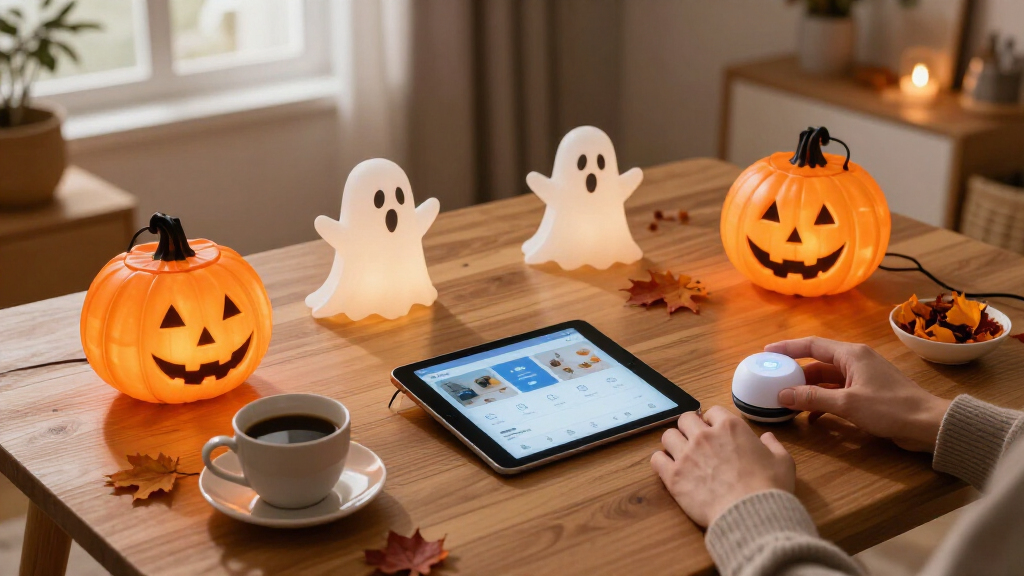
This guide provides detailed steps to create a smart home Halloween display using connected devices, lighting, and automation. Perfect for homeowners with some smart home experience, it covers setup, programming, and troubleshooting to achieve a cohesive, animated, and spooky environment. Expect to spend a few hours installing and testing your decorations to ensure they operate smoothly and impress visitors.

Get the latest gadgets delivered free with Prime
- Fast, free delivery on millions of items
- Prime Video, Amazon Music and more included
- Member-only deals all year

Linkind Smart Solar Spot Lights Outdoor SL5C, IP67 Waterproof, Color-Changing, App & Voice Control
- ✔ Brightness: 2X brighter
- ✔ Lighting Duration: 14 hours
- ✔ Battery Type: Automotive-grade battery

240 LED Smart Color Changing String Lights 92FT Halloween Lights with App & Remote Control
- ✔ Length: 92 feet
- ✔ Number of LEDs: 240
- ✔ Colors: 16 million

Brizled Smart Halloween Lights, 300 LED 98FT Color Changing String Lights with App & Voice Control
- ✔ Length: 98 feet
- ✔ LED Count: 300
- ✔ Colors: Orange & Purple
Difficulty: Intermediate | Time: 2-4 hours
What You’ll Need
Tools & Materials:
- Smart lighting system (e.g., Philips Hue, LIFX)
- Smart plugs or switches
- Wi-Fi network with stable connection
- Smart home hub or app (e.g., Google Home, Alexa, Apple HomeKit)
- Decorative Halloween props (e.g., skeletons, fog machines, inflatable decorations)
- Smart motion sensors or sound sensors (optional)
- Smart LED strips or projection devices
- Mobile device or computer for setup
Knowledge:
- Basic familiarity with your smart home app and device setup
- Understanding of Wi-Fi networks and device pairing
- Comfort with using automation routines or scenes in your smart home platform
Ensure your Wi-Fi network is strong and has enough bandwidth to support multiple devices. Check compatibility of all smart devices before purchasing. Fully update all device firmware and apps before starting installation.
Linkind Smart Solar Spot Lights Outdoor SL5C, IP67 Waterproof, Color-Changing, App & Voice Control
This pick stands out for its superior brightness and extended illumination time, making it ideal for highlighting spooky landscapes or pumpkins at night. Compared with string lights, these solar spotlights offer more focused, dramatic effects and can be placed flexibly around your yard. However, they require a separate Bluetooth Mesh Hub for voice control, adding to the initial cost and setup complexity. While perfect for those who want impactful outdoor accents, users seeking a straightforward plug-and-play experience might find the extra steps cumbersome.
Pros:
- Twice as bright as standard solar spotlights
- Up to 14 hours of illumination for all-night effects
- App and voice control compatibility (via separate hub)
- Adjustable mounting with 360° horizontal and 180° vertical tilt
Cons:
- Requires purchase of Bluetooth Mesh Hub for voice control
- Higher price point due to advanced features
- Some setup needed for app configuration
Best for: Homeowners wanting vivid outdoor landscape lighting with customizable colors and extended run time
Not ideal for: Buyers seeking a simple, all-in-one decoration solution without additional accessories
Bottom line: Best suited for those wanting impactful, customizable outdoor lighting that lasts all night, despite requiring extra accessories.
“Best suited for those wanting impactful, customizable outdoor lighting that lasts all night, despite requiring extra accessories.”
240 LED Smart Color Changing String Lights 92FT Halloween Lights with App & Remote Control
This option makes the most sense for those wanting broad, colorful lighting coverage with multiple modes and easy dual control via app or remote. Its 40 scene modes and 16 million colors make it ideal for creating a festive atmosphere and customizing effects for different holidays. Compared with spotlights, these string lights are more flexible for wrapping around trees or fences. However, they are limited to 29V low voltage power sources, which may restrict placement options in some outdoor areas. Additionally, full control depends on smartphone compatibility, which can be a barrier for less tech-savvy users.
Pros:
- Wide range of colors and lighting modes
- Dual control with app and remote
- Music rhythm feature enhances Halloween atmosphere
- Weatherproof for outdoor use
Cons:
- Requires compatible smartphone for full control
- Limited by low-voltage power source
- Setup can be complex for beginners
Best for: Decorators seeking extensive color options and multiple lighting modes for outdoor or indoor Halloween setups
Not ideal for: Those preferring simple, plug-and-play outdoor lighting without smartphone reliance
Bottom line: A flexible, feature-rich string lighting option ideal for festive customization but best suited for those with basic smart home familiarity.
“A flexible, feature-rich string lighting option ideal for festive customization but best suited for those with basic smart home familiarity.”
Brizled Smart Halloween Lights, 300 LED 98FT Color Changing String Lights with App & Voice Control
This set stands out for its vibrant orange and purple LEDs, perfectly capturing Halloween’s traditional colors. Its multiple modes, including flash and twinkle, combined with music sync, make it a lively addition to any haunted yard. Compared with the other options, Brizled’s string lights are straightforward to control via app or voice assistant, making them accessible even for less experienced users. The weatherproof design and UL certification add peace of mind for outdoor deployment. Still, the need for a compatible smartphone or voice system might be a barrier for some, and the array of modes could be overwhelming for minimalists.
Pros:
- Vivid orange and purple LED colors
- Multiple modes including flash, twinkle, and waves
- Smart app and voice control compatible
- Weatherproof and UL Certified
Cons:
- Requires compatible smartphone or voice assistant
- Potential complexity for users unfamiliar with smart controls
- More expensive than basic string lights
Best for: Those wanting traditional Halloween colors with fun effects, easy smart control, and outdoor durability
Not ideal for: Buyers seeking ultra-simple or plug-and-play decorations without smart device integration
Bottom line: A festive, easy-to-control string light set that captures Halloween spirit with traditional colors and effects, best for those comfortable with smart technology.
“A festive, easy-to-control string light set that captures Halloween spirit with traditional colors and effects, best for those comfortable with smart technology.”
As an Amazon Associate we earn from qualifying purchases.
Before You Start
Ensure your smart home devices are fully installed and connected to your Wi-Fi network. Plan your decoration layout and identify power sources. Have all tools and devices ready before beginning the setup process. Be aware of outdoor weather conditions if decorating outside, and consider weatherproofing smart devices accordingly.Step-by-Step Instructions
Step 1: Plan Your Decoration Layout
Sketch or visualize where each smart device, prop, and light will go to create your Halloween scene. Decide which parts will be animated or synchronized for maximum effect.
Tip: Place decorations where they are visible from the street or your porch for better impact. Use a layout plan to avoid missing connections or power sources.
Check: You have a clear map of your decorations and know where each smart device will be installed.
Step 2: Install Smart Lighting and Devices
Set up your smart lights, LED strips, or projection devices in their designated locations. Plug in smart plugs or switches controlling decorations that are not directly connected to your smart hub.
Tip: Ensure all devices are within Wi-Fi range or use range extenders if needed. Test each device during installation to confirm connectivity.
Check: All smart devices are installed and able to be controlled via your app or hub.
Step 3: Connect Devices to Your Smart Home Network
Open your smart home app and add each device following the manufacturer’s instructions. Assign devices to rooms or zones for easier management.
Tip: Name devices clearly (e.g., ‘Pumpkin Light’, ‘Skeleton Animatronic’) for easy scene creation. Verify device responsiveness after pairing.
Check: All devices appear in your app and respond to basic commands.
Step 4: Create Custom Scenes and Automation Routines
Use your smart home app to create scenes that activate multiple decorations simultaneously. Set up automation routines to trigger scenes based on time, motion, or sound detection.
Tip: Test each scene individually before linking to automations. Use vivid names for routines like ‘Spooky Night’ or ‘Haunted Porch.’
Check: Scenes and routines activate decorations correctly when triggered, with synchronized lighting or effects.
Step 5: Program Animations and Effects
Utilize your app’s features or third-party automation tools (if supported) to add animated effects, color changes, or sound synchronization to your decorations. Set timers or triggers for these effects.
Tip: Experiment with slow fade-ins, flickering effects, or sound effects to enhance spookiness. Confirm timing accuracy during testing.
Check: Decorations animate smoothly and trigger as programmed, creating a lively Halloween scene.
Step 6: Test the Full Setup
Run through your entire decoration sequence at least once. Activate scenes, automations, and effects to verify everything works together seamlessly.
Tip: Check for delays or device responsiveness issues. Adjust timing or placement if necessary.
Check: All decorations respond correctly, with synchronized lighting, animations, and sounds as intended.
Step 7: Secure and Weatherproof Outdoor Devices
If decorating outside, ensure all devices are weatherproof or protected from elements. Use outdoor-rated smart plugs, covers, or enclosures as needed.
Tip: Keep power cords and connections off the ground to prevent water damage. Test outdoor devices after weatherproofing.
Check: All outdoor decorations operate reliably during testing and are protected from weather.
Common Mistakes to Avoid
- Placing Wi-Fi devices too far from your router or in dead zones. — Use Wi-Fi range extenders or mesh networks to improve coverage in decoration areas.
- Overloading power sources or using incompatible smart plugs. — Check device power requirements and only use compatible, rated outlets or power strips.
- Not testing automation routines before the event. — Run full tests of all scenes and automations ahead of time to troubleshoot issues.
Troubleshooting
Problem: Some devices do not respond or are offline.
Solution: Restart the device, reset Wi-Fi connection, or update firmware. Move the device closer to the router if needed.
Problem: Animations are out of sync or delayed.
Solution: Adjust timing settings in your automation routines or reduce the number of simultaneous effects to improve response time.
Problem: Outdoor devices stop working during bad weather.
Solution: Ensure devices are weatherproofed and protected. Test in similar conditions beforehand to confirm reliability.
What Success Looks Like
The decorations activate automatically, with synchronized lighting, animated effects, and sounds that create a cohesive, spooky scene. All devices respond quickly and reliably during testing and actual display.
Next Steps
After setting up, schedule regular tests to ensure ongoing functionality. Store and secure smart devices properly after the holiday. Consider expanding or updating your display for next year, or integrating new effects or sensors to enhance your setup.
Frequently Asked Questions
Can I use any smart lights for Halloween decorations?
Most smart lights that are compatible with your home hub or app can be used. Look for color-changing or customizable options to create spooky effects. Confirm outdoor ratings if used outside.
How do I synchronize multiple devices for a coordinated effect?
Create scenes or routines in your smart home app that activate all desired devices simultaneously or in sequence. Use timers or triggers based on motion or sound for automation.
Are there safety considerations for outdoor smart decorations?
Yes. Use weatherproof devices, secure all cords and connections, and avoid overloading outlets. Keep power sources protected from moisture and check device ratings for outdoor use.