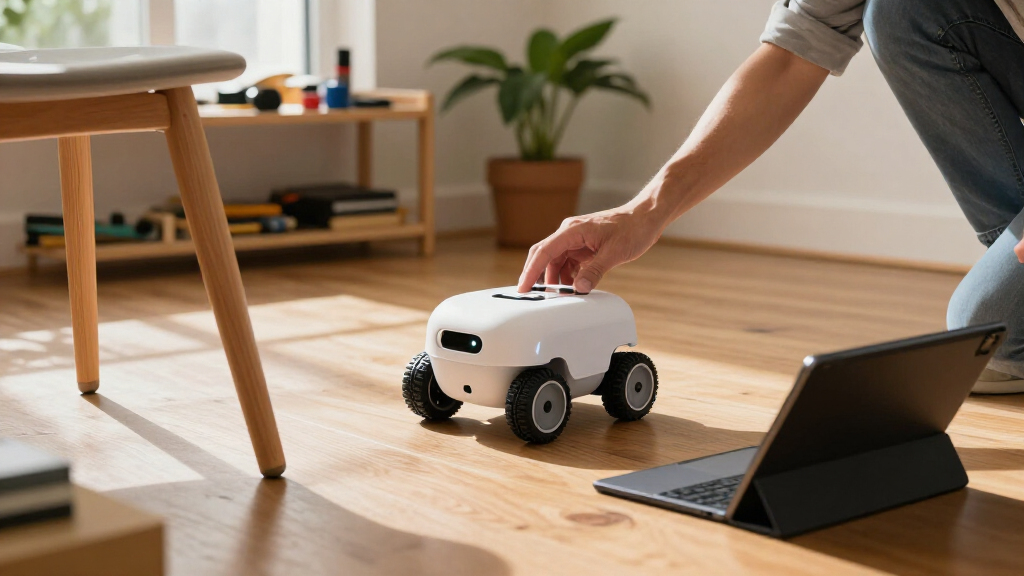
The best self-improving robot depends on what you want it to learn from: a child’s spoken questions, your interactions at a desk, or a space it can sense and move through. My strongest fit for interactive learning is the MASDROW Yonbo X1, which pairs screen-free conversation with movement and child-focused tutoring. For an adult-oriented desk companion, the EMOPET EMO with Charging Station adds the practical benefit of automatic recharging. The Unitree G1 Pro is the most physically capable pick, but its demonstration focus and lack of programming access make it a poor match for buyers seeking a robot they can develop themselves.

Get the latest gadgets delivered free with Prime
- Fast, free delivery on millions of items
- Prime Video, Amazon Music and more included
- Member-only deals all year
These products use “self-improving” in different ways. The Yonbo models center on conversational AI and following; EMO reacts to voice, touch, gestures, and app activities; and Unitree emphasizes sensor-aware humanoid movement rather than user programming. I rank them by how clearly their listed capabilities support an adaptive, useful experience, while weighing autonomy, setup, age fit, and limitations. None should be mistaken for a robot that independently rewrites its software or continually learns without bounds.
Complete the kit



Key Takeaways
- Best fit for child-focused AI learning: Yonbo X1 combines screen-free voice interaction, tutoring, language practice, vision tracking, and mobile following for ages 4–12.
- The two Yonbo listings describe closely related products: the Family Edition listing highlights no subscription fees, while the other gives clearer details such as a 5MP camera and 1.5 m/s maximum speed.
- Best EMO setup for less charging fuss: EMO with Charging Station can return to its dock, while the other EMO package does not include a charging station.
- Most advanced physical platform, not the most customizable: Unitree G1 Pro has 23 degrees of freedom, LiDAR, and a depth camera, but the listed version excludes SDK, API, and secondary development.
- Self-improvement has limits across this lineup: these robots offer AI conversation, responsive behavior, or sensor-driven movement, not a stated ability to train themselves or change their own underlying models.
| AI Robot for Kids and Adults with ChatGPT, No Subscription Fees, 4‑Mic Array |  | Best Overall for Screen-Free AI Learning | Brand: MASDROW | Model: Yonbo X1 Family Edition | Age range: 4–12 years | VIEW LATEST PRICE | See Our Full Breakdown |
| MASDROW Yonbo X1 Interactive AI Robot for Kids |  | Best for Movement and Clearer Published Specs | Brand: MASDROW | Model: Yonbo X1 | Age range: 4–12 years | VIEW LATEST PRICE | See Our Full Breakdown |
| EMOPET EMO AI Desk Robot Companion | 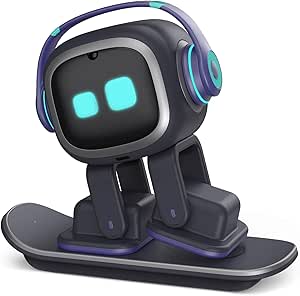 | Best for App-Connected Desk Interaction | Brand: EMOPET | Model: EMO | Recommended age: 15 years and up | VIEW LATEST PRICE | See Our Full Breakdown |
| Unitree G1 Pro Humanoid Robot |  | Best for Humanoid Movement and Sensor Demonstrations | Height: 132 cm | Weight: 35 kg | Degrees of freedom: 23 | VIEW LATEST PRICE | See Our Full Breakdown |
| EMOPET EMO AI Desk Robot Companion with Charging Station | 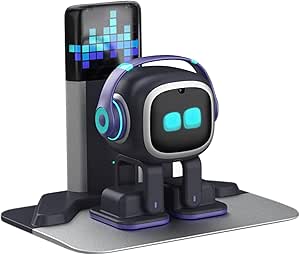 | Best for Low-Maintenance Desk Companionship | Brand: EMOPET | Model: EMO GO HOME | Recommended age: 15 years and up | VIEW LATEST PRICE | See Our Full Breakdown |
| self-improving robot | Brand | Model | Connectivity |
|---|---|---|---|
| AI Robot for Kids and Adults w | MASDROW | Yonbo X1 Family Edition | — |
| MASDROW Yonbo X1 Interactive A | MASDROW | Yonbo X1 | — |
| EMOPET EMO AI Desk Robot Compa | EMOPET | EMO | Network connection and companion app |
| Unitree G1 Pro Humanoid Robot | — | — | Wi-Fi 6 and Bluetooth 5.2 |
| EMOPET EMO AI Desk Robot Compa | EMOPET | EMO GO HOME | Network connection and EMO app |
More Details on Our Top Picks
AI Robot for Kids and Adults with ChatGPT, No Subscription Fees, 4‑Mic Array
Yonbo X1 is my leading pick for buyers who define self-improvement as a robot that can respond to a child’s changing questions and interests. It is described as a ChatGPT-powered companion for tutoring, storytelling, and language practice, while its screen-free design keeps interaction centered on talking rather than tapping through menus. The 4-mic array and vision tracking support a more conversational, mobile experience than a stationary speaker, and 360-degree movement lets it follow a child around a room.
Compared with the other Yonbo X1 listing, this Family Edition puts its clearest emphasis on lifetime access to AI features without monthly subscription fees. That makes the ongoing service model easier to understand from the supplied description, though the other listing is more explicit about the 5MP camera and maximum speed. The two listings appear close in concept and included accessories; buyers should verify the exact edition and feature set rather than assume every specification transfers between them.
Its learning potential comes from conversational variety, not a confirmed ability to retrain itself. I would choose it over EMO for a child who wants guided verbal activities and a robot that follows, but EMO is more suited to older users seeking desk-based games and expressive reactions. The main compromises are battery demands and limited visual teaching: a powerful processor and movement may mean more frequent charging, and a screen-free robot cannot show diagrams or written lessons. Its stated 4–12 age range also narrows its fit for adults despite the title’s broader wording.
Pros:- ChatGPT-powered tutoring, storytelling, and language practice are aimed at varied verbal interaction.
- Screen-free design encourages conversation rather than display-based use.
- Vision tracking and 360-degree movement let the robot follow a child around a room.
- The listing describes lifetime AI access without monthly subscription fees.
Cons:- A high-performance processor and movement may call for frequent recharging.
- Without a screen, it cannot provide visual lessons or display content.
- The stated 4–12 age range may not suit older users despite the broad product title.
Best for: Families seeking a screen-free conversational tutor and mobile companion for children ages 4–12, especially those who want the listed lifetime AI access without monthly fees.
Not ideal for: Older learners who need visual lessons, buyers who want an open programming platform, or households that prioritize long untethered sessions over mobile features.
- Brand:MASDROW
- Model:Yonbo X1 Family Edition
- Age range:4–12 years
- Interaction:ChatGPT-powered voice tutoring, storytelling, and language practice
- Microphones:4-mic array
- Movement:360-degree motion and vision tracking
- Display:Screen-free
- Included:Charging dock, 65W charger, USB-C cable, game book, wristband, and guide
Our verdict“I rank this Yonbo first for child-centered conversational learning because it combines adaptive AI interaction, screen-free use, and movement, though it is not a programmable self-training robot.”
MASDROW Yonbo X1 Interactive AI Robot for Kids
This second Yonbo X1 listing is the clearest choice for buyers who want concrete movement and camera details alongside the same broad screen-free learning concept. It specifies a 5MP camera, a 64-bit quad-core processor, a four-microphone array, and a maximum speed of 1.5 m/s. That speed matters because following is more than a decorative feature: it positions Yonbo as a moving companion rather than a desk-bound voice toy.
Its stated activities—voice tutoring, storytelling, and language practice—closely match the Family Edition pick above. The difference is mostly in how the listings present the offer: the first highlights lifetime AI access without subscription fees, while this one spells out more technical specifications. I would compare the exact seller listing and included edition details before choosing between them, since the provided information does not establish that every feature or service term is identical.
Against EMO, Yonbo is the stronger fit for younger children who want a robot that can move and follow; EMO instead offers desk-based games, dancing, and touch responses for an older audience. The tradeoff is that camera-led following may not suit families uncomfortable with a robot using vision, and the age range is explicitly limited to 4–12. Its screen-free format also favors spoken explanations over visual demonstrations. This is a more specification-forward alternative to the top pick, not a fundamentally different learning platform, and the supplied details do not promise independent model training.
Pros:- Lists a 5MP camera and vision-based following for interactive movement.
- Maximum speed is specified as 1.5 m/s, giving buyers a clearer mobility reference.
- Offers voice-based tutoring, storytelling, and language practice without a screen.
- Includes a charging dock, charger, game book, and wristband.
Cons:- Following and AI vision depend on the built-in camera.
- Its 4–12 age range limits suitability for older users.
- The supplied listing does not describe open programming or independent model training.
Best for: Parents who want a mobile, screen-free AI companion for a child ages 4–12 and value listed camera and movement specifications.
Not ideal for: Buyers seeking a distinct alternative to the other Yonbo listing, a visual teaching display, or a robot whose camera is not part of its interaction.
- Brand:MASDROW
- Model:Yonbo X1
- Age range:4–12 years
- Processor:64-bit quad-core
- Camera:5MP
- Maximum speed:1.5 m/s
- Microphones:4-mic array
- Display:Screen-free
Our verdict“I recommend this Yonbo listing when the stated camera and speed details matter most, while the Family Edition above has the clearer no-monthly-fee positioning.”
EMOPET EMO AI Desk Robot Companion
EMO is the best match here for an older user who wants a small desk companion rather than a robot that shadows them around a room. Its camera, sensors, voice commands, and responses to touch and gestures create several ways to interact. It can also dance to music and access app-based games and activities, while the supplied description includes ChatGPT-enabled conversations. That mix gives it a more playful, expressive character than the lesson-focused Yonbo robots.
Compared with Yonbo, EMO is aimed at users aged 15 and up and does not emphasize child tutoring or room-following. Its appeal rests on recurring interactions—speaking, touching, playing, and using the companion app—rather than on a stated curriculum. The key practical difference from the other EMO in this roundup is the missing charging station. The EMO GO HOME package includes a dock that allows automatic return to recharge; this package lists an adapter and skateboard but no station, so owners may need to manage charging more directly.
That makes this version a reasonable pick for a desk where a user is comfortable with app and network reliance and does not need automatic docking. It is less convincing for anyone prioritizing autonomy, because some features depend on the app and network connection. Unlike Unitree, it is not a large humanoid platform with spatial sensors and articulated movement; unlike Yonbo, it is not framed as a child’s mobile tutor. Think of EMO as an interactive character, not a robot-development kit. The listed features show responsive play, but do not establish that it learns new skills independently over time.
Pros:- Combines voice commands with touch and gesture responses.
- Offers dancing, app-based games, and activities for varied interaction.
- Description includes ChatGPT-enabled conversations.
- Package includes a skateboard and smart light alongside the robot.
Cons:- Charging station is not included.
- Some functions require the companion app and network connection.
- Its desk-oriented format lacks Yonbo’s child-following movement.
Best for: Teens and adults who want a compact-feeling desk companion for voice interaction, touch responses, dancing, and app-based activities.
Not ideal for: Buyers who want automatic charging, offline-first operation, child-focused tutoring, or a mobile robot that follows them around.
- Brand:EMOPET
- Model:EMO
- Recommended age:15 years and up
- Connectivity:Network connection and companion app
- Interaction:Voice commands, touch, gestures, camera, and sensors
- Activities:Dancing, app games, and ChatGPT-enabled conversations
- Charging station:Not included
- Included:Robot, adapter, skateboard, smart light, and user manual
Our verdict“I would pick this EMO for app-connected play at a desk, but the dock-equipped EMO is the more convenient option for buyers who want automatic recharging.”
Unitree G1 Pro Humanoid Robot
Unitree G1 Pro is the most ambitious robot physically, but not the best choice for buyers who want to teach or program a self-improving machine. At 132 cm tall, with 23 degrees of freedom, a depth camera, and 3D LiDAR, it is designed to demonstrate humanoid movement and spatial awareness. Its aluminum-alloy and carbon-fiber construction and 8-core CPU place it in a different category from tabletop EMO and child-focused Yonbo.
The catch is central to its ranking: this version is described as a demonstration and companionship model and does not support secondary development, SDK, or API access. Its movement library is also said to be limited to basic actions such as walking and rotating. So while its sensors and joints may support sophisticated demonstrations, buyers should not equate that hardware with an open robotics platform or a robot that learns new tasks from its owner. For hands-on customization, this is less suitable than the product title might suggest.
Compared with Yonbo, Unitree emphasizes large-scale physical motion and room sensing, not tutoring or sustained conversation. Compared with EMO, it is far more imposing and mechanically capable, but also has a roughly two-hour battery endurance and a 35 kg body that calls for a suitable operating space. Its strengths are visible movement and sensor hardware; its weaknesses are access and endurance. I would choose it for demonstrations or companionship where basic actions are enough, not for a classroom seeking an editable development platform.
Pros:- 23 degrees of freedom support a broad range of humanoid movement.
- Depth camera and 3D LiDAR provide spatial sensing beyond the smaller robots here.
- Aluminum alloy and carbon fiber are specified for the frame construction.
- Includes Wi-Fi 6 and Bluetooth 5.2 connectivity.
Cons:- No secondary development, SDK, or API access is listed for this version.
- Movement library is described as limited to basic actions such as walking and rotating.
- Approximate battery endurance is two hours.
Best for: Organizations or enthusiasts seeking a full-size humanoid for demonstrations, basic movement, and sensor-aware interaction without requiring software development access.
Not ideal for: Robotics learners who need an SDK or API, buyers seeking an open-ended self-learning platform, or anyone who needs long operating sessions without battery changes.
- Height:132 cm
- Weight:35 kg
- Degrees of freedom:23
- Materials:Aerospace-grade aluminum alloy and carbon fiber
- Processor:8-core CPU
- Sensors:Depth camera and 3D LiDAR
- Connectivity:Wi-Fi 6 and Bluetooth 5.2
- Battery endurance:Approximately 2 hours
- Development access:No secondary development, SDK, or API access
Our verdict“I rank Unitree for physical demonstration capability, not self-improvement: its hardware is advanced, but closed development access and short endurance sharply limit experimentation.”
EMOPET EMO AI Desk Robot Companion with Charging Station
This EMO package earns its place by solving the most obvious day-to-day drawback of the other EMO listing: charging. The included station lets the robot return to recharge automatically, so it is better suited to a desk setup where the owner wants EMO available without routinely placing it on a charger. Voice commands, camera and sensor responses, conversation, dancing, and app activities give it a range of simple ways to stay engaging.
Compared with the EMO package without a station, this one is the clear convenience pick, although its listed included components are less expansive: it specifies the robot and charging station rather than the other package’s adapter, skateboard, and smart light. Against Yonbo, EMO is for tabletop interaction and users aged 15 and up, not a child-focused mobile tutor. It does not offer the same stated language-practice and tutoring emphasis, and it cannot follow a child through a room.
Automatic docking improves availability, not learning depth. The robot still depends on network connectivity and the EMO app for some features, and its compact tabletop role limits where it can interact. The listing describes responsive conversation and activities, but does not say that EMO independently learns new abilities or builds a persistent model of its owner. I would put this ahead of the non-dock EMO for buyers who value hands-off recharging, while anyone seeking a mobile learning companion should look to Yonbo instead.
Pros:- Included charging station allows EMO to return and recharge automatically.
- Camera and sensors support interactive responses to voice and surroundings.
- Offers conversation, dancing, games, and adjustable volume through the app.
- A tabletop format suits a dedicated desk or shelf space.
Cons:- Some features rely on network connectivity and the EMO app.
- Designed for tabletop play rather than following users around.
- The listing does not describe open programming or independent learning.
Best for: Teens and adults who want a tabletop AI companion with app-connected activities and automatic return to a charging station.
Not ideal for: Buyers seeking a mobile robot, child-oriented tutoring, offline operation, or a platform for programming new behaviors.
- Brand:EMOPET
- Model:EMO GO HOME
- Recommended age:15 years and up
- Play location:Tabletop
- Connectivity:Network connection and EMO app
- Features:Voice commands, conversation, dancing, games, and adjustable volume
- Charging:Included station with automatic return to recharge
- Dimensions:11 x 8.5 x 2.95 inches
Our verdict“I recommend this EMO over the non-dock package for a convenient desk companion, while Yonbo remains the better choice for child-focused learning and mobile interaction.”
How We Picked
I ranked these five options by how well their stated features support a robot that adapts its behavior to people or surroundings—not by humanoid appearance or the word “AI” alone. I gave weight to interactive feedback, including voice, touch, gestures, vision, and movement; to whether the product can act without constant manual positioning; and to the usefulness of its AI or app features for the intended buyer.
I also treated practical constraints as part of the comparison. Age range, charging arrangements, network dependence, and development access change what a buyer can realistically do with a robot. That is why the two Yonbo listings lead for a conversational learning use case, and why the EMO with a dock ranks ahead of the EMO package without one for everyday convenience. Unitree’s hardware is the most ambitious, but its restricted development options and roughly two-hour battery endurance limit its appeal as a self-improving platform.
The supplied product details do not establish that any of these robots independently train a model, retain every interaction, or improve indefinitely. I do not treat ordinary voice recognition, app activities, or sensor response as proof of autonomous learning. My ranking reflects described capabilities and tradeoffs; buyers should check current manufacturer documentation for privacy controls, software support, and the precise behavior of AI features before purchasing.
| self-improving robot | Brand | Model | Connectivity |
|---|---|---|---|
| AI Robot for Kids and Adults w | MASDROW | Yonbo X1 Family Edition | — |
| MASDROW Yonbo X1 Interactive A | MASDROW | Yonbo X1 | — |
| EMOPET EMO AI Desk Robot Compa | EMOPET | EMO | Network connection and companion app |
| Unitree G1 Pro Humanoid Robot | — | — | Wi-Fi 6 and Bluetooth 5.2 |
| EMOPET EMO AI Desk Robot Compa | EMOPET | EMO GO HOME | Network connection and EMO app |
Factors to Consider When Choosing Best Self-improving Robots
I would start by deciding what “self-improving” means for your household. In this lineup, it can mean AI conversation that adjusts to a question, sensor responses to people and surroundings, or physical movement through space. Those are different capabilities; none of the supplied descriptions confirms an independently retraining robot.Separate adaptive responses from genuine learning
A robot may feel responsive because it recognizes a voice command, answers a question, reacts to touch, or follows a person. Those functions can make interactions feel varied without proving that the robot remembers a user over time or improves its underlying model. Ask what changes after repeated use: does the product describe persistent memory, personalized progress, or a way to teach new tasks? The available descriptions here do not spell out those mechanisms. Yonbo’s tutoring and language practice suggest adaptable conversation, while EMO’s touch, gesture, and app activities support reactive play. Unitree’s sensing and movement show physical capability, not an open learning system.
Choose the interaction style before comparing hardware
Voice-first learning points toward Yonbo. Its screen-free design and stated tutoring, storytelling, and language practice suit children who benefit from speaking and listening. EMO favors a mix of conversation, movement, music, touch, and app games at a desk. Unitree is a humanoid demonstration platform whose appeal is movement and spatial sensing. A large robot with more joints is not automatically a better conversational companion, and a small desk robot is not a substitute for a mobile tutor. Match the interaction to how the intended user will actually spend time with it.
Treat age range and supervision as practical boundaries
The two Yonbo listings specify children ages 4–12, while both EMO descriptions recommend users aged 15 and up. Those labels help establish the intended audience, but they do not answer every family’s questions about supervision, privacy, or content controls. Check the maker’s current guidance on camera use, voice data, account setup, and parental settings before bringing a connected AI robot into a child’s room. Unitree is not presented as a children’s learning toy; its size, weight, and moving joints make the setting and operating space particularly relevant.
Compare autonomy and charging as part of everyday use
The most obvious convenience distinction in this group is between the two EMO packages. One lists no charging station; the other includes a station and automatic return to recharge. Yonbo includes a charging dock, though its description also warns that a high-performance processor may require frequent recharging. Unitree lists approximately two hours of battery endurance and a quick-release battery. Think about how much owner involvement you will tolerate: a robot that needs regular repositioning or charging may see less use even if its interaction features are appealing.
Do not assume a camera means the same thing on every robot
For Yonbo, vision tracking is tied to following a child, and one listing specifies a 5MP camera. EMO’s camera and sensors are described as supporting interactive responses. Unitree pairs a depth camera with 3D LiDAR for spatial awareness. These are different roles, not interchangeable camera specifications. If a robot will move around people or a home, ask how it handles obstacles, where it operates, and what camera controls are available. Sensor capability can improve interaction, but it also makes privacy and safe placement part of the purchase decision.
Decide whether you need an app or a development platform
EMO relies on an app and network for some activities, while Yonbo’s listed appeal centers on AI-powered verbal interaction and movement. Unitree’s key limitation is especially important for technically minded buyers: the listed G1 Pro does not support secondary development, SDK, or API access. App features are not the same as programmability. If your goal is to write code, experiment with control systems, or teach a robot new tasks, verify development tools before buying. Unitree’s substantial hardware may look like the obvious robotics choice, but this particular version is restricted to basic listed actions and demonstration use.
Read the two similar listings as separate offers
The Yonbo entries share the same core idea, but their descriptions foreground different details. The Family Edition emphasizes lifetime access to AI features without monthly fees, while the other listing spells out a 5MP camera, a 64-bit quad-core processor, and 1.5 m/s maximum speed. The two EMO entries also differ in included charging equipment and accessories. Check the exact package and service terms on the listing you plan to buy rather than assuming a feature from a related model or package applies to every version.
Frequently Asked Questions
Do these robots actually improve themselves over time?
The supplied descriptions do not confirm that any of these robots independently retrain their AI models or develop new skills without user input. Yonbo offers ChatGPT-powered tutoring and conversation; EMO responds to voice, touch, gestures, and app activities; Unitree combines sensors with programmed movement. Those features can create adaptive or responsive interactions, but that is not the same as verified autonomous learning. I would check the manufacturer’s documentation for memory, personalization, and data-retention details before treating any model as a self-training robot.
Which robot is the best choice for a child?
I would start with either Yonbo X1 listing because both are described for ages 4–12 and focus on screen-free voice interaction, tutoring, storytelling, and language practice. The Family Edition listing makes the no-monthly-fee claim more prominent; the other gives clearer published camera and speed details. Neither description removes the need to check parental controls, camera settings, and how AI content is managed. EMO is listed for ages 15 and up, while Unitree is a large demonstration robot rather than a child-oriented learning companion.
What is the difference between the two EMO packages?
The EMO listing with ASIN B0DG8JPL6J includes a charging station that lets EMO return to recharge automatically. The EMO listing with ASIN B0DDT2MT9K says a charging station is not included and lists an adapter, skateboard, and smart light in the package. Both are described as app- and network-connected desk companions with voice interaction and activities. I would choose the dock-equipped package for charging convenience, then check the current package contents to confirm what accessories are included.
Is the Unitree G1 Pro suitable for learning robotics programming?
Not according to the supplied description for this version. It explicitly says the G1 Pro does not support secondary development, SDK, or API access, and characterizes its movement library as limited to basic actions such as walking and rotating. Its 23 degrees of freedom, depth camera, and 3D LiDAR may make it compelling for demonstrations, but those specifications do not grant programming access. Buyers who want a platform for coding or custom behaviors should confirm development support in writing before selecting a robot.
Which option is best if I want a robot that moves around?
The Yonbo X1 listings are the clearest fit for a buyer who wants a companion to move around and follow a child, with one listing specifying a maximum speed of 1.5 m/s and a 5MP camera. Unitree is much larger and has 23 degrees of freedom plus spatial sensors, but this version is described as a demonstration and companionship model with limited basic actions and no development access. EMO is a tabletop companion, so it is not the choice for room-following movement. Match the robot’s movement to the space and supervision it will need.
Conclusion
For families seeking conversational learning, I recommend MASDROW Yonbo X1: choose the Family Edition listing if the stated lifetime AI access without monthly fees is your priority, or the other listing if its published camera and speed details are more useful. For a teen or adult who wants a desk companion with less charging management, choose EMO GO HOME, whose included station supports automatic recharging. The EMO package without a station makes more sense if its listed accessories fit your setup and manual charging is acceptable. For a physical humanoid demonstration, Unitree G1 Pro stands apart, but I would skip it if your goal is coding, custom task development, or long sessions. Across all five options, choose for the kind of interaction you want—and treat “self-improving” as a claim to verify, not a promise that the robot will teach itself.
Black Friday Picks

Sony WH-1000XM6 Wireless Noise-Canceling Headphones, Black
As an affiliate, we earn on qualifying purchases.