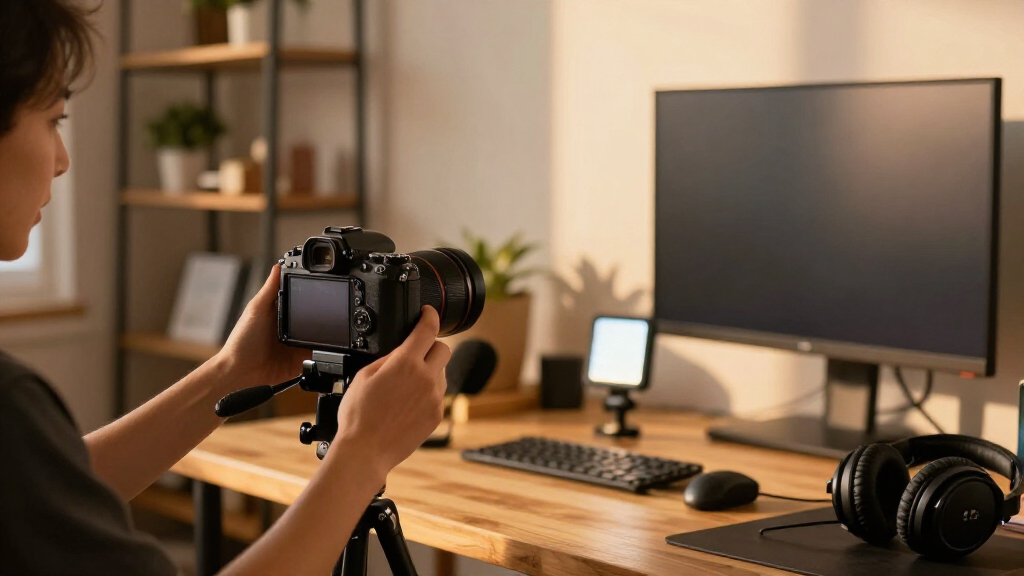

This checklist is for creators building a compact studio for recording, streaming, video calls, or other desk-based work. It covers the named gear picks and practical webcam guidance, with an emphasis on matching each item to your space and setup.

Get the latest gadgets delivered free with Prime
- Fast, free delivery on millions of items
- Prime Video, Amazon Music and more included
- Member-only deals all year
The sections follow the path from audio capture and mic positioning to lighting, webcam choice, audio connections, and file storage. Each slot explains what to consider, common fit or compatibility pitfalls, and who may find the pick most useful.
Use the look-for lists to compare the checklist with equipment you already own. Confirm your desk dimensions, device connections, mounting options, and recording needs before buying, then prioritize the items that solve the biggest gaps in your workflow.
USB Microphones
A microphone is a core audio choice for a creator setup, and the RØDE NT1 5th Generation offers both XLR and USB-C connections. That flexibility can suit someone who wants a direct computer connection now while keeping the option to use an audio interface later. Before choosing it, check which connection you intend to use and whether you have the cables and ports that path requires. The product name alone does not establish every included accessory or software feature, so confirm package details before ordering.A common mistake is focusing on the microphone without considering its placement and surroundings. Check that your desk or stand can position it comfortably near your speaking area, and consider whether your room and recording habits call for additional acoustic treatment. Also confirm that the mic’s connection works with your computer or interface and that your intended recording software supports the setup. If you plan to add a boom arm, verify its mounting arrangement and available desk clearance rather than assuming every arm-and-mic combination fits. A good choice is one that integrates cleanly into the way you record, leaves room for other desk gear, and can adapt if your connection needs change.
What to look for:
- Confirm whether you will connect by USB-C or XLR and check the matching ports.
- Check which cables and accessories are included in the package.
- Measure desk or stand clearance for comfortable microphone placement.
- Verify compatibility with your computer, interface, and recording software.
- Plan for room acoustics and a suitable mounting arrangement.
RØDE NT1 5th Generation Studio Condenser Microphone with XLR and USB-C

The NT1 5th Generation is a large-diaphragm condenser microphone with both XLR and USB-C connectivity for use with audio interfaces, mixers, and computers. It combines a warm sound profile and low self-noise with a built-in Revolution Preamp, high-resolution digital conversion, and 32-bit float USB recording.
Pros:
- Supports both XLR and USB-C connections for flexible recording setups.
- Offers 32-bit float recording over USB and digital conversion up to 192 kHz.
- Low self-noise and high SPL handling suit vocals and a range of instruments.
- Durable metal body with nickel plating and ceramic coating.
Cons:
- Requires a compatible XLR setup or USB-connected computer to record.
- Listed as battery-powered and specifies one 12V battery, which may add a power requirement.
Best for: Creators who want USB-C or XLR connection options.
Not ideal for: Buyers who need a complete recording setup without checking included accessories.
Bottom line: Choose the NT1 5th Generation if its connection options fit your current setup and likely next step.
Desktop Boom Arms
A desktop boom arm helps put a microphone where you can use it while keeping the desk arrangement workable. The RØDE PSA1+ is a dedicated positioning accessory for a studio desk, but its suitability depends on your furniture and microphone setup. Before purchasing, check the product’s mounting requirements and compare them with your desk’s thickness, edge shape, and available clamp area. Leave enough space for the arm to move without bumping a monitor, wall, or nearby equipment.A frequent buying mistake is assuming an arm will fit every microphone or desk. Check the mounting compatibility for your mic, including whether an adapter or separate holder is needed, and make sure the arm can reach the position you use while recording. Consider where cables will run as the arm moves, and whether its range of movement suits sitting or standing use. Also think about how much desk space the clamp occupies and whether it conflicts with other mounts. A boom arm is most useful when its reach, attachment method, and motion work with your actual workstation, so compare those details before treating it as a universal add-on.
What to look for:
- Measure desk thickness and confirm the clamp suits its edge and material.
- Check microphone thread or holder compatibility and any adapter needs.
- Compare the arm’s reach with your seated or standing recording position.
- Allow clearance around monitors, walls, and other desk equipment.
- Plan cable routing through the arm’s full range of movement.
RØDE PSA1+ Professional Studio Boom Arm, Black

The RØDE PSA1+ is a studio boom arm for microphones weighing 0.25–1.2 kg, with a desk clamp for surfaces up to 70 mm thick. Its damped springs support quiet, smooth repositioning, while 360-degree rotation and integrated cable management help keep a recording setup tidy.
Pros:
- Damped internal springs enable quiet repositioning.
- Supports microphones weighing 0.25–1.2 kg.
- Rotates 360 degrees for flexible microphone placement.
- Integrated cable management keeps cables organized.
Cons:
- Desk clamp fits desks up to 70 mm thick.
- Microphone support is limited to 0.25–1.2 kg.
Best for: Creators who want to reposition a desk microphone.
Not ideal for: Setups with limited clamp space or uncertain mic mounting compatibility.
Bottom line: Pick the PSA1+ when its clamp, reach, and mic attachment match your workstation.
LED Video Lights
Lighting can shape how clearly and consistently you appear on camera. The Godox SL60IIBi Bi-Color LED Video Light Kit, 2-Pack provides two lights, so check that your room has space for the two-light arrangement you intend to use. Consider where stands or mounts would go, how close they can sit to your recording area, and whether they would obstruct a camera view, walkway, or other desk equipment. The product name identifies bi-color lighting, but check the kit details for controls, accessories, and mounting components before planning around them.A common mistake is buying lights before checking the room and mounting fit. Measure the available footprint and verify that your stands or mounts suit the room; account for nearby walls, desk edges, and storage when the lights are not in use. Make sure the kit’s power and control arrangements are practical for your location, and check what is included rather than assuming stands or modifiers come in the box. Think through how two lights will be positioned relative to your camera and workspace, and whether you can adjust them without crowding the setup. Choose the kit when the two-light format and its verified accessories work with your space and intended recording routine.
What to look for:
- Check package contents, including stands, mounts, and any modifiers.
- Measure space for two lights and their stands or mounting hardware.
- Confirm power arrangements and outlet access at the intended positions.
- Plan placement so lights do not obstruct the camera or workspace.
- Review bi-color controls and verify they meet your lighting workflow.
Godox SL60IIBi Bi-Color LED Video Light Kit, 2-Pack

This two-light kit includes SL60II-Bi LED lights, softboxes, stands, umbrellas, reflectors, a barn-door kit, and a remote. The lights offer adjustable brightness from 0% to 100%, a 2800K–6500K color temperature range, 11 FX effects, and control through the Godox app, remote, or onboard buttons.
Pros:
- Two lights with a broad range of included modifiers and accessories
- Adjustable color temperature and dimmable brightness
- Offers app, remote, and onboard controls
- Bowens mount supports compatible lighting accessories
Cons:
- The complete kit weighs 26.7 lb
- Power source is listed as a charging cable
Best for: Creators with room to position and store two video lights.
Not ideal for: Small desks or rooms without practical stand or mounting space.
Bottom line: Choose this two-pack if its verified contents and footprint suit your room.
Webcams
The checklist has no specific webcam pick, so choose one by starting with your actual camera use: video calls, streaming, or recording may have different requirements. Check how the camera connects to your computer, whether your operating system and conferencing or recording software support it, and how it will mount above or beside your display. If you already have a camera, phone, or other capture device that meets your needs, compare its setup before adding another piece of hardware.Common mistakes include overlooking mounting and framing or buying for a feature you will not use. Check the camera’s field of view against your desk distance and the background you want in frame; make sure its clip, stand, or mount works with your monitor. Consider the room’s lighting and whether the webcam can be positioned to avoid glare or an awkward angle. For a compact studio, also check cable reach and whether the connection occupies a port you need for other gear. Confirm specifications from the manufacturer and compatibility with your intended apps, then choose a model that fits your display, room, and use rather than relying on a generic feature checklist.
What to look for:
- Verify connection type, operating system, and app compatibility.
- Check the mount against your monitor or intended camera position.
- Match field of view to your desk distance and background.
- Consider room lighting, glare, and framing before selecting a location.
- Confirm cable reach and available computer ports.
Audio Interfaces
An audio interface connects compatible recording gear to a computer and can bring several pieces together in one workflow. The Focusrite Scarlett 2i2 Studio 4th Gen USB-C Audio Interface Bundle is presented as a bundle, so check the current package contents and confirm they match the microphones and headphones you plan to use. The product name includes an interface and Studio bundle; verify the specific included components and connection details before relying on them for your setup.A common mistake is treating an interface bundle as automatically compatible with every mic or computer. Check the input and connection needs of your equipment, including whether you need XLR, USB, or another connection path, and avoid planning to route a USB microphone through an interface unless the manufacturer supports that use. Confirm computer ports, operating system support, and compatibility with your recording software. Consider whether you need to connect more sources at once than the interface supports, and measure desk space for the interface and its cables. A bundle can be convenient when its verified components match your workflow, but compare the contents with what you already own to avoid duplicating equipment.
What to look for:
- Confirm bundle contents and identify any components you already own.
- Match microphone and headphone connections to the interface inputs and outputs.
- Check USB-C port, operating system, and recording software compatibility.
- Consider how many sources you need to connect at the same time.
- Allow desk space and cable access for the interface.
Focusrite Scarlett 2i2 Studio 4th Gen USB-C Audio Interface Bundle
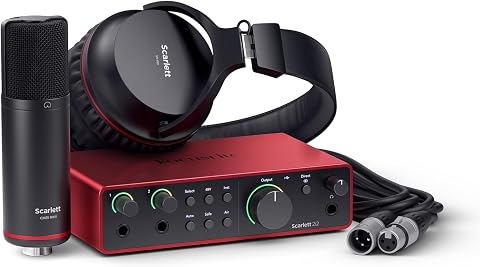
This two-channel USB-C recording bundle includes the Scarlett 2i2 interface, CM25 MkIII condenser microphone, SH-450 headphones, and recording software. The interface features two low-noise mic preamps, 120 dB dynamic range, Auto Gain, Clip Safe, and Air mode, with support for recording up to 192 kHz.
Pros:
- Includes an interface, condenser microphone, headphones, and recording software.
- Two low-noise mic preamps and a 120 dB dynamic range support detailed recording.
- Auto Gain and Clip Safe help set levels and prevent clipping.
- Air mode adds presence and harmonic drive to vocals and guitars.
Cons:
- The interface has two audio channels and two audio inputs.
- The included software bundle requires a compatible Mac, Windows, or iOS device.
Best for: Creators whose gear needs match the bundle’s verified components.
Not ideal for: Setups relying on unsupported USB-mic routing or extra simultaneous inputs.
Bottom line: Choose the Scarlett 2i2 Studio bundle after confirming its contents and connection path.
Portable SSDs
A portable SSD can provide a place to keep and move project files, and the SanDisk Extreme Portable SSD is named with a 4TB capacity and up to 2000MB/s speed. Check that the capacity and speed claims fit your intended use, and remember that actual transfer performance can depend on the computer, port, cable, and files involved. Confirm the device’s connector and compatibility with the computers or other equipment you expect to use before building it into a workflow.A common mistake is choosing storage based only on headline capacity or speed while overlooking connection compatibility and backup habits. Check which ports your devices provide and whether the supplied cable or an appropriate adapter supports the connection you need. Consider how you will organize, back up, and safely eject project files; a portable drive should not be the only copy of important work. For a compact studio, think about where the drive will sit during transfers and how you will transport it between locations. Verify current product specifications and included accessories, and choose capacity based on your files and retention plans rather than assuming the named capacity will be available for every project.
What to look for:
- Confirm available capacity against your project and retention needs.
- Check connector, cable, and port compatibility across your devices.
- Compare stated transfer speed with the ports and workflow you use.
- Plan a second copy and a routine for organizing project files.
- Verify package contents and the drive’s physical fit in your setup.
SanDisk Extreme Portable SSD, 4TB, Up to 2000MB/s

A pocket-sized 4TB portable SSD with read speeds up to 2000MB/s for backing up projects and storing photos and videos. It has an IP65 rating, up to 3-meter drop protection, and password protection with 256-bit AES encryption.
Pros:
- Up to 2000 MB/s read speed
- Pocket-sized for portable storage
- IP65 rating and up to 3-meter drop protection
- Password protection with 256-bit AES encryption
Cons:
- Write speeds are lower than the stated read speed
- Encryption requires a software download and is supported on Windows 10+ and macOS 12+
Best for: Creators who need portable space for large project files.
Not ideal for: Workflows without compatible ports or a separate backup plan.
Bottom line: Choose this SSD if its capacity and connection fit your devices and storage routine.
For a budget-first buying order, start with the item that removes your biggest workflow bottleneck: audio capture, microphone placement, lighting, camera framing, interface connections, or storage. Reuse compatible gear you already own, then check package contents and connection requirements before filling the next gap.
Build the studio one well-matched piece at a time, and keep your desk, room, and actual recording habits at the center of each decision. A thoughtful fit across the whole setup makes it easier to create comfortably and consistently.